[Beginner’s Guide #4] How to Read Graphics Card Specs: GPU Comparison and Selection Guidelines for Gaming & Work

When buying a computer, many people check the graphics card after the CPU, memory, and storage. Specification sheets often show terms like “integrated graphics,” “RTX 4060,” “RX 7600,” or “8GB,” but many buyers choose based only on the model name without understanding what it means.
The graphics card is responsible for displaying images on the screen and handling visually demanding tasks such as gaming, video editing, and design. Choosing a card that is too powerful for your needs wastes money; choosing one that is too weak can cause stuttering or make work uncomfortable. This guide explains the main manufacturers, product tiers, what the numbers mean, and how to choose by use case — in plain language for beginners.
1. Who Makes Graphics Cards?
Ordinary consumers mainly encounter three manufacturers:
- NVIDIA: Sold under the GeForce brand. Most widely used for gaming and video work. Model names include GTX or RTX (current focus is the RTX series).
- AMD: Sold under the Radeon brand. Often emphasizes gaming performance and value. Model names include RX.
- Intel: Sold under the Arc brand. Still has fewer products than NVIDIA or AMD, but sometimes chosen for value or specific workloads.
All three produce images on the screen. At the beginner stage, the company name matters less than deciding what performance level you actually need.
2. Performance Tiers by Manufacturer
Like CPUs, graphics cards are released in performance tiers. Here is a rough guide:
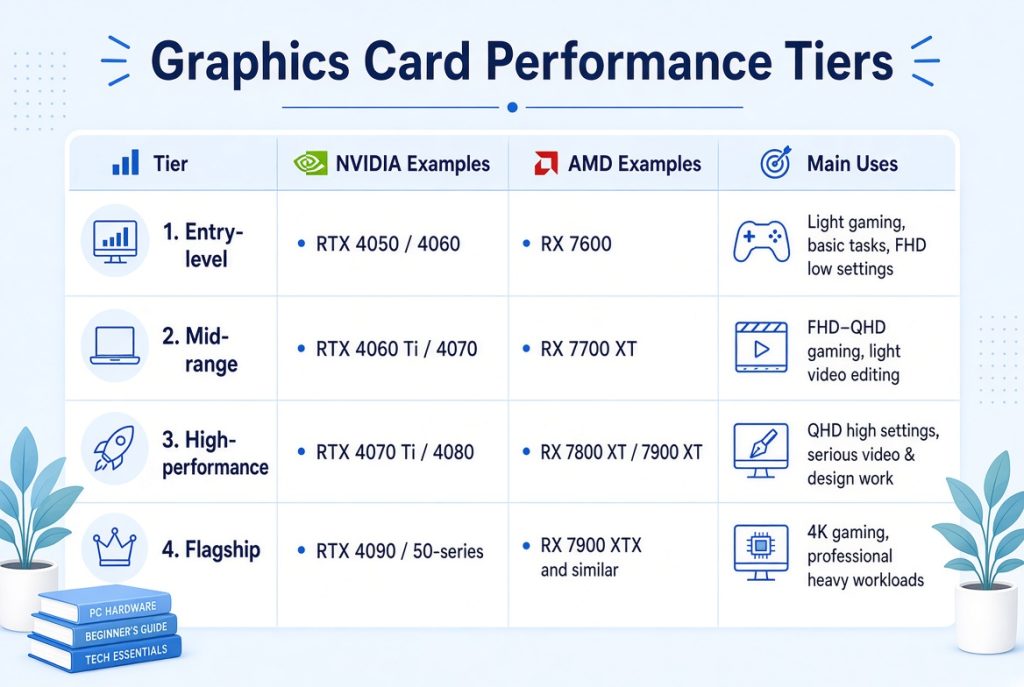
Note: Even within the same tier, different generations can perform differently. An older high-end card can sometimes match or beat a newer mid-range card. Do not judge performance by the tier name alone.
3. What the Numbers Actually Mean
Graphics card model numbers are easier to understand when split into leading digits (generation) and trailing digits (performance tier).
① Leading Digits = Technology Generation
These show roughly when the technology was released.
- NVIDIA: 30-series (e.g., RTX 3060) → previous generation / 40-series (e.g., RTX 4060) → current mainstream generation / 50-series → newer generation
- AMD: 6000-series (e.g., RX 6600) → previous generation / 7000-series (e.g., RX 7600) → current mainstream generation
Newer generations often improve power efficiency and features within the same tier, but a higher generation number does not automatically mean “always better.”
② Trailing Digits = Performance Tier
Within the same generation, higher numbers generally mean higher performance.
- NVIDIA Example: RTX 4060 < RTX 4070 < RTX 4080 < RTX 4090
- AMD Example: RX 7600 < RX 7700 < RX 7800 < RX 7900
Looking at both the generation and the tier gives a clearer picture of where a card sits.
4. Integrated Graphics vs Discrete Graphics
- Integrated Graphics: Built directly into the CPU. No separate graphics card is needed for the screen to work. Usually enough for documents, browsing, video watching, and light use.
- Discrete Graphics: A separate card installed on the motherboard. Needed for gaming, video editing, high-resolution work, or other visually demanding tasks.
The first question a beginner should ask is: “Do I actually need a discrete graphics card?”
5. Recommended Graphics Direction by Use Case
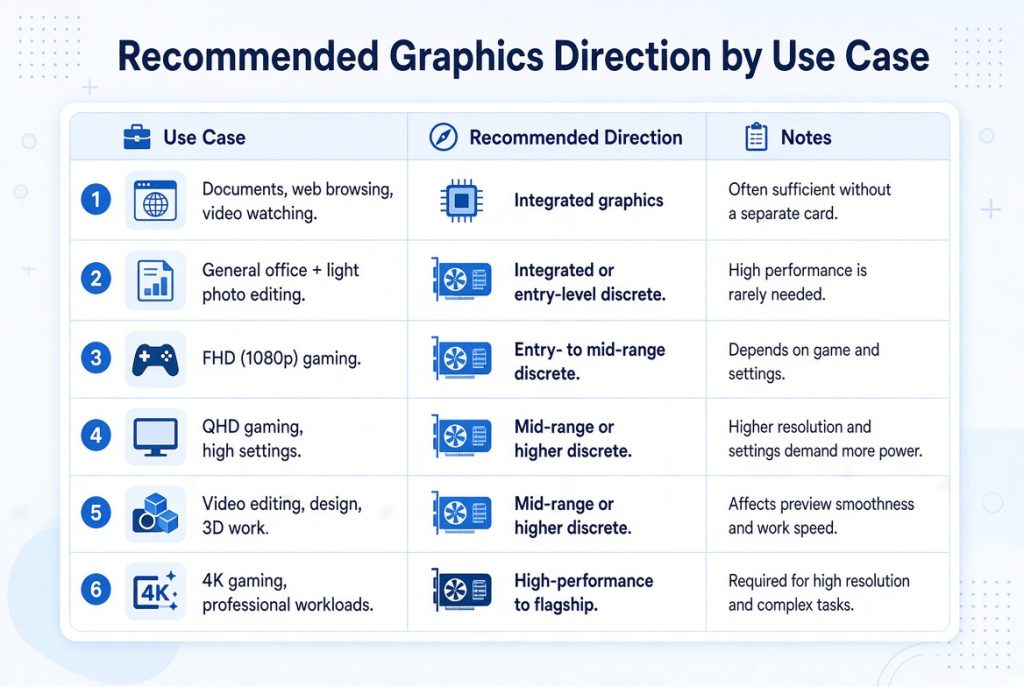
If your main use is internet and documents, there is no need to start with a high-end graphics card. If you play recent games at high settings or do frequent video editing, the graphics card has a large impact on the overall experience.
6. When Integrated Graphics Is Enough vs When You Need Discrete
Integrated graphics is usually enough when:
- You mainly write documents, browse the web, and watch videos
- You rarely or never play games
- You only do light photo editing
Discrete graphics is needed when:
- You want smooth performance in recent games
- You frequently do video editing or design work
- You connect multiple high-resolution monitors
- You do 3D work or other visually heavy tasks
7. Common Mistakes Beginners Make
- Judging performance only by the numbers in the model name: Always consider both generation and tier together.
- Choosing a much more powerful card than your actual needs: That budget might be better spent on more RAM or storage.
- Checking only “graphics included” on a pre-built PC: Confirm whether it is integrated or discrete, and which tier it belongs to.
- Ignoring power supply and cooling: Higher-performance cards need more power and better cooling — check both before buying.
8. What to Check on Pre-Built PC Specs
Look for these points:
- Integrated or discrete graphics?
- If discrete, the manufacturer and approximate tier (entry / mid / high)
- Graphics memory capacity (6GB, 8GB, 12GB, etc.)
- Overall balance with the CPU, RAM, and storage
Deciding only by total price or CPU can lead to a graphics configuration that does not match your needs.
9. Recommended Order for Choosing a Graphics Card
- Decide what you will mainly use the computer for.
- Determine whether integrated graphics is enough or whether you need discrete.
- If discrete is needed, choose a tier that matches your resolution and workload.
- On the specification sheet, check the manufacturer, generation, tier, and memory capacity.
- Look at overall balance with the CPU, RAM, storage, and power supply.
Final Takeaways
The graphics card displays images on the screen and handles gaming, video, and design workloads. Three main manufacturers exist — NVIDIA, AMD, and Intel — each offering cards from entry-level to flagship.
In model names, the leading digits indicate the generation and the trailing digits indicate the performance tier within that generation. Not everyone needs a high-end discrete card. For documents and internet use, integrated graphics is often enough. For gaming or creative work, matching the tier to your actual needs is what matters most.
Start by defining your use case, then check whether the graphics is integrated or discrete and which performance level it offers. This simple habit helps avoid both unnecessary spending and disappointing performance.
Next Article: Read the next part of the series: [Beginner’s Guide #5] How to Read Power Supply & Cooler Specs: Choosing the Right PSU and Cooling for Your PC
Previous Article: [Beginner’s Guide #3] How to Read Storage Specs: SSD vs HDD and Recommended Capacity for Gaming & Work
