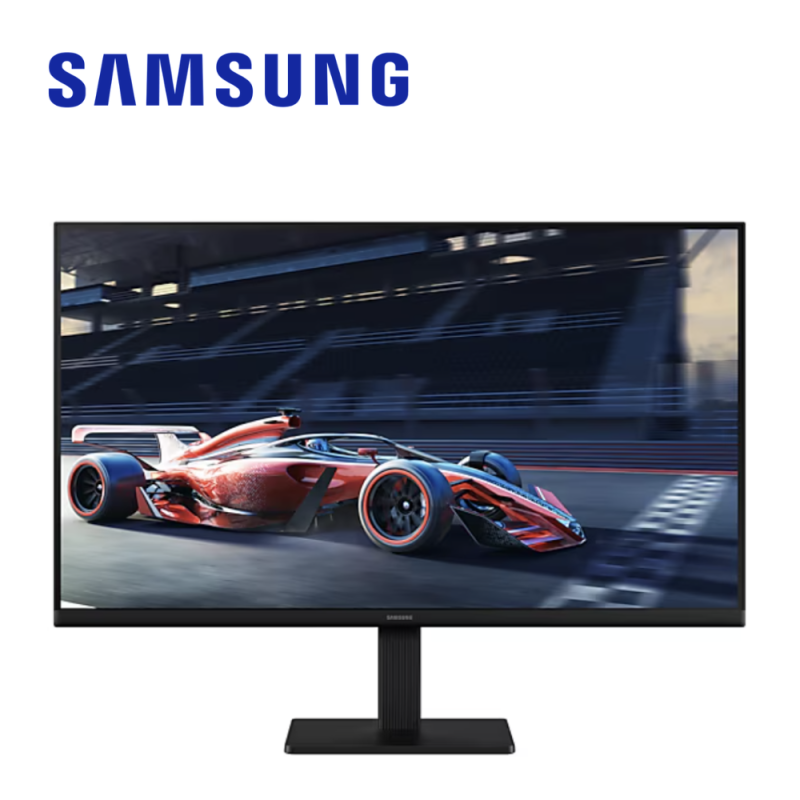
Image Source: Samsung Official
Who Is It For?
On the Samsung Essential S3 24-inch and S4 24-inch, a flat Full HD 1920×1080 panel sits on a 16:9 desk for Word, Excel, a browser, and a video call at indoor brightness around 250 nits. A person who keeps one or two 24-inch screens at a home desk, plugs HDMI, and leaves the laptop charger in a second socket works inside that layout. A clerk who still has a VGA output on an older PC can use many S3 listings that still print a D-Sub port.
The same line does not feed a laptop through USB-C Power Delivery — USB-C charging is listed as No on current S3 and S4 sheets — so a single-cable docking desk does not form. A 27-inch Essential panel is still Full HD, so text is larger in pixel size than on a 24-inch unit. Color-critical photo work and high-frame competitive play sit outside this line; ViewFinity and Odyssey are separate Samsung families with different panels and ports.
If this form factor or screen size doesn’t quite fit your daily work, exploring other lineup categories would be a better path.
1. S3 Tilt Bases and S4 Height Stands
Samsung sells Essential as an FHD office family, not as Odyssey gaming or ViewFinity color-work. Two consumer tiers show up on official pages: Essential Monitor S3 (names such as S30GD, S31C, S36GD) and Essential Monitor S4 (S40GD, and older S43GC in some regions). Both stay 16:9 Full HD. The split is stand, ports, and a few extra sockets — not a jump to 4K.
| Tier | Typical names | Rough position |
|---|---|---|
| Essential S3 | S30GD, S31C, S36GD, LS2xD300 / LS2xC310 class | Tilt stand, HDMI + often VGA, 22–27 inch FHD, some 32 inch regional |
| Essential S4 | S40GD, S43GC, LS2xD400 / LS2xC430 class | Height, swivel, pivot; DisplayPort + dual HDMI + USB hub on current S40GD |
S3 cartons are the volume SKUs. Official S30GD 27-inch sheets list IPS, 1920×1080, max 100 Hz, 250 cd/m² typical, 5 ms GTG, one HDMI 1.4, one D-Sub, no USB-C, no USB hub, tilt only. S31C-class 24- and 27-inch units on earlier sheets cap at 75 Hz with the same tilt base and VESA 100×100 mm. Some S3 codes in retail are curved VA at 27 inches with a 75×75 mm mount; those are not the flat IPS S30GD. The listing’s panel and VESA numbers have to match the code on the box.
S4 is the same FHD canvas with a different chassis kit. Official S40GD 24- and 27-inch pages list IPS, max 100 Hz, 250 cd/m², 5 ms GTG, DisplayPort 1.2, two HDMI 1.4, a USB-B upstream plus two USB-A downstream, headphone jack, and a HAS stand with about 105 mm of height travel, swivel, and pivot. USB-C and USB-C charging power are No. FreeSync is No on several current S40GD spec tables. Speakers appear only on named SKUs, not on every S4.
ViewFinity S6–S9 and Odyssey stay outside this table. Those lines change resolution, color volume, USB-C PD, or refresh class. Mixing an Essential FHD code with a ViewFinity QHD/4K title on a marketplace card is a different product.
2. VGA Left on S3, No USB-C Charge
Tilt-only S3 versus 105 mm S4 HAS
S3 stands in the official tables are SIMPLE: tilt, no height, no swivel, no pivot. Eye line is set by books under the base or by a VESA arm after the stand comes off. S4 S40GD lists HAS 105 mm (±5 mm), tilt about −3° to 25°, swivel ±45°, pivot ±92°. Portrait documents need that pivot, or an arm. Two listings both titled “Essential 27 inch” can differ only in the stand. The sales page has to print HAS or tilt; the series name does not.
HDMI plus VGA, still no USB-C PD
Current S3 S30GD interface rows show one HDMI 1.4 and one D-Sub. D-Sub is analog VGA for older PCs. There is no DisplayPort and no USB-C on that sheet. Current S4 S40GD rows show DisplayPort 1.2, two HDMI 1.4, USB hub, and USB-C No / USB-C charging power N/A. A laptop that expects one USB-C cable for video and 60–90 W charge does not get that path here. HDMI plus a separate charger remains the desk. Confirm whether the carton includes HDMI; VGA-only PCs still need the S3 D-Sub or an adapter that the box may not contain.
27-inch Full HD is still 1920×1080
Essential 22-, 24-, 27-inch class panels on Samsung FHD pages are 1920×1080. At 27 inches that pixel pitch is coarser than the same 1080p map on 24 inches. Spreadsheet text is larger; fine UI edges are less dense. This line is not the ViewFinity QHD/4K family. A 27-inch card that does not print 1920×1080 or 2560×1440 is incomplete. If the work is small type all day, the 24-inch FHD size keeps density higher inside the same series.
250 nits and a window behind the chair
Typical brightness on S3 and S4 FHD sheets is 250 cd/m² (nits = brightness unit), minimum often 200. Eye Saver Mode and Flicker Free appear as Yes. HDR is listed as not available on S40GD pages. A desk under strong side sun can wash the image; 250 nits is indoor office light, not a sunlit window face. Color gamut on these sheets is about 72% NTSC (CIE 1931). That is not a factory-calibrated photo panel.
S3 without height, without USB-C, and at 27-inch 1080p cannot become a docking 4K station or a calibrated edit display by changing a setting.
3. 60 cm Desks and Window Glare
Stand feet on a shallow desk
S3 24-inch with stand is about 540 × 423 × 217 mm on an older S31C sheet; S4 24-inch S40GD with stand is about 541 × 498 × 219 mm because the HAS column is taller. On a desk about 60 cm deep, those front feet share space with a keyboard and a mouse. The extra height of S4 does not shrink the base depth. A VESA 100×100 mm arm (standard screw pattern) clears the feet after the stand is removed, on models that print 100×100. Some curved S3 listings print 75×75; the arm plate has to match that number.
Two 24-inch widths side by side
A 24-inch class Essential body is about 540 mm wide without the stand; a 27-inch class body is about 612–618 mm. Two 24-inch units sit on a 120 cm desk with a small gap. Two 27-inch units need more than 120 cm once bezels and a little spacing are included. S3 three-side slim bezels help dual setups; the tilt bases still leave two footprints. S4 pivot lets one screen turn portrait for a long document while the other stays landscape, only if that unit is S4 HAS.
Lamps, windows, and the coating
Indoor 250 nits holds under ceiling light. A window at the side of a 16:9 panel still throws a band across Excel. Rotating the desk so the screen is perpendicular to the window reduces that band; the panel itself does not gain nits. Eye Saver Mode cuts blue light in the OSD; it does not raise brightness. Night work with a lamp behind the user reads more stably than a lamp on the glass.
Cables that leave the back, not the laptop
S3 often uses an external power adaptor; S4 S40GD lists internal power on some regional pages. HDMI 1.4 is the common video path. S4 adds DP 1.2 and a USB-B upstream if the hub is to work — the upstream cable is a third stick on the desk. Headphone jacks exist on S4 sheets and are absent on some S3 S30GD sheets. None of these cables charge a laptop.
4. 22 to 27 Inch at Full HD Only
Essential sizes that appear on official FHD pages are 22, 24, and 27 inches, all 16:9 1920×1080 in the S3/S4 FHD family. A 32-inch S3 appears in some regional announcements at FHD with a lower refresh than the 100 Hz 24/27 class; that SKU is not a 4K ViewFinity panel. QHD is not the Essential FHD spec row.
| Size | Common resolution | Aspect ratio | Notes |
|---|---|---|---|
| 22 inch | Full HD 1920×1080 | 16:9 | Narrow cubicle width; same FHD map as 24 inch |
| 24 inch | Full HD 1920×1080 | 16:9 | Common dual-monitor width; denser 1080p than 27 inch |
| 27 inch | Full HD 1920×1080 | 16:9 | Larger pixels at the same 1080p; confirm IPS vs curved VA |
| 32 inch (regional S3) | Full HD on announced S3 | 16:9 | Separate from ViewFinity 32-inch 4K; verify Hz on the sheet |
A 22-inch S3 is a single-task or tight-shelf screen. Documents and one browser fit; two large windows feel tight. A 24-inch S3 or S4 is the width that two units can share on a standard desk without overlapping stands. A 27-inch FHD Essential is the same 1920×1080 stretched. Reading comfort can rise; sharpness of small type does not. Anyone comparing a 27-inch Essential to a 27-inch ViewFinity QHD is comparing two pixel counts, not two brand names.
Refresh on this line is not one number. S31C-class sheets list max 75 Hz. S30GD and S40GD FHD sheets list max 100 Hz. A few later S3 retail codes print 120 Hz; that is a different year code and must appear on the seller row. Windows and the OSD may boot at 60 Hz until the 100 Hz mode is set.
5. Performance by Use Case
The table uses a common current carton: 24-inch Essential S3 or S4, IPS, 1920×1080, 100 Hz where the sheet says max 100 Hz, about 250 nits, HDMI 1.4. S4 adds HAS and DisplayPort. S31C 75 Hz and 27-inch FHD change density and motion, not the office row.
| Use Case | Software / Task | Rating | Reason |
|---|---|---|---|
| Office documents | Word, Excel, email | Sufficient | FHD text at 24 inches, IPS angles, 250 nits indoors |
| Dual-window office | Browser + spreadsheet | Sufficient | 24-inch width holds two panes; 27-inch FHD enlarges pixels |
| Web video / calls | YouTube, Meet at 1080p | Adequate | 100 Hz helps motion; 250 nits and no HDR cap the window |
| Photo / color work | Lightroom, print prep | Not enough | ~72% NTSC, no HDR, no factory calibration row |
| Fast 3D play | Competitive shooters | Not enough | 100 Hz / 5 ms class; many S40GD sheets list FreeSync No |
A 75 Hz S31C makes the video row a little less smooth than a 100 Hz S30GD. A 27-inch FHD unit does not turn the photo row into Sufficient. Odyssey-class refresh and ViewFinity-class color live on other Samsung pages.
6. Official Specs (with plain explanations)
| Category | Specification | Notes |
|---|---|---|
| Sizes | 22 / 24 / 27 inch FHD; some regional 32 inch S3 | 16:9 flat IPS common; some S3 curved VA |
| Resolution | 1920×1080 Full HD | Not ViewFinity QHD/4K |
| Refresh | 75 Hz (S31C) or max 100 Hz (S30GD/S40GD) | OSD may stay at 60 Hz until changed |
| Panel | IPS on current S30GD/S40GD; VA on some curved S3 | 178°/178° on IPS sheets |
| Brightness | 250 cd/m² typical, 200 min on many sheets | Indoor; HDR not available on S40GD |
| Response | 5 ms GTG typical (some 4 ms listings) | Pixel color change time |
| S3 ports | HDMI 1.4 + D-Sub; no USB-C | VGA for older PCs |
| S4 ports | DP 1.2, 2× HDMI 1.4, USB hub; USB-C No | HAS 105 mm, VESA 100×100 |
| Color | ~72% NTSC (CIE 1931) | 16.7 million colors |
This line is sold with different tier names, sizes, refresh rates, and panels depending on the exact model and region. Please match the specifications on your current seller page with the official information above.
Source: Samsung Official Product Page
The S3 D-Sub row is the VGA path in section 2. The S4 USB-C No row is the missing laptop charge cable. The 1920×1080 row is why 27-inch Essential is not a sharper 27-inch, only a larger 1080p map. HAS 105 mm appears only on S4 sheets that print it.
7. Main Variations in This Line
Stand is the first fork. S3 tilt cannot raise the panel to eye height. S4 HAS 105 mm, swivel, and pivot can. Dual desks that need one portrait screen are an S4 mechanical difference, not a panel difference.
Ports are the second fork. S3 HDMI + VGA serves an old tower. S4 DP + dual HDMI + USB hub serves a DP PC and a second HDMI stick. Neither fork adds USB-C PD.
Panel shape is the third fork. Flat IPS S30GD/S40GD keep color more stable off-axis. Some S3 27-inch codes are curved VA with a different contrast number and sometimes a 75×75 VESA plate. Curved VA and flat IPS are not swapped in the OSD.
Refresh is the fourth fork. 75 Hz S31C, 100 Hz S30GD/S40GD, and occasional later 120 Hz S3 codes are separate year strings. The box Hz has to match the GPU output.
Speakers are a fifth, SKU-level fork. A few S4 part numbers include 1 W speakers; neighboring S4 codes in the same size do not. The spec table’s speaker Yes/No line is the check, not the words Essential S4.
8. What to Check on the Sales Page
Samsung prints Essential, S3, S4, S30GD, and S40GD on overlapping marketplace titles. Two “27 inch Essential” cards can differ in stand, VGA, DisplayPort, and whether the panel is flat IPS or curved VA.
- Line / Tier / Size: Check whether you are getting the Essential S3 (S30GD/S31C) or S4 (S40GD) model, not a ViewFinity or Odyssey panel under a Samsung logo.
- Stand: Check tilt-only versus HAS 105 mm with swivel and pivot.
- Ports: Check HDMI + D-Sub versus DisplayPort + dual HDMI, and that USB-C charging is not assumed.
- Resolution and Hz: Check 1920×1080 and 75 Hz versus 100 Hz (or a later 120 Hz code if printed).
- VESA and panel: Check 100×100 versus 75×75, and IPS flat versus curved VA.
The included cable list on the box decides whether HDMI arrives in the carton. VGA on the S3 sheet does not mean a VGA cable is in the bag.
9. Disclaimer & Buying Advice
This buying guide for the Samsung Essential series is based on official manufacturer specifications and recurring real-world user experiences. It is completely independent, not sponsored, and does not guarantee specific performance for every unit. Tier name, screen size, refresh rate, panel type, and ports can differ by model and region, so please double-check the exact specifications listed on your seller’s page before purchasing.
10. Beginner Guide
If the gap between a tilt-only S3, a 105 mm S4 stand, and a laptop that still needs HDMI plus a charger is unclear, Start Here explains ports, VESA, and Full HD versus QHD before you open a listing.