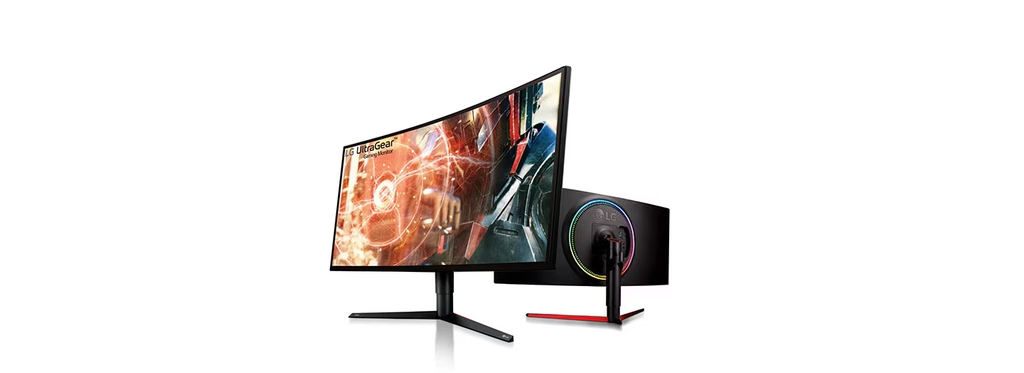
Image Source: LG Official
Who Is It For?
The LG UltraWide series fits users who require a wider horizontal workspace to manage multiple windows side-by-side without the physical gap of a dual-monitor setup. This series suits video editors who need a long timeline view, financial analysts who manage expansive spreadsheets, and programmers who keep documentation open next to their code editor. Because many models include a 21:9 aspect ratio—wider than a standard 16:9 television—they fit users who want a more immersive field of view in supported cinematic games and movies.
However, this series does not fit console-only gamers, as the PlayStation 5 and Xbox Series X do not natively support the 21:9 aspect ratio, resulting in permanent black bars on the sides of the screen. It is not for users with very narrow desks, as the physical width of these monitors can exceed 80 cm (31 inches), potentially overhanging the desk edges. The UltraWide series does not fit those who primarily work with vertical content, such as mobile app developers or long-form writers who prefer a portrait orientation, as the extreme width makes rotating the monitor 90 degrees physically impractical for most desk heights. If this form factor or screen width doesn’t quite fit your daily work, exploring other lineup categories would be a better path.
1. How This Line Is Grouped
LG organizes the UltraWide series into several tiers based on resolution, panel technology, and connectivity features. The model names typically include numbers representing the screen size and letters indicating the feature set and release year (e.g., 34WQ75C).
| Tier | Typical Names | Rough Position |
| Entry-Level Productivity | 26WQ500, 29WQ600 | 26-29 inch, 1080p resolution, flat IPS panels. |
| Mainstream QHD | 34WP65G, 34WQ75C | 34-inch, 1440p resolution, flat or curved options. |
| Business & Hub | 34WQ85C, 38WR85QC | USB-C with high power delivery, KVM switches. |
| Creative Professional | 34BK95U, 40WP95C | 5K2K resolution, Nano IPS, Thunderbolt 4 support. |
| Super UltraWide | 49WQ95C, 49GR85DC | 49-inch, 32:9 aspect ratio, equivalent to two 27″ screens. |
Entry-Level Productivity Group
The 26-inch and 29-inch models represent the starting point of the UltraWide line. These monitors use “UltraWide FHD” resolution (2560 x 1080). While they provide extra horizontal space, they have the same vertical height as a standard 24-inch monitor. These models are physically flat and use IPS (In-Plane Switching) panels, which are known for consistent colors and wide viewing angles. They are intended for basic office multitasking where a high pixel density is not a requirement.
Mainstream QHD Group
The 34-inch models are the core of the UltraWide series. They move the resolution up to “UltraWide QHD” (3440 x 1440), providing significantly more detail and workspace. This group is split between flat and curved panels. Curved models (indicated by a “C” in the name) use a subtle arc to keep the edges of the wide screen at a consistent distance from the user’s eyes. These models often feature a 100Hz to 160Hz refresh rate—how many times the image updates each second—making them a fit for both work and gaming.
Business & Hub Group
These models function as a docking station for laptops. They feature a USB-C port that handles video, data, and Power Delivery (PD). Power Delivery allows the monitor to charge a connected laptop through a single cable. Higher-end models in this group include a built-in KVM switch, which allows a user to control two different computers using one set of keyboard and mouse. These are physically distinguished by more ergonomic stands and a focus on connectivity over high-speed gaming features.
Creative Professional & Super UltraWide
The 40-inch and 49-inch models are the flagship displays. The 40-inch models use “5K2K” resolution (5120 x 2160), which provides the vertical height of a 4K monitor with extra horizontal room. The 49-inch “Super UltraWide” models use a 32:9 aspect ratio, which is physically equivalent to placing two 27-inch monitors side-by-side but without the plastic border (bezel) in the middle. These require a very large desk and a powerful computer to drive the high number of pixels.
2. Check Before You Buy
Black Bars in 16:9 Content
A physical characteristic of the 21:9 aspect ratio is that standard 16:9 content—such as most YouTube videos, TV shows, and console games—will not fill the entire screen. When viewing this content, the monitor will display black bars on the left and right sides. While some browser extensions can “zoom” video to fill the screen, this often cuts off the top and bottom of the image. Users who primarily consume standard widescreen media may find a large portion of their screen remains unused during playback.
USB-C Power Delivery Wattage
For laptop users, the “Power Delivery” (PD) wattage is a critical spec. LG UltraWide monitors offer various levels of charging, typically ranging from 60W to 90W. A 60W output is sufficient for a 13-inch MacBook Pro or an Ultrabook, but a powerful 16-inch workstation laptop may require 90W or more to stay charged during heavy processing tasks. If the monitor’s wattage is lower than the laptop’s requirement, the battery may still drain slowly even while plugged into the screen.
Curvature and Visual Distortion
Most 34-inch and larger UltraWide monitors are curved. While the curve helps reduce neck movement, it can introduce a physical challenge for architects or designers who work with straight lines. In software like AutoCAD or when performing precise photo perspective corrections, a curved screen can make a perfectly straight line appear slightly bent. Users who require absolute geometric accuracy often prefer the flat UltraWide models, though these require the user to sit further back to see the edges clearly.
Resolution and Vertical Height
The 29-inch UltraWide models are often misunderstood by first-time buyers. Physically, a 29-inch 21:9 monitor has the same vertical height as a 23-inch or 24-inch 16:9 monitor. Users moving from a 27-inch standard monitor to a 29-inch UltraWide will actually lose vertical screen space. To maintain or increase vertical workspace, a 34-inch UltraWide is the physical equivalent of a 27-inch standard monitor in terms of height.
3. How It Fits a Real Desk Setup
Desk Width and Peripheral Vision
An LG 34-inch UltraWide monitor is approximately 82 cm (32 inches) wide. On a standard 120 cm (47 inches) wide desk, the monitor will occupy nearly 70% of the horizontal space. Because the screen is so wide, the user’s peripheral vision is heavily utilized. If the desk is too shallow (less than 60 cm deep), the user may find themselves constantly turning their head from left to right to see the corners, which can lead to neck fatigue over an 8-hour workday.
The ArcLine Stand Footprint
LG UltraWide monitors typically use the “ArcLine” stand, which features a large, C-shaped base. On a desk, this base provides high stability but occupies a significant amount of surface area directly in front of the monitor. The curve of the stand base allows for a keyboard to be tucked partially inside the arc, but it can interfere with the placement of a large mousepad or a desktop microphone. Most mainstream and premium stands offer height and tilt adjustments, but the extreme width of the panel usually prevents the stand from offering a 90-degree “pivot” (vertical) mode.
VESA Mounting and Weight
Because UltraWide monitors are physically wider and heavier than standard screens, they require a sturdy monitor arm if the user chooses to bypass the included stand. A 34-inch LG UltraWide typically weighs between 6 kg and 8 kg (13-18 lbs) without the stand. Standard budget monitor arms are often rated for only 5 kg, which will cause the arm to sag or the tilt mechanism to fail. A high-capacity gas-spring arm is a physical requirement for these larger models.
PBP/PIP and Dual Controller
LG includes software features like “PBP” (Picture-by-Picture) and “Dual Controller” to maximize the desk setup. PBP allows the monitor to display signals from two different computers simultaneously, splitting the screen into two 4:3 or 16:9 sections. Dual Controller allows the user to control both computers with one set of keyboard and mouse connected to the monitor. This fits a desk setup where a user has a dedicated work laptop and a personal desktop PC running at the same time.
4. Sizes and Models in This Line
The LG UltraWide line is defined by its aspect ratios, with 21:9 being the standard and 32:9 being the “Super” variant.
| Size | Common Resolution | Aspect Ratio | Notes |
| 26″ / 29″ | 2560 x 1080 (FHD) | 21:9 | Entry-level; same height as a 24″ monitor. |
| 34″ | 3440 x 1440 (QHD) | 21:9 | The most popular size; balances space and sharpness. |
| 38″ | 3840 x 1600 (WQHD+) | 21:10 | Extra vertical height; premium professional choice. |
| 40″ | 5120 x 2160 (5K2K) | 21:10 | High pixel density; fits 4K video editing timelines. |
| 49″ | 5120 x 1440 (DQHD) | 32:9 | Equivalent to two 27″ QHD monitors side-by-side. |
The 34-inch QHD models (like the 34WQ75C) are the industry standard for ultrawide computing. At this size, the pixel density—how many pixels are packed into an inch—is approximately 110 PPI (Pixels Per Inch). This is the same density as a 27-inch 1440p monitor, meaning text and icons will appear at a natural size without needing to use software scaling.
The 38-inch models (like the 38WR85QC) are a specialized variation. They use a 21:10 aspect ratio, providing 1600 pixels of vertical height instead of the standard 1440. This extra 160 pixels of vertical space is a physical fit for users who find standard ultrawides too “short” for reading long documents or viewing complex software toolbars.
The 49-inch models (like the 49WQ95C) are “Super UltraWide.” These monitors are 120 cm (47 inches) wide. On a real desk, this monitor replaces two 27-inch monitors entirely. It is a physical fit for traders, engineers, or streamers who need to monitor multiple data feeds or chat windows simultaneously without a plastic border in the middle of their vision.
5. Performance by Use Case
The performance of an LG UltraWide monitor is determined by its panel type (IPS vs. VA) and its connectivity suite.
| Use Case | Software / Task | Rating | Reason |
| Office Multitasking | Excel, Slack, Browser | Sufficient | 21:9 ratio allows three windows side-by-side. |
| Video Editing | Premiere Pro, Resolve | Sufficient | Long horizontal space fits complex timelines. |
| Immersive Gaming | Racing/Flight Sims, RPGs | Sufficient | Wider field of view increases immersion. |
| Competitive Gaming | Valorant, CS2 | Adequate | 144Hz+ is available, but width can be distracting. |
| Console Gaming | PS5, Xbox Series X | Not enough | Lack of 21:9 support leads to black bars. |
| Creative Design | Photoshop, Illustrator | Sufficient | IPS panels provide 99% sRGB color accuracy. |
The “Sufficient” rating for office multitasking is due to LG’s “OnScreen Control” software. This allows the user to digitally “split” the screen into various templates (e.g., one large center window and two small side windows), which is a physical requirement for staying organized on such a wide display.
6. Official Specs (with plain explanations)
| Category | Specification | Notes |
| Panel Type | IPS or Nano IPS | Known for wide viewing angles and color accuracy. |
| Resolution | 2560×1080 to 5120×2160 | Total number of pixels; higher = sharper image. |
| Refresh Rate | 60Hz to 160Hz | How many times the image updates each second. |
| Response Time | 1ms to 5ms (GtG) | Time for a pixel to change color; lower is better. |
| Brightness | 250 to 450 nits | Nits = unit of brightness; 300 is standard for offices. |
| Connectivity | HDMI, DP, USB-C, TB4 | TB4 = Thunderbolt 4 for high-speed Mac connection. |
| Power Delivery | 60W to 90W | The amount of power sent to a laptop via USB-C. |
This line is sold with different tier names, sizes, refresh rates, and panels depending on the exact model and region. Please match the specifications on your current seller page with the official information above.
Source: LG Official Product Page
The “Nano IPS” technology found in premium models uses a layer of nanoparticles on the backlight to absorb excess light wavelengths. This results in more vibrant and accurate colors, particularly in the red and green spectrums, which is a physical requirement for professional color grading.
7. Main Variations in This Line
The most significant variation in the UltraWide line is the stand type. The “Ergo” models (indicated by “UN” or “GN” in some regions, or specifically branded as UltraWide Ergo) feature a C-clamp arm instead of a traditional base. This arm attaches to the edge of the desk, allowing the monitor to be moved forward, backward, up, down, and even swiveled to face a colleague. This is a physical fit for users who want to reclaim desk surface area.
Another variation is the inclusion of Thunderbolt 4. While standard USB-C is common, Thunderbolt 4 models (like the 40WP95C) are specifically designed for Mac users. Thunderbolt 4 provides the high bandwidth (40Gbps) required to drive 5K2K resolutions while simultaneously transferring data to external hard drives connected to the monitor’s USB ports.
The “Gaming” focused UltraWides (often branded under the UltraGear sub-line but sharing the UltraWide form factor) feature higher refresh rates (144Hz+) and “1ms Motion Blur Reduction.” These models often use VA panels in the curved versions to achieve higher contrast ratios (3000:1), making blacks look darker in a dark room compared to IPS panels (1000:1).
8. What to Check on the Sales Page
- Line / Tier / Size: Check whether you are getting the UltraWide “WQ” (newer) or “WP” (older) model, as the internal software and power delivery wattage may differ.
- Resolution: Verify if the 34-inch model is “FHD” (2560×1080) or “QHD” (3440×1440). The FHD version will look pixelated at this size.
- USB-C Power Delivery: If you plan to charge a laptop, confirm the wattage (e.g., 90W). If the page says “15W,” it will not charge your laptop while you work.
- Panel Type: Verify if the screen is IPS (for color/angles) or VA (for contrast).
- Refresh Rate: Ensure the Hz (e.g., 60Hz, 100Hz, 144Hz) matches your needs for smooth motion in games or video.
9. Disclaimer & Buying Advice
This buying guide for the LG UltraWide Series is based on official manufacturer specifications and recurring real-world user experiences. It is completely independent, not sponsored, and does not guarantee specific performance for every unit. Tier name, screen size, refresh rate, panel type, and ports can differ by model and region, so please double-check the exact specifications listed on your seller’s page before purchasing.
10. Beginner Guide
If you are new to monitor terms like refresh rate (Hz), panel type (IPS/VA), and resolution (FHD/QHD/5K2K), read the basics in our [Start Here]. Understanding how the 21:9 aspect ratio interacts with your desk space and your computer’s graphics card will help you determine if the LG UltraWide series fits your specific needs.