
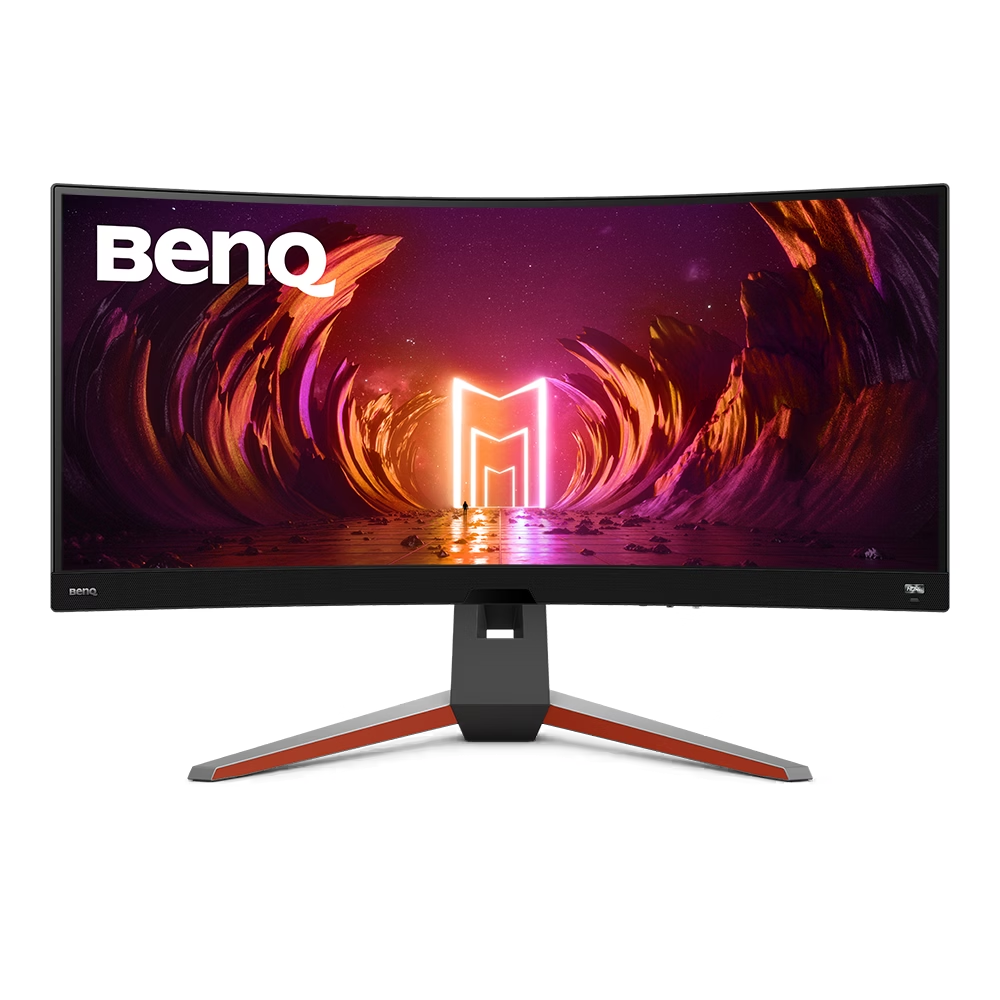
Image Source: BenQ Official
Who Is It For?
The BenQ MOBIUZ series fits users who seek an all-in-one entertainment hub rather than a stripped-down competitive tool. This series suits console gamers and PC players who prefer playing without a headset, as the integrated treVolo speaker systems provide higher audio fidelity than standard monitor speakers. Because these monitors include “HDRi” technology—a system that uses a built-in light sensor to adjust screen brightness and contrast based on the room’s lighting—they fit users who play in varying environments, from bright daylight to dark rooms.
However, this series does not fit professional eSports players who prioritize the thinnest possible bezels and the highest possible motion clarity above all else; BenQ’s own Zowie line is better suited for that specific purpose. It is also not for users with very shallow desks, as the “V-shaped” stands are physically deep and occupy significant space. The MOBIUZ line does not fit minimalists who want a subtle office look, as the chassis often features bright orange accents and integrated LED lighting on the back. If this form factor or the integrated audio system doesn’t quite fit your daily work, exploring other lineup categories would be a better path.
1. How This Line Is Grouped
The MOBIUZ line is organized by resolution and screen technology, with the model numbers (EX series) indicating the tier and features. The series moves from entry-level 1080p displays to high-end 4K and OLED panels.
| Tier | Model Examples | Resolution | Primary Panel Type |
| Entry / High-Speed | EX240, EX2510S | 1920 x 1080 (FHD) | IPS |
| Mid-Range / Balanced | EX2710Q, EX3210R | 2560 x 1440 (QHD) | IPS or VA (Curved) |
| Premium / Console | EX2710U, EX3210U | 3840 x 2160 (4K) | IPS |
| Flagship / Large | EX480UZ | 3840 x 2160 (4K) | OLED |
The 1080p models (FHD) focus on high refresh rates—how many times the image updates each second—typically reaching 165Hz or 180Hz. These are smaller screens, usually 24 to 25 inches, where the lower resolution still looks sharp. They feature 2.0 channel speakers (two speakers, no subwoofer).
The 1440p models (QHD) represent the middle ground. The “Q” in models like the EX2710Q stands for QHD. These often upgrade the audio to a 2.1 channel system, which includes two speakers and a dedicated internal subwoofer for better bass. This tier also introduces the “R” models, which are curved (VA panels), providing a more wrapped-around field of view for racing or flight simulators.
The 4K models (UHD) are the “U” series, such as the EX2710U. These are designed with HDMI 2.1 ports, which are necessary for modern consoles to run at 4K resolution and 120Hz simultaneously. These models feature the most advanced treVolo audio and often include a noise-canceling microphone built into the monitor frame. The flagship EX480UZ uses OLED technology, where each pixel produces its own light, allowing for perfect blacks but requiring more careful management to avoid image retention.
2. Check Before You Buy
The Physical Depth of the V-Stand
The MOBIUZ series uses a wide, V-shaped stand with orange rubber accents. On a desk that is 60 cm (24 inches) deep, the legs of the stand can extend forward into the area normally reserved for a large mousepad. Because the legs spread wide, they provide high stability, but they prevent the monitor from being pushed flat against a wall. Users with limited desk depth may find the screen sits closer to their eyes than expected.
HDRi vs. Standard HDR
BenQ uses a proprietary feature called “HDRi” (High Dynamic Range intelligence). Standard HDR (High Dynamic Range) expands the range between the brightest and darkest parts of an image. HDRi uses a sensor on the bottom “chin” of the monitor to detect ambient light and then digitally alters the HDR image to prevent highlights from being too bright or shadows from being too dark. While this is useful for visibility, it can change the intended color accuracy of a game or movie. There is a dedicated physical button on the front of most MOBIUZ monitors to toggle between these modes.
Integrated Audio and the “Chin”
Unlike many monitors that have thin borders on all four sides, MOBIUZ monitors have a thick bottom bar, often called a “chin.” This bar houses the treVolo speakers and the light sensors. If you plan to use a multi-monitor setup where one screen is stacked vertically above another, this thick bottom bar creates a large physical gap between the two displays. The audio quality is significantly better than standard 2W monitor speakers, but it still cannot match a dedicated pair of external bookshelf speakers or a high-end soundbar.
Recessed VESA Mount Area
For those using a monitor arm, the MOBIUZ series supports the VESA 100×100 standard (the standard screw pattern for mounting). However, the mounting area on the back of the monitor is often recessed (sunken) into the chassis. Some universal monitor arm plates are too wide to fit into this square hole. In such cases, the user must use the “spacers” (small plastic or metal tubes) that usually come with the monitor arm to bridge the gap between the monitor and the plate.
3. How It Fits a Real Desk Setup
Cable Management and the Rear Cover
The back of the MOBIUZ monitors includes a plastic cover that snaps over the port area. This is designed to hide the HDMI, DisplayPort, and power cables, routing them down through a hole in the stand. While this creates a clean look from the back, the space inside the cover is tight. Using thick, high-end “braided” cables can make it difficult to snap the cover back into place.
Remote Control Convenience
Higher-end models like the EX3210U and EX480UZ include a small infrared remote control. On a desk setup where the monitor is also used as a TV for a console or a streaming device, the remote allows the user to change volume, brightness, and input sources without reaching for the buttons behind the screen. The remote requires a clear line of sight to the sensor on the front “chin” of the monitor.
Rear LED Lighting (MOBIUZ Lighting)
The premium models feature four LED strips on the back of the monitor arranged in an “X” pattern. These can be set to different colors or patterns. On a desk placed against a white wall, these LEDs provide “bias lighting,” which can reduce eye strain by providing a soft glow behind the screen. However, the brightness of these LEDs is relatively low; they will not illuminate a whole room and are mostly visible in dark or dimly lit environments.
USB Hub Functionality
Most MOBIUZ monitors include a USB hub (multiple USB-A ports). To use these, a “USB Upstream” cable must be connected from the monitor to the PC. This allows the user to plug a mouse, keyboard, or webcam directly into the monitor. On a real desk, this helps reduce the number of cables running down to the computer tower, but the ports are located on the bottom-rear of the monitor, making them difficult to reach for frequently swapped items like thumb drives.
4. Sizes and Models in This Line
The MOBIUZ line covers the most common gaming sizes, with specific resolutions assigned to each size to maintain image clarity.
| Size | Common Resolution | Aspect Ratio | Notes |
| 24″ / 25″ | 1920 x 1080 | 16:9 | High pixel density for 1080p; very sharp for its size. |
| 27″ | 2560 x 1440 | 16:9 | The “sweet spot” for PC gaming; balances detail and speed. |
| 27″ | 3840 x 2160 | 16:9 | Extremely sharp; requires a powerful GPU for 4K gaming. |
| 32″ | 3840 x 2160 | 16:9 | Large screen for immersive gaming; fits 4K perfectly. |
| 34″ | 3440 x 1440 | 21:9 | Ultrawide; provides extra horizontal peripheral vision. |
| 48″ | 3840 x 2160 | 16:9 | OLED flagship; essentially a small TV for a desk. |
The 24-inch and 27-inch models are the most common for desktop use. A 27-inch 1440p monitor (like the EX2710Q) is often considered the standard for modern gaming because it offers more detail than 1080p without requiring the extreme processing power of 4K.
The 34-inch models (EX3410R, EX3415R) are “Ultrawide.” These have a 21:9 aspect ratio, meaning they are wider than a standard TV. This fits racing games and cinematic RPGs (Role-Playing Games) where a wider field of view is beneficial. However, some console games do not support this width and will display black bars on the sides.
The 48-inch OLED (EX480UZ) is a specialized model. It is too large for a standard 60 cm deep desk and usually requires a desk with at least 80-90 cm of depth or a separate floor stand. It uses an OLED panel, which provides a 0.1ms response time—the time it takes for a pixel to change color—making motion look extremely smooth.
5. Performance by Use Case
The MOBIUZ series is designed to be versatile, but its performance varies depending on whether the task is speed-focused or visual-focused.
| Use Case | Software / Task | Rating | Reason |
| Immersive RPGs | Elden Ring, Witcher 3 | Sufficient | HDRi and treVolo audio enhance the atmosphere. |
| Competitive FPS | Valorant, CS2 | Adequate | Fast refresh rates are present, but the “chin” adds bulk. |
| Console Gaming | PS5, Xbox Series X | Sufficient | HDMI 2.1 and 4K support (on U models) fit consoles. |
| Movie Watching | Netflix, Blu-ray | Sufficient | 2.1 audio and high contrast (especially on VA/OLED). |
| Office Work | Excel, Word | Adequate | 1440p/4K text is sharp, but the gaming aesthetic is loud. |
| Color Grading | Photoshop, Resolve | Adequate | Good color coverage, but HDRi can interfere with accuracy. |
The “Sufficient” rating for console gaming is due to the “U” models’ support for VRR (Variable Refresh Rate). VRR allows the monitor to sync its refresh rate with the console’s frame rate, preventing “tearing” (where the image looks split horizontally) during fast movement.
6. Official Specs (with plain explanations)
| Category | Specification | Notes |
| Refresh Rate | 144Hz – 240Hz | How many times the screen updates per second. |
| Response Time | 1ms (MPRT) / 0.1ms (OLED) | How fast pixels change; lower is better for motion. |
| Brightness | 250 – 600 nits | Nits = unit of brightness; 400+ is good for HDR. |
| Panel Types | IPS, VA, OLED | IPS = colors; VA = contrast; OLED = perfect blacks. |
| Audio | 2.0 or 2.1 Channel | 2.1 includes a subwoofer for deeper sound. |
| Color Gamut | 90% – 98% P3 | The range of colors the monitor can show. |
| Connectivity | HDMI 2.0/2.1, DP 1.4 | HDMI 2.1 is required for 4K 120Hz on consoles. |
This line is sold with different tier names, sizes, refresh rates, and panels depending on the exact model and region. Please match the specifications on your current seller page with the official information above.
Source: BenQ Official Product Page
The “MPRT” (Moving Picture Response Time) of 1ms is achieved using a strobe backlight. This can make motion look clearer but may cause a slight flickering sensation for users sensitive to light pulses.
7. Main Variations in This Line
The most important variation is the panel type. “IPS” (In-Plane Switching) panels are used in the flat models (like EX2710Q) and are known for accurate colors and wide viewing angles. “VA” (Vertical Alignment) panels are used in the curved models (like EX3210R) and offer much deeper blacks and higher contrast, which is better for playing in dark rooms.
Another variation is the “S” vs. “non-S” models in the 1080p line. The EX2510S is an updated version of the original EX2510, usually offering a slightly higher refresh rate (165Hz vs 144Hz) and improved brightness.
The “U” models (EX2710U, EX3210U) are the only ones in the line that feature a built-in noise-canceling microphone. This microphone uses an AI chip to filter out background noise like keyboard clicks, allowing the user to chat with teammates without a headset.
8. What to Check on the Sales Page
- Line / Tier / Size: Check whether you are getting the MOBIUZ EX model, not a BenQ GW (Office) or Zowie (eSports) model.
- HDMI Version: If you are a console gamer, ensure the model has HDMI 2.1. Models with HDMI 2.0 will be limited to 4K at 60Hz.
- Speaker Configuration: Verify if the model is 2.0 (standard) or 2.1 (with subwoofer) if audio quality is a priority.
- Panel Type: Confirm if the screen is flat (IPS) or curved (VA), as this changes the viewing experience and contrast.
- Refresh Rate: Check if the model is 144Hz, 165Hz, or 240Hz, as this must match your computer’s performance capabilities.
9. Disclaimer & Buying Advice
This buying guide for the BenQ MOBIUZ Series is based on official manufacturer specifications and recurring real-world user experiences. It is completely independent, not sponsored, and does not guarantee specific performance for every unit. Tier name, screen size, refresh rate, panel type, and ports can differ by model and region, so please double-check the exact specifications listed on your seller’s page before purchasing.
10. Beginner Guide
If you are new to monitor terms like refresh rate (Hz), panel type (IPS/VA/OLED), and resolution (1080p/1440p/4K), read the basics in our [Start Here]. Understanding how these specs interact with your gaming console or PC will help you determine if the MOBIUZ series fits your specific needs.

[…] BenQ MOBIUZ EX3415R — Immersive curved gaming monitor with high-fidelity sound […]