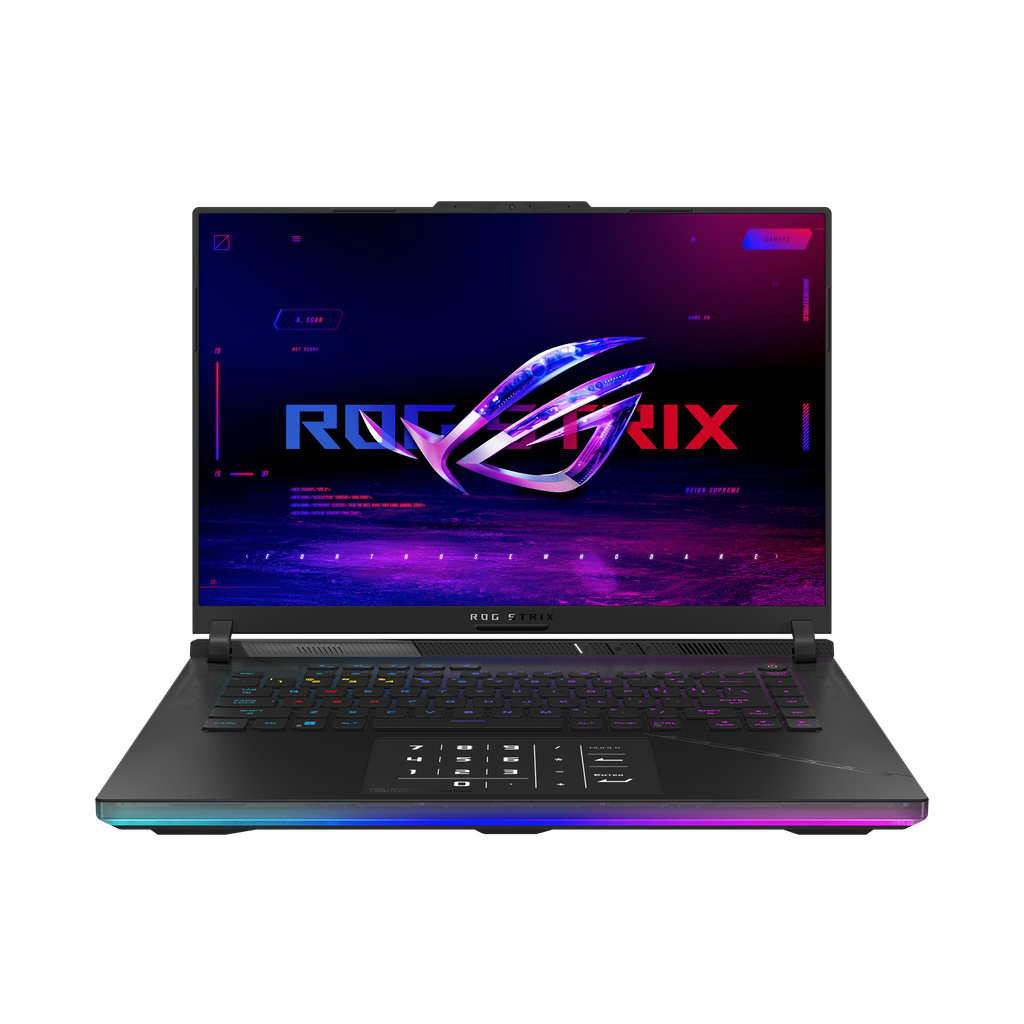
Image Source: ASUS Official
Who Is It For?
The ROG Strix SCAR 16 packs a 16-inch high-refresh Mini-LED display, high-TGP NVIDIA GeForce RTX laptop graphics, and a 90 Wh battery into a 2.80 kg chassis for users who demand strong gaming and creation performance while still moving the machine between desk and temporary locations. Players who want high frame rates on a large screen or creators who export video and then pack up for travel fit the daily pattern. The relatively thick body and 380 W brick make frequent long-distance bag carries less practical than desk-to-desk or hotel-room use. Two SO-DIMM slots and two M.2 bays allow memory and storage expansion after purchase. Battery mode sharply limits the discrete GPU. If this form factor or power doesn’t quite fit your daily work, exploring other lineup categories would be a better path.
1. High-TGP Limits and Dual-Slot Expansion
GPU power and the required brick
Graphics options use NVIDIA GeForce RTX 50-series laptop GPUs with TGP up to 175 W (including Dynamic Boost) on flagship configurations. Full sustained performance requires the included 380 W proprietary adapter. USB-C Power Delivery is limited and throttles the discrete GPU heavily. The large brick therefore becomes a permanent travel companion for any serious gaming or export session. Confirm the exact GPU model and maximum TGP listed on the sales page.
Dual SO-DIMM memory
Memory uses two DDR5 SO-DIMM slots supporting up to 64 GB. Capacity can be increased later by replacing or adding modules. Confirm the installed amount and that both slots are accessible on the specific model.
Dual M.2 storage and vent design
Two M.2 PCIe slots support the primary SSDs and allow expansion. Air intake occurs primarily on the underside with exhaust along the rear and sides. Soft surfaces or closed bags quickly restrict cooling and raise temperatures under load. These physical choices remain fixed after purchase except for the modules that fit the slots.
These constraints keep the machine oriented toward plugged-in high-performance work while allowing later memory and storage growth.
2. Daily Carry Weight and Desk Heat
2.80 kg plus the heavy brick
The closed chassis measures 35.4 × 26.8 × 2.28–3.08 cm and weighs 2.80 kg. It fits most 16-inch backpacks, yet the combined weight with the 380 W adapter becomes noticeable on longer walks or public transport. Opening the lid on a café table or airplane tray leaves limited free surface for a mouse or notebook beside it.
Fan noise and thermal behavior on a desk
Advanced vapor-chamber and multi-fan cooling keeps the system relatively controlled at idle or light work. Under full GPU and high-CPU loads the fans ramp aggressively and become clearly audible in a quiet room. Rear and underside vents must stay unobstructed; soft beds or thick mats raise surface temperatures quickly. On a hard desk the system sustains its rated TGP, yet the chassis transfers heat to the surface beneath it.
Battery under GPU load
The 90 Wh pack supports a few hours of web browsing, document work, or media playback. Once the discrete GPU engages for gaming or export, runtime drops sharply to a short window. Any serious session still needs the full-wattage adapter nearby.
3. Performance by Use Case
Higher configurations pair Intel Core Ultra HX-series processors with RTX 50-series GPUs at elevated TGP. All heavy GPU work assumes the proprietary high-watt adapter is connected; battery or limited USB-C mode restricts the discrete graphics.
| Use Case | Software | Rating | Reason |
|---|---|---|---|
| Modern AAA gaming at high settings (plugged in) | Cyberpunk, recent titles at 1440p/high | Sufficient | High TGP and 240 Hz Mini-LED panel sustain playable frame rates when powered |
| 4K video editing and export | Premiere, DaVinci Resolve | Sufficient | Discrete GPU, dual M.2, and high memory keep timelines and exports moving on AC power |
| Content creation and multitasking | Photoshop, browsers, Discord | Sufficient | Dual SO-DIMM capacity and strong CPU handle concurrent loads |
| Battery-only light productivity | Office, web, streaming | Adequate | 90 Wh pack covers a few hours without GPU load |
| Battery-only gaming or heavy export | Any discrete-GPU intensive task | Not enough | GPU power collapses and runtime shrinks to a short window |
Lower GPU or memory configurations reduce the margin on the first three rows. Sustained maximum TGP is only available with the full adapter.
4. Official Specs (with plain explanations)
| Category | Specification | Notes |
|---|---|---|
| Display | 16″ WQXGA Mini-LED, 240 Hz | High brightness HDR options |
| Processor | Intel Core Ultra 9 HX-series | Soldered |
| Graphics | NVIDIA GeForce RTX 50-series Laptop | Up to 175 W TGP with Dynamic Boost |
| Memory | 2× DDR5 SO-DIMM, up to 64 GB | Upgradable |
| Storage | 2× M.2 NVMe | Upgradable |
| Battery | 90 Wh | Built-in |
| Adapter | 380 W proprietary | Full power requires brick |
| Weight | 2.80 kg | With battery |
| Ports | 2× Thunderbolt 5, HDMI 2.1, USB-A, 3.5 mm | Fixed layout |
This series is sold with different GPUs, memory, and storage depending on the release year and configuration. Please match the specifications on your current seller page with the official information above.
Source: ASUS Official Product Page
The high-TGP requirement and dual SO-DIMM / M.2 slots listed above directly determine daily adapter use and later expansion.
5. Main Variations in This Series
GPU choice among RTX 5080, 5090, or mid-range options changes sustained frame rates and export times once the machine is plugged in. Memory starting at 32 GB versus higher (expandable to 64 GB) affects how large game worlds or creative projects remain open. Storage of one versus two populated M.2 drives determines how much local game and media libraries stay onboard. Display options between Mini-LED configurations alter brightness, local dimming, and HDR performance. Each of these choices is permanent after purchase except for the modules that fit the available slots.
6. What to Check on the Sales Page
Confirm the exact hardware listed for the SKU you are considering, because the same series name covers multiple GPU and capacity levels.
- Exact GPU model and maximum TGP (including Dynamic Boost).
- Installed DDR5 memory amount and confirmation of two SO-DIMM slots.
- Number of M.2 slots filled and total storage capacity.
- Included adapter wattage (typically 380 W).
- Display type (Mini-LED) and resolution/refresh rate.
Matching these five items against the official sheet prevents receiving a lower-power or lower-capacity configuration under the same series name.
7. Disclaimer & Buying Advice
This buying guide for the ROG Strix SCAR 16 is based on official manufacturer specifications and recurring real-world user experiences. It is completely independent, not sponsored, and does not guarantee specific performance for every unit. Hardware configurations such as the processor, graphics, memory, and storage can differ by generation and region, so please double-check the exact specifications listed on your seller’s page before purchasing.
8. Beginner Guide
The high-watt proprietary adapter required for full GPU power and the dual upgradable SO-DIMM / M.2 slots define the daily limits of this series more than any other factor. Start Here walks through how those constraints interact with common high-end gaming and mobile-creation patterns before any purchase decision.