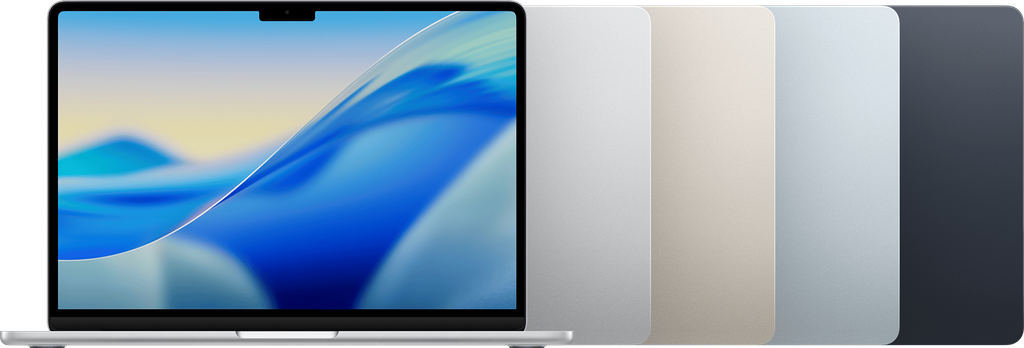
Image Source: Apple Official
A fanless aluminum chassis that stays completely silent under everyday loads defines the current MacBook Air series.
On a normal day this silence shows up when someone works through emails, browser tabs and a video call at a café table without any whir, or slips the closed machine into a slim bag for short walks between meetings and still has charge left at the end of the afternoon.
The same design becomes less comfortable when the work stretches into long video exports or continuous multi-core tasks that push the chip for more than a few minutes, because heat has nowhere to go except through the metal body.
Under those longer loads the underside warms against the lap, performance slowly eases back to stay within safe temperatures, and neither memory nor storage can be expanded after the machine leaves the factory.
Does the weight stay light after a full day of carrying?
The 13-inch models sit at 1.24 kg.
The 15-inch models sit at 1.51 kg.
After several moves across a day the smaller unit barely registers in a bag. The larger unit still feels manageable for most people, yet the extra 270 grams becomes noticeable once a charger and a notebook join the load.
How long does the battery last during mixed office work?
Battery capacity is 52.6–53.8 Wh on the 13-inch models and 66.5 Wh on the 15-inch models.
Under a typical mix of browser tabs, documents and video calls at moderate brightness both sizes routinely cover a full workday and often stretch into a second lighter day.
Heavy continuous tasks such as long exports or large file transfers shorten that window more noticeably.
Charging uses the MagSafe connector or either Thunderbolt port. A higher-wattage adapter recovers the battery faster; the included compact adapter is enough for overnight top-ups.
When does the chassis warm up and performance ease?
Because there is no fan, light office work produces no sound and almost no heat.
Once the chip works harder for several minutes the underside and the area under the keyboard warm enough that bare legs or palms notice it.
Sustained loads such as video encoding or long compiles cause the chip to reduce speed gradually so temperatures stay safe. The first few minutes run at full pace; later stretches feel slower.
How do reflections and brightness feel under real lighting?
The Liquid Retina display reaches 500 nits and covers a wide color range.
Under bright office fluorescent lights the screen stays readable without needing maximum brightness.
Outdoor shade remains usable; direct sunlight still washes the image out, as with most laptop panels.
The glossy finish can throw soft reflections when overhead lights sit directly above, yet the high brightness helps keep text clear.
Can memory or storage be increased later?
Both memory and storage are soldered to the board.
Capacity is fixed at the moment of purchase—currently starting at 16 GB of unified memory and 256 GB of storage, with higher options available only at order time.
No slots exist for later upgrades. Choosing the amount needed on day one is the only path.
What happens to ports when a desk is already full?
Each model carries two Thunderbolt 4 / USB-C ports, a MagSafe 3 charging port and a headphone jack.
Connecting an external display, a hub and a mouse often uses both Thunderbolt ports at once.
A separate dongle or dock becomes necessary for HDMI, extra USB-A devices or an SD card.
The MagSafe connector keeps charging separate so one Thunderbolt port can stay free for data.
How does the hinge feel after months of daily opening?
The hinge is a conventional clamshell design.
It opens smoothly to a wide angle and holds position without drifting under normal desk use.
After repeated daily cycles the resistance stays consistent.
There is no 360-degree rotation, so tablet or tent modes are not available.
| Size | Weight | Battery capacity | Memory & storage | Ports | Cooling |
|---|---|---|---|---|---|
| 13-inch | 1.24 kg | 52.6–53.8 Wh | Soldered, fixed | 2× Thunderbolt + MagSafe + jack | Fanless |
| 15-inch | 1.51 kg | 66.5 Wh | Soldered, fixed | 2× Thunderbolt + MagSafe + jack | Fanless |
The weight difference shows clearly after a full day of carrying.
Battery runtime under the same office mix remains long on both sizes, yet the larger screen uses the extra capacity to keep pace rather than extend the day much further.
Soldered memory and storage remove any later expansion path.
The two Thunderbolt ports limit simultaneous connections without a hub.
What changes on a small desk once the lid is open?
On a narrow table the open lid leaves limited space for a mouse or notebook once the screen is raised.
The 13-inch model fits more easily into tight spaces.
The 15-inch model needs clearer depth so the larger panel can open fully without hitting a wall or another object.
How does the keyboard feel during long typing sessions?
The keyboard uses a low-travel scissor mechanism with white backlighting.
Keycaps stay stable during normal typing.
The layout includes a full-size arrangement on both sizes, with the larger model offering slightly more palm-rest area.
Touch ID sits in the top-right corner and registers fingerprints after the first setup; wet or cold fingers can slow recognition on busy mornings.
Exact chip generation, memory capacity and storage size change by configuration and production period, so the precise listing on the seller page for the unit under consideration remains the only reliable check. This overview draws only from official manufacturer specifications and consistent patterns reported across independent professional review sources, and it stays independent of any sales interest. For a wider look at how physical limits interact with everyday work patterns, see Start Here.