
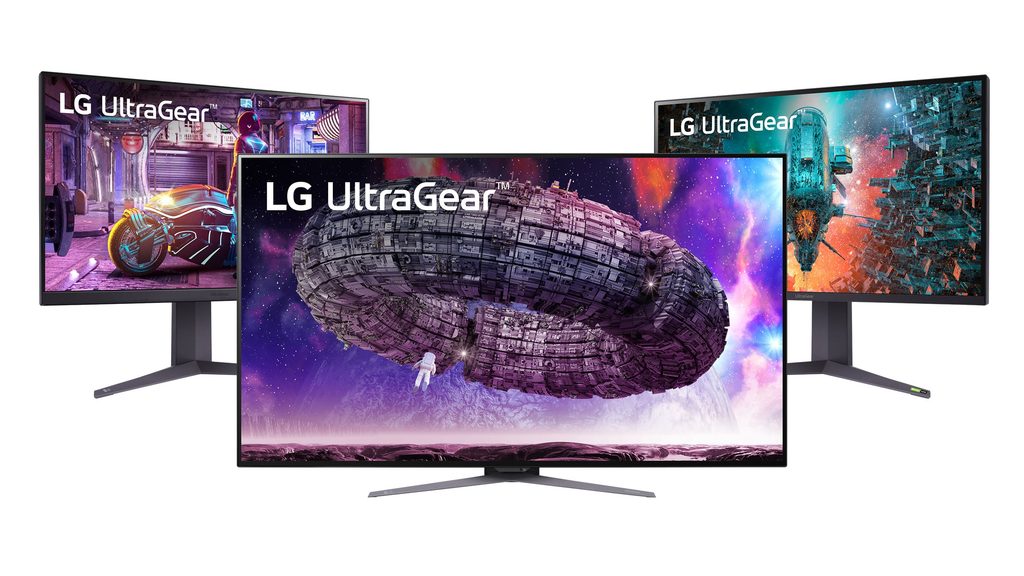
Image Source: LG Official
Who Is It For ?
The LG UltraGear series is a collection of monitors where the technical specifications are centered around motion clarity and input speed. This line primarily utilizes two types of screen technology: IPS (In-Plane Switching), which is a liquid crystal display (LCD) known for wide viewing angles and color accuracy, and OLED (Organic Light Emitting Diode), which uses self-lit pixels to achieve deep black levels and near-instantaneous pixel transitions. These monitors are frequently identified by their high refresh rates—the number of times the image updates each second—and low response times—the speed at which a pixel changes from one color to another. Visually, the series often features a distinct V-shaped stand and red or purple accents, along with “Hexagon Lighting” on the rear of newer, higher-tier models.
This series is a common choice for environments where fast-moving images, such as those in competitive gaming or action-heavy media, are the primary focus. The hardware is built to reduce motion blur, which is the trailing effect seen behind moving objects on slower screens. However, the physical design of the UltraGear line, particularly the depth of the stand and the gaming-centric aesthetic, may not align with a minimalist office setup or a very shallow desk. The high brightness of the LCD models and the infinite contrast of the OLED models serve different lighting environments, making it necessary to match the specific model to the room’s light levels. If this form factor or screen size doesn’t quite fit your daily work, exploring other lineup categories would be a better path.
1. How This Line Is Grouped
The UltraGear lineup is organized into tiers based on resolution, panel technology, and the year of release. LG uses a specific naming convention where the letters in the middle of the model code (such as GN, GP, GR, or GS) indicate the generation and feature set.
| Tier | Typical names | Rough position |
| Entry | 24GN / 27GN | 1080p (FHD) resolution, standard IPS panels, 144Hz refresh rates. |
| Mid-Range | 27GP / 32GP | 1440p (QHD) resolution, Nano IPS technology, 165Hz-180Hz refresh rates. |
| High-End LCD | 27GR / 32GR / 27GN950 | 4K (UHD) resolution, HDMI 2.1 support, high color accuracy. |
| Ultrawide | 34GP / 38GN / 45GR | 21:9 aspect ratio, curved screens, increased horizontal workspace. |
| Premium OLED | 27GR95 / 27GS95 / 45GS | OLED panels, 240Hz-480Hz refresh rates, 0.03ms response times. |
Entry-Level LCD Models (GN Series)
The entry-level models, often carrying the “GN” designation in older stock or “GQ” in some regions, typically feature 1920×1080 (FHD) resolution. These models use standard IPS panels that provide consistent colors but lack the advanced color-enhancing layers found in higher tiers. They are often used in setups where the computer’s hardware cannot maintain high frame rates at higher resolutions. The stands on these models are sometimes limited to tilt adjustments only, lacking height or pivot functions.
Mid-Range Nano IPS Models (GP and GR Series)
The mid-range is where LG introduces “Nano IPS” technology. This involves a layer of nanoparticles applied to the backlight to absorb excess light wavelengths, resulting in a wider color gamut (the range of colors the screen can display). Most of these models offer 2560×1440 (QHD) resolution. This tier usually includes a fully adjustable stand that allows the user to change the height, tilt, and rotate the screen 90 degrees into a vertical (pivot) position.
High-End 4K and Ultrawide Models
The high-end LCD models focus on 3840×2160 (4K) resolution or ultrawide formats. The 27-inch and 32-inch 4K models require HDMI 2.1 to reach their full 144Hz refresh rate on modern gaming consoles or PCs. The ultrawide models use a 21:9 aspect ratio, which is wider than the standard 16:9, providing more horizontal screen space for side-by-side windows or a wider field of view in compatible software.
Premium OLED Models (GR and GS Series)
The OLED models represent a complete shift in technology. Unlike LCDs that require a backlight, OLED pixels produce their own light. This allows the monitor to turn off individual pixels completely, resulting in “true black” and a contrast ratio that is effectively infinite. These models are found in 27-inch, 34-inch, 39-inch, and 45-inch sizes. They feature the highest refresh rates in the lineup, reaching up to 480Hz on specific 1080p modes or 240Hz at 1440p.
2. Check Before You Buy
The V-Shaped Stand and Desk Depth
The standard UltraGear stand uses a wide V-shape where the two legs extend forward toward the user. On a 27-inch or 32-inch model, the distance from the back of the stand to the tips of the legs can be over 25 centimeters. On a shallow desk (60cm or less), this stand occupies a large portion of the center workspace and can interfere with large mousepads. Checking the physical dimensions of the stand base against your available desk depth is a necessary step before purchasing.
IPS Glow and Contrast Ratios
Most LCD models in this line use IPS panels. While IPS provides excellent viewing angles—meaning the colors do not distort when viewed from the side—they are subject to “IPS Glow.” This is a visible light “haze” in the corners of the screen when viewing dark content in a dimly lit room. Furthermore, the contrast ratio of these panels is typically 1000:1, which means black areas of an image may appear as dark gray rather than deep black.
HDMI 2.1 for Console Compatibility
If the monitor is intended for use with a PlayStation 5 or Xbox Series X, the version of the HDMI port is a significant factor. Older or lower-tier UltraGear models often feature HDMI 2.0, which limits 4K resolution to 60Hz. To utilize 4K at 120Hz with Variable Refresh Rate (VRR)—a feature that prevents screen tearing by syncing the monitor to the console’s output—the monitor must explicitly list HDMI 2.1 specifications.
OLED Brightness and ABL
The OLED models in the UltraGear series include a feature called ABL (Automatic Brightness Limiter). Because OLED pixels generate heat, the monitor will automatically dim the screen if a large portion of the display becomes bright white, such as when opening a full-screen spreadsheet or a white web page. This is a protective measure for the panel but results in a fluctuating brightness level that some users may notice during productivity tasks.
3. How It Fits a Real Desk Setup
Viewing Distance and Screen Size
A 27-inch UltraGear monitor at 1440p resolution is often placed approximately 60cm to 70cm from the user. At this distance, the pixel density—the number of pixels per inch—is high enough that individual pixels are difficult to see. However, if a 32-inch monitor is used at the same 1440p resolution, the pixels are larger, and the user may need to move the monitor further back to maintain the same perceived sharpness. For 32-inch 4K models, the increased detail allows for a closer viewing distance, but the physical size of the panel requires more head movement.
Recessed VESA Mount Constraints
The back of most UltraGear monitors features a circular recessed area where the stand attaches. This area also contains the VESA mount holes (100x100mm), which are the standard screw patterns for attaching the monitor to a mechanical arm. Some third-party monitor arm plates are square and larger than this circular opening. In such cases, the plate will not fit flush against the monitor, requiring the use of spacers (plastic standoffs) and longer screws to secure the arm.
Horizontal Port Orientation
Unlike many office monitors where the cables plug in from the bottom and point downward, UltraGear ports usually point straight out the back. This makes the ports easier to see and access when setting up the monitor. However, it means the cables stick out horizontally toward the wall. If the desk is pushed directly against a wall, there must be enough clearance (approximately 5cm to 8cm) to prevent the cables from bending at an extreme angle, which can cause connection instability.
Matte Coating and Room Lighting
LG applies a matte anti-glare coating to almost all UltraGear models, including the OLED versions. This coating scatters incoming light to reduce reflections from windows or lamps. While this makes the monitor easier to use in bright rooms, it can slightly diffuse the light coming from the pixels, which some users perceive as a “grainy” texture on solid white backgrounds. In a dark room, this coating is less noticeable, but the IPS glow of LCD models becomes more apparent.
4. Sizes and Models in This Line
The UltraGear series covers a wide range of physical sizes, each impacting the desk layout and the visual experience differently.
24-inch and 27-inch Models
The 24-inch models are almost exclusively 1920×1080 (FHD). These are often used in dual-monitor setups or on very small desks. The 27-inch models are the most common and are available in FHD, QHD, and UHD (4K). A 27-inch QHD panel has a pixel density of about 109 pixels per inch (PPI), which provides sharp text and detailed images without requiring the user to use OS scaling (enlarging text and icons).
32-inch Models
The 32-inch models provide a significantly larger viewing area. When used at 2560×1440 (QHD), the text appears larger than on a 27-inch screen, which can be helpful for users who prefer not to strain their eyes. However, for maximum detail, the 32-inch 4K (UHD) models are the standard. These models are heavy and require a desk with a width of at least 80cm to accommodate the wide stand and provide a comfortable viewing distance.
34-inch to 45-inch Ultrawide Models
The 34-inch and 38-inch models use a 21:9 aspect ratio, which is roughly 30% wider than a standard screen. These are almost always curved to keep the edges of the screen within the user’s peripheral vision. The 45-inch OLED model features a very aggressive 800R curve. An 800R curve means the screen follows the arc of a circle with an 800mm radius. This curve is designed to wrap around the user, but it can make straight lines in architectural or spreadsheet work appear slightly bent.
| Size | Common resolution | Aspect ratio | Notes |
| 24″ | 1920 x 1080 | 16:9 | Fits small desks; standard for high-speed FHD. |
| 27″ | 2560 x 1440 | 16:9 | High pixel density; fits most standard desks. |
| 32″ | 3840 x 2160 | 16:9 | Large 4K canvas; requires deep desk space. |
| 34″ | 3440 x 1440 | 21:9 | Ultrawide; equivalent to 27″ height but wider. |
| 45″ | 3440 x 1440 | 21:9 | Large OLED; features aggressive 800R curve. |
5. Performance by Use Case
The following ratings are based on the mid-to-high tier Nano IPS and OLED models within the UltraGear line. Entry-level 1080p models may perform differently in high-resolution tasks.
| Use Case | Software / Task | Rating | Reason |
| Fast-Paced Gaming | FPS, Racing, Action | Sufficient | High refresh rates and low response times reduce blur. |
| General Office Work | Word, Excel, Browsing | Adequate | Clear text on QHD/4K models; stand is bulky. |
| Color-Critical Work | Photo/Video Editing | Adequate | Nano IPS has wide color gamut; contrast is low. |
| Dark Room Cinema | Movies, Horror Games | Not enough | IPS models have visible glow; OLED is Sufficient here. |
| Console Gaming | PS5, Xbox Series X | Sufficient | Newer models support 4K 120Hz via HDMI 2.1. |
The performance of these monitors in HDR (High Dynamic Range) varies. Most LCD UltraGear monitors have “VESA DisplayHDR 400” or “600” certifications, but because they lack many local dimming zones (the ability to dim small parts of the backlight), the HDR effect is limited compared to the OLED models.
6. Official Specs (with plain explanations)
| Category | Specification | Notes |
| Panel Type | IPS / Nano IPS / OLED | Changes color accuracy, viewing angle, and black levels. |
| Refresh Rate | 144Hz to 480Hz | How many times the image updates each second. |
| Response Time | 1ms to 0.03ms (GtG) | How quickly a pixel changes from one gray to another. |
| Resolution | FHD, QHD, UHD (4K) | The total number of pixels on the screen. |
| Brightness | 300 to 600 nits | Screen brightness unit; higher nits help in bright rooms. |
| Color Gamut | DCI-P3 95% – 98% | The range of colors the monitor can accurately display. |
| Connectivity | HDMI 2.0/2.1, DP 1.4 | The types of cables used to connect to a PC or console. |
| VESA Mount | 100 x 100 mm | Standard screw pattern for mounting on a monitor arm. |
This line is sold with different tier names, sizes, refresh rates, and panels depending on the exact model and region. Please match the specifications on your current seller page with the official information above.
Source: LG Official Product Page
7. Main Variations in This Line
Nano IPS vs. Standard IPS
The “Nano IPS” models (often found in the GP and GR series) use a specialized backlight to achieve more vibrant and accurate colors. Standard IPS models (often in the GN series) are more common in the entry-level price bracket and provide a more traditional color range that is sufficient for general use but lacks the saturation of the Nano versions.
Flat vs. Curved Panels
Most 24-inch, 27-inch, and 32-inch UltraGear monitors are flat. This is preferred for tasks where straight lines must remain straight, such as in graphic design or CAD work. The ultrawide models (34-inch and larger) are almost always curved to reduce the distance between the user’s eyes and the corners of the screen, which helps maintain color consistency across the wide panel.
Refresh Rate Overclocking
Some UltraGear models are marketed with a “native” refresh rate and an “overclocked” refresh rate. For example, a monitor may be 144Hz native but can be set to 160Hz or 180Hz through the monitor’s internal menu. Using the overclocked setting may sometimes limit the color depth (the number of colors the screen can process) depending on the bandwidth of the cable being used.
8. What to Check on the Sales Page
When looking at a specific UltraGear model on a retailer’s website, verify these details to ensure the hardware matches your expectations.
- Line / Tier / Size: Check whether you are getting the 27GP850 (Nano IPS) model, not a different tier like the 27GN600 (Standard IPS) or 27GR75Q (Entry QHD) under the same brand name.
- Model Code Suffix: Letters like “B” at the end (e.g., 27GP850-B) usually refer to the color of the chassis (Black), but verify if other suffixes indicate different stand types.
- HDMI Version: Confirm the presence of HDMI 2.1 if you intend to use the monitor with a modern gaming console at 120Hz.
- Stand Adjustability: Verify if the stand includes height and pivot adjustments, as some lower-cost versions of the same screen only offer tilt.
- Panel Technology: Ensure the listing explicitly states “OLED” or “IPS” to avoid confusing the two very different technologies.
9. Disclaimer & Buying Advice
This buying guide for the LG UltraGear Series is based on official manufacturer specifications and recurring real-world user experiences. It is completely independent, not sponsored, and does not guarantee specific performance for every unit. Tier name, screen size, refresh rate, panel type, and ports can differ by model and region, so please double-check the exact specifications listed on your seller’s page before purchasing.
10. Beginner Guide
If you are new to monitor terms like refresh rate (Hz), panel type (IPS/OLED), and resolution (QHD/4K), read the basics in our [Start Here].

[…] LG UltraGear 32GS95UE — Dual-mode 4K/FHD OLED gaming monitor […]