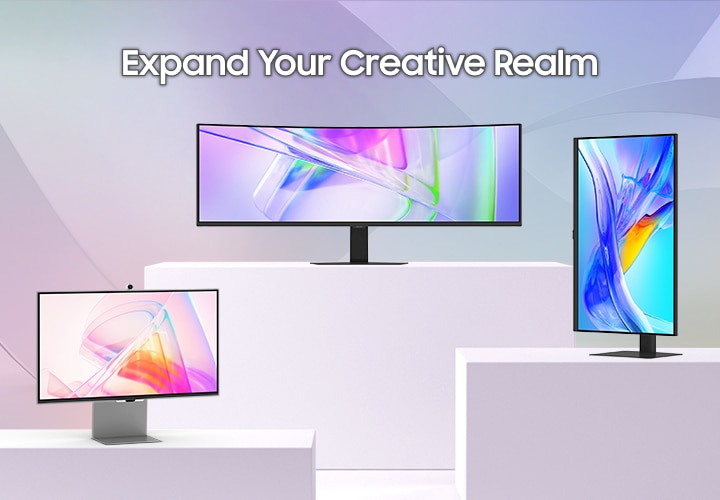
Image Source: Samsung Official
Who Is It For?
The Samsung ViewFinity series fits users who require high-resolution displays for detailed creative work, such as graphic design, photo editing, and large-scale data management. This series suits professionals who use a modern laptop as their primary computer, as the integrated USB-C docking features—which carry video, data, and power through one cable—simplify the desk environment. Because the higher-end models (S8 and S9) feature a specialized matte finish, they fit users who work in rooms with multiple overhead lights or windows where reflections usually interfere with screen visibility.
However, this series does not fit competitive gamers who require ultra-high refresh rates—how many times the image updates each second—as most ViewFinity models are physically limited to 60Hz. It is not for users who primarily play fast-paced action games, as the response times are optimized for color stability rather than eliminating motion blur. The ViewFinity S9, specifically, does not fit those who want a simple “plug-and-play” monitor without a software layer, as it includes the Tizen Smart OS which requires a setup process similar to a television. If this form factor or the professional-grade color focus doesn’t quite fit your daily work, exploring other lineup categories would be a better path.
1. How This Line Is Grouped
Samsung organizes the ViewFinity line into four primary tiers, moving from entry-level professional displays to high-end flagship workstations. The model numbers (S6, S7, S8, S9) indicate the feature set and target resolution.
| Tier | Typical Names | Rough Position |
| Mainstream Pro | ViewFinity S6 (S60D, S65UC) | QHD resolution, flat or curved, 100Hz available. |
| Entry 4K | ViewFinity S7 (S70D) | 4K resolution, basic stand, high color accuracy. |
| High-End 4K | ViewFinity S8 (S80D, S80PB) | 4K resolution, Matte Display, 90W USB-C PD. |
| Flagship 5K | ViewFinity S9 (S90PC) | 5K resolution, Matte Display, Thunderbolt 4, Tizen OS. |
ViewFinity S6 (Mainstream Pro)
The S6 series is the entry point for professional multitasking. These monitors typically offer QHD (2560 x 1440) resolution. This provides 77% more screen space than a standard 1080p monitor. The S6 series is unique in the line because it includes the S65UC, a 34-inch curved ultrawide model with a 100Hz refresh rate. This higher refresh rate makes the movement of the mouse cursor and the scrolling of documents look smoother than the standard 60Hz models.
ViewFinity S7 (Entry 4K)
The S7 series focuses on providing 4K (3840 x 2160) resolution at a lower price point. These models prioritize “PPI” (Pixels Per Inch), which is a measure of how many pixels are packed into an inch of the screen. High PPI results in extremely sharp text. To keep the cost down, the S7 often uses a simpler stand that only tilts and lacks the USB-C power delivery features found in the S8 and S9.
ViewFinity S8 (High-End 4K)
The S8 series is the core professional model. It introduces the “Matte Display,” which is a physical texture on the glass that scatters light to prevent glare. It also features a “USB-C Hub” that provides up to 90W of Power Delivery (PD). Power Delivery is the ability of the monitor to charge a connected laptop. A 90W output is sufficient to charge a powerful 16-inch workstation laptop while it is performing heavy tasks like video rendering.
ViewFinity S9 (Flagship 5K)
The S9 is the flagship model, featuring a 5K (5120 x 2880) resolution. This resolution is a physical requirement for “Retina” grade sharpness on a 27-inch screen, where individual pixels are invisible to the human eye at a normal viewing distance. The S9 includes a Thunderbolt 4 port, which offers 40Gbps data speeds—four times faster than standard USB-C. It also includes a built-in 4K webcam and the Tizen Smart OS, allowing the monitor to run apps like Netflix or Microsoft 365 without a computer.
2. Check Before You Buy
The Matte Display Texture (S8 and S9)
The ViewFinity S8 and S9 feature a “UL-verified Glare-Free” matte finish. This is a physical etching on the glass surface. While it is highly effective at eliminating reflections from windows or lamps, it can introduce a slight “grainy” or “textured” appearance on bright, solid white backgrounds. Users who are accustomed to the crystal-clear “pop” of a glossy smartphone or laptop screen may find this texture distracting during the first few days of use.
Refresh Rate and Motion Smoothness
Most ViewFinity monitors (S7, S8, S9) are limited to a 60Hz refresh rate. Refresh rate (Hz) is how many times the screen updates the image per second. While 60Hz is the standard for office work, it can feel “slow” or “choppy” to users who are used to 120Hz or 144Hz screens on modern smartphones or gaming laptops. Only the S65UC (Ultrawide) offers a 100Hz refresh rate, which provides a physically smoother experience for moving windows and scrolling through long code or spreadsheets.
Tizen OS Integration on the S9
The ViewFinity S9 runs Samsung’s Tizen operating system, the same software found on Samsung Smart TVs. This means the monitor has its own processor, Wi-Fi, and remote control. When the monitor is turned on, it may default to a “Smart Hub” home screen rather than the computer input. This adds a layer of software complexity that is absent in traditional “dumb” monitors. Users who want a monitor that simply turns on and off with the computer may find the smart features and the required Samsung account setup to be an unnecessary hurdle.
USB-C Power Delivery Limits
While the S8 and S9 offer 90W of power, the S6 and S7 models vary significantly. Some S6 models only offer 65W or no power delivery at all. If a user connects a high-performance laptop to a 65W monitor, the laptop battery may still drain slowly during heavy use. Checking the specific “Power Delivery” wattage on the sales page is a requirement for those who want to eliminate their laptop’s original power brick from their desk.
3. How It Fits a Real Desk Setup
Stand Footprint and Depth
Samsung ViewFinity stands typically use a flat, rectangular metal base. On a desk with a depth of 60 cm (24 inches), this base occupies about 20 cm to 25 cm of depth. Because the base is flat, it allows the user to place a keyboard, a smartphone, or a small notebook directly on top of the stand, reclaiming some usable surface area. Most models (except the entry S7) include a “HAS” (Height Adjustable Stand) that allows the screen to be raised, tilted, swiveled, and pivoted 90 degrees into a vertical orientation.
VESA Mounting and the Rear Design
For users who prefer a monitor arm, the ViewFinity series supports the VESA 100×100 standard—the standard screw pattern for a monitor arm. The back of the monitor is usually flat with a horizontal textured pattern. On the S9, the back is completely smooth metal. Because the ports face directly outward on some models and downward on others, the user must check the clearance between the monitor and the wall. A desk placed flush against a wall may require “L-shaped” cables to prevent the wires from being crushed.
Cable Management and the “Easy Setup”
Samsung includes a rubber clip or a plastic channel on the back of the stand to route cables. This helps keep the power and USB-C wires tucked behind the vertical riser. For the S9, the Thunderbolt 4 cable handles everything, but the monitor also requires a large external power brick (the black box on the power cord). This brick must be hidden under the desk or in a cable management tray, as it is too large to sit comfortably on most desktop surfaces.
Built-in Camera and Microphones (S9)
The ViewFinity S9 includes a “SlimFit Camera” that attaches magnetically to the top of the monitor. This camera has a 4K resolution and includes a physical privacy cover. On a real desk, this eliminates the need for a separate USB webcam. The monitor also features built-in speakers and microphones. While the speakers are sufficient for video calls and system sounds, they lack the bass required for high-quality music or movie watching.
4. Sizes and Models in This Line
The ViewFinity line covers the most common professional sizes, focusing on 27-inch and 32-inch options to maximize resolution clarity.
| Size | Common Resolution | Aspect Ratio | Notes |
| 27″ | 2560 x 1440 (QHD) | 16:9 | Available in S6; standard office sharpness. |
| 27″ | 3840 x 2160 (4K) | 16:9 | Available in S7/S8; very high pixel density. |
| 27″ | 5120 x 2880 (5K) | 16:9 | Available in S9; Retina-grade sharpness. |
| 32″ | 3840 x 2160 (4K) | 16:9 | Available in S7/S8; large workspace for 4K. |
| 34″ | 3440 x 1440 (UWQHD) | 21:9 | Available in S6 (S65UC); curved ultrawide. |
The 27-inch 4K models (S7 and S8) offer a pixel density of 163 PPI. At this density, text looks extremely sharp, but it may be too small for some users to read at “100% scale.” Most users will need to use Windows or macOS “Scaling” (setting it to 150%) to make the interface a comfortable size.
The 27-inch 5K model (S9) offers 218 PPI. This is the same density as the Apple Studio Display. It allows for a “2x” scaling factor, which results in a workspace that looks like 1440p but with every icon and letter having four times the detail. This is a physical requirement for users who perform high-precision vector work or professional typography.
The 34-inch Ultrawide (S65UC) is 81 cm (32 inches) wide. It provides the same horizontal space as two smaller monitors but without the plastic border (bezel) in the middle. The 1000R curvature—a measure of how tight the curve is—keeps the edges of the screen at the same distance from the user’s eyes, reducing eye strain during long work sessions.
5. Performance by Use Case
The performance of a ViewFinity monitor is defined by its color accuracy and its ability to act as a connectivity hub.
| Use Case | Software / Task | Rating | Reason |
| Graphic Design | Photoshop, Illustrator | Sufficient | 99% sRGB and DCI-P3 coverage with factory calibration. |
| Software Dev | VS Code, Docker, Jira | Sufficient | High resolution and 120Hz (on S6) or 5K (on S9) clarity. |
| Video Editing | Premiere Pro, Resolve | Sufficient | 4K/5K resolution and 90W PD for workstation laptops. |
| Competitive Gaming | Valorant, CS2, Apex | Not enough | 60Hz refresh rate and 5ms response time cause motion blur. |
| Office Work | Excel, Word, Outlook | Sufficient | Sharp text and “ComfortView” low blue light features. |
| Video Calls | Zoom, Teams, Webex | Sufficient | S9 includes a 4K camera; others have clear IPS panels. |
The “Sufficient” rating for design work is due to the “Pantone Validated” status of the S8 and S9 models. This means the monitors have been physically tested to accurately reproduce the Pantone Matching System colors, which is a requirement for professionals who work in print and brand design.
6. Official Specs (with plain explanations)
| Category | Specification | Notes |
| Panel Type | IPS (In-Plane Switching) | Known for wide viewing angles and color consistency. |
| Resolution | QHD, 4K, or 5K | Total number of pixels; higher = sharper image. |
| Refresh Rate | 60Hz to 100Hz | How many times the image updates each second. |
| Response Time | 5ms (GtG) | Time for a pixel to change color; standard for office. |
| Brightness | 300 to 600 nits | Nits = unit of brightness; 350 is standard for offices. |
| Color Gamut | 99% sRGB / 99% DCI-P3 | The range of colors the monitor can physically show. |
| Connectivity | HDMI, DP, USB-C, TB4 | TB4 = Thunderbolt 4 (only on S9). |
| Power Delivery | 65W to 90W | The amount of power sent to a laptop via USB-C. |
This line is sold with different tier names, sizes, refresh rates, and panels depending on the exact model and region. Please match the specifications on your current seller page with the official information above.
Source: Samsung Official Product Page
The “GtG” (Gray to Gray) response time of 5ms is a measure of how quickly a pixel can shift. While 5ms is fine for office work and video editing, it is significantly slower than the 1ms or 0.03ms response times found on gaming monitors, which is why this series is not intended for competitive play.
7. Main Variations in This Line
The most significant variation is the “Matte” vs. “Glossy” finish. The S6 and S7 models typically use a standard anti-glare coating (semi-matte), while the S8 and S9 use the heavy Matte Display. A user who prefers the “glassy” look of an iMac should be aware that the S9 will look very different due to this texture.
Another variation is the “S65UC” vs. the standard S6. The S65UC is a curved ultrawide with a built-in KVM switch. A KVM (Keyboard, Video, Mouse) switch allows a user to control two different computers (like a desktop and a laptop) using one set of keyboard and mouse connected to the monitor.
The S9 model is the only one that includes “Smart Calibration.” This feature allows the user to calibrate the monitor’s colors using a smartphone (Galaxy or iPhone) and the monitor’s built-in sensors. This is a physical alternative to buying a professional colorimeter device.
8. What to Check on the Sales Page
- Line / Tier / Size: Check whether you are getting the ViewFinity “S” model, not a Samsung “Smart Monitor” (M series) or “Odyssey” (Gaming) model, as the panel accuracy and features differ.
- Resolution: Verify if the 27-inch model is QHD (1440p), 4K (2160p), or 5K (2880p). The price and sharpness vary significantly between these.
- USB-C Power Delivery: If you plan to charge a laptop, confirm the wattage (e.g., 90W). If the page says “15W,” it will not charge your laptop while you work.
- Stand Adjustability: Confirm if the stand is “Height Adjustable” or “Tilt Only” (common on S7).
- Refresh Rate: Ensure the Hz (e.g., 60Hz or 100Hz) matches your needs for motion smoothness.
9. Disclaimer & Buying Advice
This buying guide for the Samsung ViewFinity Series is based on official manufacturer specifications and recurring real-world user experiences. It is completely independent, not sponsored, and does not guarantee specific performance for every unit. Tier name, screen size, refresh rate, panel type, and ports can differ by model and region, so please double-check the exact specifications listed on your seller’s page before purchasing.
10. Beginner Guide
If you are new to monitor terms like refresh rate (Hz), panel type (IPS), and resolution (QHD/4K/5K), read the basics in our [Start Here]. Understanding how these technical specs interact with your creative software and laptop will help you determine if the professional-focused Samsung ViewFinity series fits your specific needs.