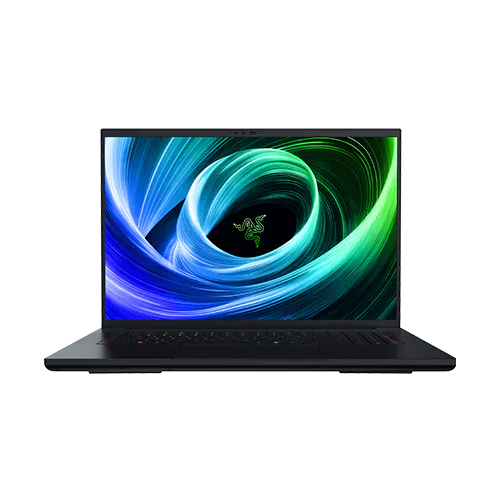
Image Source: Razer Official
Who Is It For?
The Razer Blade 18 is an 18-inch, 16:10 Windows laptop in a CNC aluminum body about 400 mm wide and 275 mm deep, listed at 3.20 kg before a separate 400 W adapter. That single lid can hold a 4K timeline, a 3D viewport, and a full-screen game without a second monitor, but only while the brick is on the floor. A compositor who leaves the machine on one home desk from morning to night works across that canvas with the barrel plug seated. A developer who compiles at a dining table and then drives the closed lid to a client office moves one chassis instead of a tower.
A person who walks to a train with a sleeve cut for 14- or 16-inch laptops does not close that zipper; the lid and the proprietary brick need a large backpack and add several kilograms to one shoulder. Two DDR5 SO-DIMM sockets — removable sticks in small laptop slots — mean memory can change later. The 18-inch panel, the vapor chamber, and the 400 W jack do not. Thunderbolt ports accept USB-C Power Delivery up to 100 W, which keeps Windows awake but does not feed the graphics chip at the TGP printed on the sheet. TGP is the watt limit that chip may use.
If this form factor or power doesn’t quite fit your daily work, exploring other lineup categories would be a better path.
1. Lid Width, Two Sticks of RAM, and the 400 W Jack
Bags cut for 16 inches and a 400 mm lid
Official size is 399.96 × 275.4 × 22.79–28.7 mm. A sleeve or backpack shaped around a 16-inch class laptop leaves the lid proud of the zipper. Airline tray tables and small cafe tops leave almost no strip for a mouse once that footprint is down. Current pages list chassis weight at 3.20 kg / 7.06 lb; 2023–2024 sheets list about 3.1 kg. The 400 W adapter is a second object with its own cable. A listing that photographs the laptop and omits the brick is not a full-power kit. Sales pages that quote only the chassis mass also hide that extra brick in the bag.
SO-DIMM pair and the vacant M.2
Current boards use two DDR5 SO-DIMM sockets, not chips soldered to the board. Typical cartons ship 32 GB as 2 × 16 GB. 2026 support lists a 128 GB ceiling; 2024–2025 pages list 96 GB at one speed or 64 GB at another. Storage uses two M.2 bays. Many RTX 5070 Ti and 5080 boxes install 1 TB in one bay and leave the second empty. RTX 5090 boxes often install 2 TB. On recent boards one bay is Gen 5 capable and the other stays Gen 4. The screen, GPU, and vapor chamber stay as built. A line that only says “32 GB, 1 TB” still needs the slot count and the empty bay named, because those two facts decide what can change after unboxing.
Dual-mode 18-inch LCD that never leaves the lid
Current units share one 18-inch dual-mode LCD: UHD+ 3840 × 2400 at 240 Hz, or FHD+ 1920 × 1200 at 440 Hz, 16:10, Calman verified, up to 100% DCI-P3 (the wide film-style color range), about 600 nits peak on the latest sheet. Nits are a brightness unit. Earlier years sold QHD+ Mini-LED 300 Hz panels and other UHD+ IPS options. Mini-LED means tiny backlights grouped into dimming zones; it is not the same panel as the current dual-mode LCD. The lid is not a spare part. UHD+ mode is the 4K-class workspace. FHD+ mode trades pixels for a higher refresh rate. Gloss, coating, and Mini-LED versus IPS follow the year, so the listing’s panel string has to match the CPU and GPU year.
400 W barrel versus 100 W USB-C
2026 spec sheets pair the chassis with a 400 W AC adapter, 20 V / 20 A, on a Razer power jack. 2024-class units shipped a 280 W brick. Thunderbolt 5 and Thunderbolt 4 accept 20 V USB-C PD 3.0 up to 100 W. That 100 W path runs documents and a browser. It does not replace the 400 W brick when the discrete GPU is at TGP. The 99 Wh pack (about 97 Wh on some 2024 sheets, 91.7 Wh on 2023) is built in and is not a user-swappable slice. Long exports, 3D viewports, and high-preset games stay on the barrel plug. A photo that shows only USB-C still has to name which adapter is in the box.
The 18-inch lid, the two memory sockets, and the 400 W path set the ceiling: a desk-first machine that can ride in a large bag. It is not a full-power PC on a 100 W charger.
2. Tray Tables, Bottom Intake, and the Extra Brick
Depth left for a mouse once the base is down
On a 120 cm desk the 275 mm depth plus HDMI, Ethernet, and the power barrel occupy the rear and one side. The remaining strip for a mouse is narrow if a keypad or a card reader cable sits on the same surface. Side USB-A ports and the UHS-II SD slot face the user’s right or front edge depending on year; those cables then cross the mouse path. A coffee-shop table that already holds a cup leaves the glass trackpad as the pointing device because the chassis occupies the rest of the top.
Intake under the hood and a warm keyboard deck
Cooling is a large vapor chamber — a sealed plate that spreads heat with a liquid-vapor cycle — plus three fans. Exhaust leaves through a rear thermal hood. Intake is on the bottom. A blanket, a couch cushion, or a soft bag under the base blocks that intake and the fans climb. Under long 3D or game sessions the keyboard deck runs warm and the fans are clearly audible in a quiet room. Idle documents stay much quieter. Closed-back headphones sit over game audio when the fans are up. The bottom panel uses several Torx screws; RAM or SSD work happens on a hard, clear surface so the chamber is not pressed shut.
The 99 Wh pack when the discrete GPU wakes
The 99 Wh battery covers web, documents, and video for a stretch of hours in independent rundown tests, with results that vary by brightness and generation. Those tests are not a workday promise. Once the discrete GPU is loaded, independent gaming-on-battery loops fall to a short window. Windows stays up. Frame delivery and export speed do not match the plugged-in TGP figures. A day that is mostly browser tabs can leave the brick in the bag. A day that is Blender, Premiere, or a high-preset title keeps the 400 W unit on the floor from the first hour.
Car trunk versus a walked station
The 3.2 kg chassis plus the 400 W brick is a two-object load. Review units fit some large backpacks and fail compact 16-inch bags. Walking with that pack every weekday is a different day from moving the closed lid from a home desk to a car trunk. Ethernet, HDMI 2.1, Thunderbolt 5, Thunderbolt 4, three USB-A ports, and the SD reader let a hotel desk run a wired display, a capture card, and a camera card without a dock. The same row adds cable bulk on a tray table. The Blade 16 is a separate series with a smaller lid and, on recent years, a different memory layout. It is not a lighter Blade 18.
3. Performance by Use Case
The table uses a current mid-to-high carton: Intel Core Ultra 9 HX-class CPU, 32 GB DDR5 in both SO-DIMM slots, and an NVIDIA GeForce RTX 50-series laptop GPU. RTX 5070 Ti listings cap near 140 W TGP. RTX 5080 and 5090 listings rise toward 175 W TGP with Dynamic Boost. Older 14th-gen Core i9 HX plus RTX 40-series units follow the same shape of results at lower ceilings. Heavy rows assume the year-matched brick is connected.
| Use Case | Software | Rating | Reason |
|---|---|---|---|
| Plugged-in AAA play | Current titles in UHD+ or FHD+ mode | Sufficient | Discrete GPU at listed TGP, dual-mode panel, G-Sync on supported years |
| 3D viewports and still frames | Blender, Maya | Sufficient | HX core count plus high-VRAM SKUs while the 400 W brick feeds the chamber |
| Code and containers | Visual Studio, Docker | Sufficient | 24-core HX CPU and dual-channel SO-DIMM keep large solutions in RAM |
| 4K timeline on a 12 GB GPU | Premiere Pro, DaVinci Resolve | Adequate | Hardware encode holds playback; 12 GB VRAM tightens multi-stream 4K on 5070 Ti |
| Unplugged heavy GPU work | Same games or exports on battery | Not enough | 100 W USB-C and the 99 Wh pack do not hold peak TGP for long |
RTX 5070 Ti 12 GB, RTX 5080 16 GB, and RTX 5090 24 GB do not share the same VRAM and watt ceiling. A 16 GB RAM SKU also changes how many VMs or 4K streams stay in memory. The table is a fit check for one common box, not a score for every machine that shares the name.
4. Official Specs (with plain explanations)
| Category | Specification | Notes |
|---|---|---|
| Processor | Intel Core Ultra 9 HX; older years Core i9 HX | 24-core HX class, generation varies by year |
| Graphics | RTX 5070 Ti ~140 W / 5080–5090 up to 175 W TGP | Discrete laptop GPU, TGP changes by SKU |
| Memory | 2 × DDR5 SO-DIMM, 32 GB typical, up to 128 GB (2026) | Removable sticks, two slots, not soldered |
| Storage | Dual M.2 NVMe, 1 TB + empty common | Second bay often free; one Gen 5 on recent boards |
| Display | 18″ 16:10 dual-mode UHD+ 240 Hz / FHD+ 440 Hz | Panel locked in lid; older years used Mini-LED QHD+ |
| Battery | 99 Wh built-in (older years ~92–97 Wh) | Internal pack, not a user slice |
| Power | 400 W proprietary adapter (older years 280 W) | USB-C PD up to 100 W on Thunderbolt |
| Weight | About 3.20 kg / 7.06 lb (older years ~3.1 kg) | Chassis only; brick is extra mass |
| Ports | TB5, TB4, 3× USB-A, HDMI 2.1, 2.5 GbE, UHS-II SD | Side and rear row, year-dependent TB5 |
This series is sold with different CPUs, memory, and storage depending on the release year and generation. Please match the specifications on your current seller page with the official information above.
Source: Razer Official Product Page
The slot counts in the table are the same facts as the SO-DIMM and second M.2 notes in section 1. The 400 W row is the brick that section 1 separated from 100 W USB-C. The dual-mode line is the panel that does not come out of the lid. Weight is chassis-only; the adapter is a second line item on the same listing.
5. Main Variations in This Series
CPU year is the first split. 2026 units use Intel Core Ultra 9 290HX Plus. 2025 units use Core Ultra 9 275HX. 2024 units use 14th-gen Core i9 HX. 2023 units use 13th-gen Core i9 HX. Each year changes Thunderbolt generation, adapter wattage, battery Wh, and the memory ceiling on the support page.
GPU SKU is the second split. RTX 5070 Ti, 5080, and 5090 on current pages differ in VRAM (12 / 16 / 24 GB) and TGP (about 140 W versus up to 175 W). RTX 40-series years used 4070 / 4080 / 4090 with their own watt caps. Export time, viewport fluidity, and high-preset games scale with that cap and with VRAM, not with the series name alone.
Display year is the third split. Current carts share the UHD+ 240 Hz / FHD+ 440 Hz dual-mode LCD at about 600 nits. Some 2024 configs used a QHD+ Mini-LED 300 Hz panel with a higher peak-brightness claim. Mini-LED local dimming and IPS dual-mode do not treat black frames the same way. The lid is not an after-purchase part.
RAM and SSD factory fills are the fourth split. 32 GB versus 64 GB versus 128 GB still sit in the same two SO-DIMM sockets on current boards. 1 TB with a vacant M.2 versus both bays filled changes how soon a second drive is required. Opening the bottom panel is a service step; damage from that step is outside Razer’s warranty.
Adapter wattage follows the year: 400 W on the latest sheets, 280 W on earlier HX years. A used listing with no brick in the photo is a different kit from a boxed 400 W set.
6. What to Check on the Sales Page
The words “Blade 18” cover four hardware years and several GPU and panel combinations. Two listings with the same title can differ on CPU generation, TGP, RAM ceiling, and whether the 400 W brick is included.
- CPU Generation: Check whether you are getting the Intel Core Ultra 9 HX (290HX Plus or 275HX) or an older Core i9 HX processor.
- Graphics TGP and VRAM: Check RTX 5070 Ti 12 GB / 140 W versus 5080 16 GB / 175 W versus 5090 24 GB / 175 W, or the RTX 40-series equivalent on older stock.
- RAM Capacity: Check whether the listing is 32 GB, 64 GB, or 128 GB and that two SO-DIMM slots are stated.
- Storage layout: Check the installed SSD size and whether the second M.2 bay is empty.
- Display and adapter: Check UHD+ dual-mode versus QHD+ Mini-LED, and whether the 400 W or 280 W proprietary brick is in the box.
The chassis weight on the page is without the brick. The Thunderbolt PD 100 W note is not a substitute for that brick on a full-power listing.
7. Disclaimer & Buying Advice
This buying guide for the Razer Blade 18 is based on official manufacturer specifications and recurring real-world user experiences. It is completely independent, not sponsored, and does not guarantee specific performance for every unit. Hardware configurations such as the processor, memory, and storage can differ by generation and region, so please double-check the exact specifications listed on your seller’s page before purchasing.
8. Beginner Guide
If the difference between a 400 W barrel and 100 W USB-C, or between soldered RAM and two SO-DIMM sticks, is still unclear, [Start Here] maps those parts in plain language before you return to a product listing.