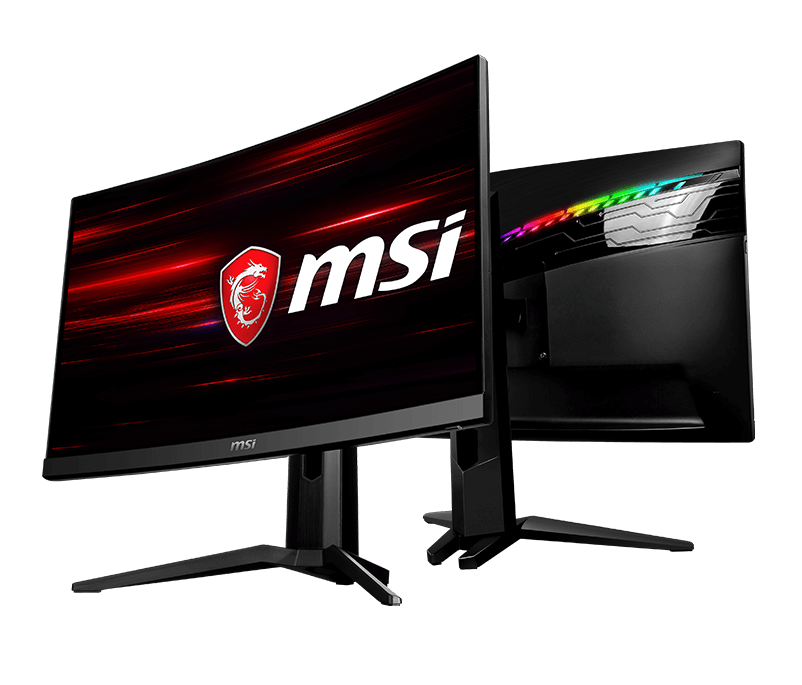
Image Source: MSI Official
Who Is It For?
The MSI MAG series fits users who prioritize internal hardware performance and panel speed over premium chassis materials or extensive RGB lighting. This series suits competitive gamers who require “Rapid IPS” technology—a type of liquid crystal display that reduces motion blur—to maintain clarity during fast-paced movement. Because the line includes high-contrast VA (Vertical Alignment) curved panels, it fits users who play immersive simulation games in dimly lit rooms where deep black levels are a physical requirement for atmosphere. The newer MAG QD-OLED models fit enthusiasts who want the fastest possible response times—how quickly a pixel changes color—without the higher price tag of the MPG or MEG flagship tiers.
However, this series does not fit professional colorists who require absolute color accuracy out of the box, as the “Quantum Dot” models often feature heavy color oversaturation that requires manual calibration. It is not for users with very shallow desks, as the wide-spreading “claw” or square stands occupy significant surface area. The MAG series does not fit those who require a “clean” office look, as the rear of the monitor often features aggressive geometric patterns and brushed plastic finishes. If this form factor or the specific gaming-focused feature set doesn’t quite fit your daily work, exploring other lineup categories would be a better path.
1. How This Line Is Grouped
MSI categorizes its gaming monitors into three main tiers: MEG (Enthusiast), MPG (Performance), and MAG (Arsenal). The MAG series is the mainstream tier, focusing on essential gaming specs while removing some of the luxury features found in higher tiers.
| Tier | Typical Names | Rough Position |
| MAG LCD (Flat) | MAG 274QRF-QD, MAG 251RX | Rapid IPS panels, high refresh rates, flat screens. |
| MAG LCD (Curved) | MAG 275CQRF, MAG 341CQ | VA panels, immersive curvature, high contrast. |
| MAG QD-OLED | MAG 271QPX, MAG 321UPX | Self-emissive pixels, 240Hz+, infinite contrast. |
MAG LCD (Flat) Group
This group is defined by the use of “Rapid IPS” panels. Standard IPS (In-Plane Switching) is known for good colors and wide viewing angles, but older versions were slow. Rapid IPS uses thinner liquid crystal layers to achieve 1ms or faster response times. These models are physically flat and are the primary choice for first-person shooters (FPS) where a distorted curved image is a hindrance to aiming.
MAG LCD (Curved) Group
These models utilize VA panels, which are physically manufactured with a curve (typically 1000R or 1500R). The “R” number refers to the radius in millimeters; a 1000R curve is more aggressive than an 1800R curve. VA technology allows the monitor to block more light when displaying black, resulting in a contrast ratio of 3000:1 or higher. This is three times higher than standard IPS, making these models a fit for cinematic games played in dark environments.
MAG QD-OLED Group
The newest addition to the MAG line uses Quantum Dot OLED technology. Unlike LCDs, these do not have a backlight; every pixel produces its own light. This allows for a 0.03ms response time, which is physically impossible for any LCD to reach. The MAG versions of these OLEDs are often distinguished from the MPG versions by having fewer USB ports or lacking certain software-side features, though the physical panel remains the same.
2. Check Before You Buy
Firmware Update Limitations on Early OLED Models
A significant physical constraint of early MAG QD-OLED models (such as the initial batches of the MAG 271QPX and 321UPX) is the lack of a user-accessible firmware update feature. While the higher-tier MPG models allow users to update the monitor’s software via a USB cable to fix bugs or improve performance, these specific MAG models were manufactured without the necessary internal hardware for home updates. This means any software bugs present at the time of purchase are permanent unless the unit is physically sent back to a service center. Buyers must check the specific sub-model revision to see if “Firmware Update” is supported.
Quantum Dot Color Oversaturation
Models with “QD” in the name use a Quantum Dot layer—a film of tiny phosphorescent crystals that enhance color vibrancy. While this makes games look very “popping” and colorful, it often results in oversaturation, where reds and greens look unnaturally bright. For a beginner, this might look impressive, but it can hide fine detail in images. The MAG series often lacks the sophisticated “sRGB clamp” (a software setting that limits colors to standard web levels) found in the MPG series, meaning the vibrant colors are always active unless the user manually calibrates the screen.
HDMI Bandwidth and Console Mode
MSI MAG monitors often include “Console Mode,” which allows a 4K signal to be accepted by a 1440p monitor. However, the physical HDMI version matters. Some MAG models use HDMI 2.0, which is limited to 1440p at 144Hz or 4K at 60Hz. Newer models feature HDMI 2.1, which supports 4K at 120Hz for consoles like the PS5 or Xbox Series X. A buyer must verify the HDMI version on the sales page to ensure it matches their console’s output capabilities, as the “MAG” branding alone does not guarantee the latest HDMI standard.
VRR Flickering on Curved VA Panels
The curved VA panels in the MAG series can exhibit “VRR flickering” when using G-Sync or FreeSync (Variable Refresh Rate). VRR allows the monitor to sync its refresh rate—how many times the image updates each second—with the game’s frame rate. On VA panels, the brightness of the pixels can fluctuate slightly as the refresh rate changes rapidly. In dark scenes, this appears as a subtle “flicker” or pulsing of the backlight. This is a physical characteristic of the panel type and is not a defect of the individual unit.
3. How It Fits a Real Desk Setup
The Wide-Leg Stand Footprint
Most MAG monitors use a “V-shaped” or “claw” stand. On a desk with a depth of 60 cm (about 24 inches), the front legs of the stand can extend significantly into the area where a user would normally place a large mousepad. This design provides high stability for the screen but limits the physical space for keyboard placement. Some newer MAG models have moved to a flat square base, which allows the user to place small items like a phone or a controller directly on the stand, reclaiming some desk space.
VESA Mounting and the Recessed Square
For users who prefer a monitor arm, the MAG series supports the VESA 100×100 standard (the standard screw pattern for a monitor arm). However, the mounting area on the back of the monitor is often a recessed (sunken) square. Some universal monitor arm plates are too wide to fit into this hole. In these cases, the user must use the “standoff” screws (small metal extensions) that are usually included in the MSI box to bridge the gap between the monitor and the arm plate.
Rear Joystick Navigation
MSI places a red 5-way joystick on the back-right side of the monitor to navigate the On-Screen Display (OSD) menus. This is a physical improvement over monitors that use multiple buttons, as it allows the user to change brightness or input sources with one finger. However, if the monitor is placed in a tight corner or right next to a second monitor, reaching the joystick can be physically difficult. The user needs about 5 cm of clearance on the right side of the monitor to reach the control comfortably.
Cable Routing and Port Orientation
The ports on MAG monitors typically face downwards. This allows the cables to hang vertically, which is a fit for wall-mounting as the cables do not stick out toward the wall. MSI often includes a plastic clip or a hole in the stand for cable management. Because the ports are tucked under a lip on the back, plugging in a new HDMI or DisplayPort cable often requires the user to tilt the monitor significantly or look at the ports from underneath with a flashlight.
4. Sizes and Models in This Line
The MAG line covers the most common gaming sizes, with resolutions ranging from 1080p to 4K.
| Size | Common Resolution | Aspect Ratio | Notes |
| 24″ / 25″ | 1920 x 1080 (FHD) | 16:9 | High pixel density for 1080p; fits small desks. |
| 27″ | 2560 x 1440 (QHD) | 16:9 | The “sweet spot” for 27-inch sharpness and speed. |
| 32″ | 3840 x 2160 (4K) | 16:9 | Large screen; fits 4K gaming and media. |
| 34″ | 3440 x 1440 (UWQHD) | 21:9 | Ultrawide; provides extra horizontal vision. |
The 24-inch models (like the MAG 251RX) are built for speed, often reaching 240Hz. At this size, 1080p resolution looks sharp because the pixels are packed closely together. This size fits competitive players who want to see the entire screen without moving their eyes.
The 27-inch 1440p models (like the MAG 274QRF-QD) are the most popular in the line. 1440p provides 77% more screen space than 1080p, allowing for more detail in games and more room for windows on the desktop. This size requires a mid-to-high-end graphics card to maintain high frame rates.
The 34-inch “Ultrawide” models (like the MAG 341CQ) have a 21:9 aspect ratio, which is wider than a standard TV. This fits racing games and cinematic adventures where a wider field of view is beneficial. However, some console games do not support this width and will display black bars on the sides. These models are almost always curved to keep the edges of the wide screen within the user’s peripheral vision.
5. Performance by Use Case
The performance of an MSI MAG monitor is determined by its panel type and refresh rate.
| Use Case | Software / Task | Rating | Reason |
| Competitive FPS | Valorant, CS2, Apex | Sufficient | Rapid IPS and 165Hz+ provide clear motion. |
| Cinematic RPGs | Cyberpunk 2077, Elden Ring | Sufficient | QD-OLED or VA panels provide high contrast and color. |
| Console Gaming | PS5, Xbox Series X | Sufficient | HDMI 2.1 models support 4K 120Hz and VRR. |
| Office Work | Excel, Word, Outlook | Adequate | Sharp text on 1440p/4K, but OLED has burn-in risk. |
| Video Editing | Premiere Pro, Resolve | Adequate | Good color gamut, but oversaturation needs fixing. |
| Photo Editing | Photoshop, Lightroom | Adequate | Wide color coverage, but lacks professional calibration. |
The “Sufficient” rating for competitive gaming is due to the low “input lag”—the delay between moving the mouse and seeing the action on screen. MAG monitors are physically designed to minimize this delay, often keeping it under 5 milliseconds.
6. Official Specs (with plain explanations)
| Category | Specification | Notes |
| Refresh Rate | 144Hz to 360Hz | How many times the image updates each second. |
| Response Time | 1ms (GtG) / 0.03ms (OLED) | Time for a pixel to change color; lower is better. |
| Brightness | 250 to 400 nits | Nits = unit of brightness; 300 is standard for indoors. |
| Panel Types | Rapid IPS, VA, QD-OLED | IPS = speed/colors; VA = contrast; OLED = blacks. |
| Color Gamut | 90% – 99% DCI-P3 | The range of colors the monitor can physically show. |
| Connectivity | HDMI, DisplayPort, USB-C | USB-C often supports video but low power (15W). |
| Sync Tech | FreeSync / G-Sync Compatible | Prevents “tearing” (split images) during gaming. |
This line is sold with different tier names, sizes, refresh rates, and panels depending on the exact model and region. Please match the specifications on your current seller page with the official information above.
Source: MSI Official Product Page
The “GtG” (Gray to Gray) response time is a measure of how quickly a pixel can shift. A 1ms GtG rating on a Rapid IPS panel means that fast-moving objects will have very little “ghosting” or trailing blur behind them.
7. Main Variations in This Line
The most common variation in the MAG line is the “QD” vs. “non-QD” models. For example, the MAG 274QRF-QD has the Quantum Dot layer for extra color, while the MAG 274QR has a standard IPS panel. The non-QD models are often cheaper and have more natural, though less vibrant, colors.
Another variation is the stand functionality. Some MAG models include a “full-function” stand that can tilt, swivel, and change height. Others, usually the budget-focused versions, have a “tilt-only” stand. A buyer who does not use a monitor arm must check the “Stand Adjustability” section to ensure the monitor can be raised to their eye level.
The “UPX” vs. “QPX” suffix in the OLED line refers to the resolution. “UPX” models are typically 4K (3840 x 2160), while “QPX” models are 1440p (2560 x 1440). Both use the same QD-OLED technology but require different levels of graphics card power to run.
8. What to Check on the Sales Page
- Line / Tier / Size: Check whether you are getting the MAG model, not an MPG or G-series (budget) model, as the panel speed and build quality differ.
- Firmware Update Support: If buying a MAG OLED, verify if the specific model supports user firmware updates.
- HDMI Version: For 4K 120Hz gaming on consoles, ensure the model has HDMI 2.1.
- Stand Adjustability: Confirm if the stand is “Height Adjustable” or “Tilt Only” if you are not using a monitor arm.
- Panel Type: Verify if the screen is “Rapid IPS” (for speed) or “VA” (for contrast), as this changes the viewing experience significantly.
9. Disclaimer & Buying Advice
This buying guide for the MSI MAG Series is based on official manufacturer specifications and recurring real-world user experiences. It is completely independent, not sponsored, and does not guarantee specific performance for every unit. Tier name, screen size, refresh rate, panel type, and ports can differ by model and region, so please double-check the exact specifications listed on your seller’s page before purchasing.
10. Beginner Guide
If you are new to monitor terms like refresh rate (Hz), panel type (IPS/VA/OLED), and resolution (1080p/1440p/4K), read the basics in our [Start Here]. Understanding how these technical specs interact with your gaming hardware will help you determine if the performance-focused MSI MAG series fits your specific needs.