Image Source: MSI Official
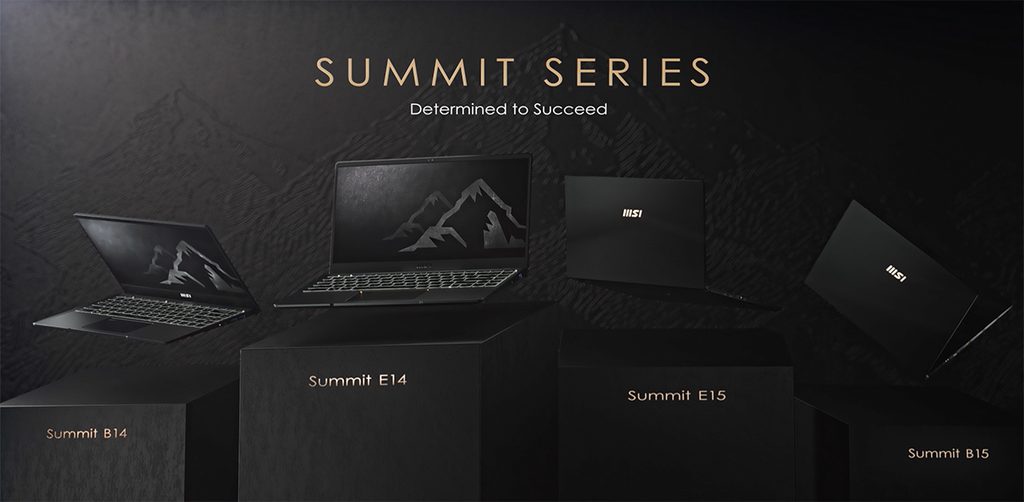
The MSI Summit series sits in the upper part of MSI’s business and productivity range. Most current models use aluminum bodies, 2-in-1 Flip hinges, Thunderbolt ports, and higher-grade security features. They target professionals who need a machine that can switch between laptop, tent, and tablet modes while still handling full workdays away from a desk.
A matching day includes moving between meetings, using the pen for notes or mark-ups, joining long video calls on battery, and docking with a single cable at the office. Another fitting pattern is a consultant or manager who works in different locations and values the ability to share the screen in tent mode without extra hardware. The series does not suit buyers who only need basic web and document work at the lowest cost, or those who require sustained high-power rendering and discrete graphics for long periods. Thinner profiles still limit continuous heavy loads.
How the 360-Degree Hinge Changes Daily Sharing and Note-Taking
Many Summit models use a 360-degree Flip hinge. This lets the screen fold flat into tablet mode or stand in tent mode. In a meeting the machine can sit upright and face colleagues without a separate stand. With the included or optional pen, notes and mark-ups become possible directly on the screen.
The hinge adds a small amount of thickness and weight compared with pure clamshell designs. On a long walk the extra bulk is noticeable next to the lightest 13-inch or 14-inch Prestige models. The hinge also needs care: opening from one corner repeatedly can put uneven stress on the mechanism over years of use.
Battery Life When Video Calls and Screen Sharing Run Together
Summit batteries are sized for full workdays. Capacities commonly sit in the 70 Wh range or higher on larger models. Under mixed use—browser tabs, documents, and a continuous video call—real runtime often lands between six and nine hours depending on brightness and network activity.
The same mixed load on smaller-battery machines forces a midday charge. Because many Summit units support fast USB-C charging, a short plug-in during lunch can restore a useful portion of the battery. Still, a full day of back-to-back calls with high brightness will empty even a large pack faster than light document work.
Screen Quality for Color Checks and Outdoor Visibility
Summit panels frequently cover 100 % sRGB or wider gamuts. Colors stay consistent when checking logos, product photos, or slides that will later be printed or shown on other screens. Brightness on higher configurations reaches levels that remain readable near windows or under strong office lighting.
Touch support is standard on Flip models. The surface is glass, so fingerprints appear more easily than on matte non-touch screens. In very bright sunlight the glossy finish can still produce reflections, so positioning the machine away from direct light remains necessary.
Weight, Build, and the Reality of Daily Carry
Aluminum construction keeps the chassis rigid. Lifting the machine by one corner produces little flex, which protects the internal board when the laptop is packed tightly in a bag. Weights vary by size: 13-inch models stay relatively light, while 16-inch Flip versions add more mass because of the larger screen and hinge.
For all-day commuting the lighter 13-inch and 14-inch versions feel manageable. The 16-inch models suit users who mostly move between a car, an office, and short walking distances rather than long public-transit journeys with a heavy bag.
Core Differences That Affect Desk and Travel Choices
| Area | Typical Summit Characteristics |
|---|---|
| Form factor | Mostly 2-in-1 Flip with 360° hinge |
| Chassis material | Aluminum |
| Common battery range | Around 70 Wh and higher on larger models |
| Display focus | High color coverage, touch on Flip models |
| Ports | Thunderbolt 4 common, plus USB-A and HDMI |
| Security features | Fingerprint, IR camera, TPM, physical webcam lock |
| Memory | Usually soldered (fixed at purchase) |
The Flip design and stronger security features set Summit apart from simpler clamshell lines. Thunderbolt support allows a single-cable dock for power, displays, and data. Soldered memory means the amount chosen at purchase cannot be increased later.
Fixed Memory and What It Means for Future Multitasking
Most current Summit models use soldered LPDDR memory. The capacity bought on day one stays fixed. An 16 GB configuration handles typical office multitasking—video calls, multiple documents, and browser tabs—without constant slowdowns. Moving to heavier simultaneous loads can push the system into using the storage drive for overflow, which causes brief stutters.
Storage is usually a single M.2 SSD that can often be replaced with a larger drive. The RAM limit, however, remains permanent.
Fan Behavior and Heat Under Sustained Work
During normal document and browser work the fans stay quiet. Sustained tasks such as compiling code, batch photo work, or longer video exports raise temperatures. The fans become clearly audible and the processor may slow itself to stay within safe limits. This behavior is normal for thin designs. Placing the machine on a soft surface blocks vents and makes the slowdown happen sooner. A hard, flat desk keeps airflow open and helps maintain higher speeds for longer.
This guide is based only on official manufacturer specifications and recurring physical, power, and thermal constraints observed across the Summit line. It is independent and not sponsored. Exact memory size, screen type, battery capacity, and port layout can differ by region and configuration, so always match the full specifications on the seller’s page before purchasing. If terms such as soldered memory, Thunderbolt, or thermal throttling are still unclear, the explanations on the [Start Here] page will help before you check individual product listings.