Image Source: Lenovo Official
Who Is It For?
The ThinkStation P5 is used by engineers and architects who run complex Computer-Aided Design (CAD) software and require the stability of ECC memory. It fits the needs of data scientists who process large datasets that exceed the memory limits of standard desktop computers. It also serves as a workstation for 3D animators and video editors who work with high-resolution textures and multiple streams of 8K video. The tool-less chassis and front-accessible storage make it a choice for IT environments where hardware maintenance and data security through removable drives are necessary.
If this form factor or power doesn’t quite fit your daily work, exploring other lineup categories would be a better path.
1. Check Before You Buy
Xeon Processor Architecture and ECC Memory
The ThinkStation P5 utilizes Intel Xeon W-2400 series processors, which differ from the Core i5 or i7 processors found in standard home computers. These Xeon chips are designed to work with Error Correction Code (ECC) memory. ECC memory detects and fixes internal data errors that can cause a system to crash during long calculations. This hardware combination is a factor for tasks that run for several days without interruption. The Xeon platform also provides more PCIe lanes, which are the internal data paths used to connect multiple graphics cards and high-speed storage drives. The choice of a Xeon processor is a permanent hardware decision that requires specific DDR5 ECC memory modules.
Physical Dimensions and Weight Considerations
The ThinkStation P5 is a full-sized tower with a volume of 40.6 liters. It stands approximately 44 cm tall and 16.5 cm wide. The weight of the system starts at 19 kg and increases as more components like hard drives and secondary graphics cards are added. Moving the device requires physical effort, and the chassis includes integrated handles at the front and rear for this purpose. The size of the tower requires a dedicated space on or under a desk with sufficient clearance for airflow. Placing the tower in a confined space without ventilation will cause the internal fans to spin faster to manage the heat.
Power Supply and Electrical Requirements
The 750W or 1000W power supply units in the ThinkStation P5 are designed for high electrical efficiency. When the system is equipped with dual high-end graphics cards and a high-core-count Xeon processor, the electrical draw is significant. A 1000W power supply requires a stable electrical circuit, and using a low-capacity uninterruptible power supply (UPS) or a thin extension cord can lead to power delivery issues. The power supply is a modular unit that can be removed from the rear of the chassis without opening the main side panel. This allows for a quick replacement if the power unit fails, but the wattage chosen at purchase limits the future addition of high-power components.
Internal Expansion and Tool-less Access
The interior of the ThinkStation P5 is designed for physical access and maintenance. Lenovo uses red touchpoints on various internal components to indicate where a user can press or pull to remove a part without using a screwdriver. This includes the fans, the memory shrouds, and the storage bays. The chassis supports up to three M.2 NVMe SSDs and three 3.5-inch SATA hard drives. Some configurations include a front-accessible storage bay, which allows a hard drive to be removed from the front of the tower using a key. This physical accessibility is a characteristic of the P5 series, intended for environments where hardware needs to be swapped or upgraded frequently.
Thermal Management and Noise Levels
The cooling system uses a front-to-back airflow pattern. The front of the chassis features a hexagonal mesh design developed in collaboration with Aston Martin to maximize air intake. Internal fans are positioned to move air directly over the processor and the memory slots. During standard office tasks, the fans operate at a low speed that is difficult to hear. When the system is performing complex 3D renders or data simulations, the fans increase their rotation speed. The noise produced is a steady air-rushing sound. The internal thermal sensors monitor the temperature of each component and adjust the fan speeds independently to maintain a balance between cooling and noise.
2. How It Fits a Real Desk Setup
Desktop Placement and Airflow Clearance
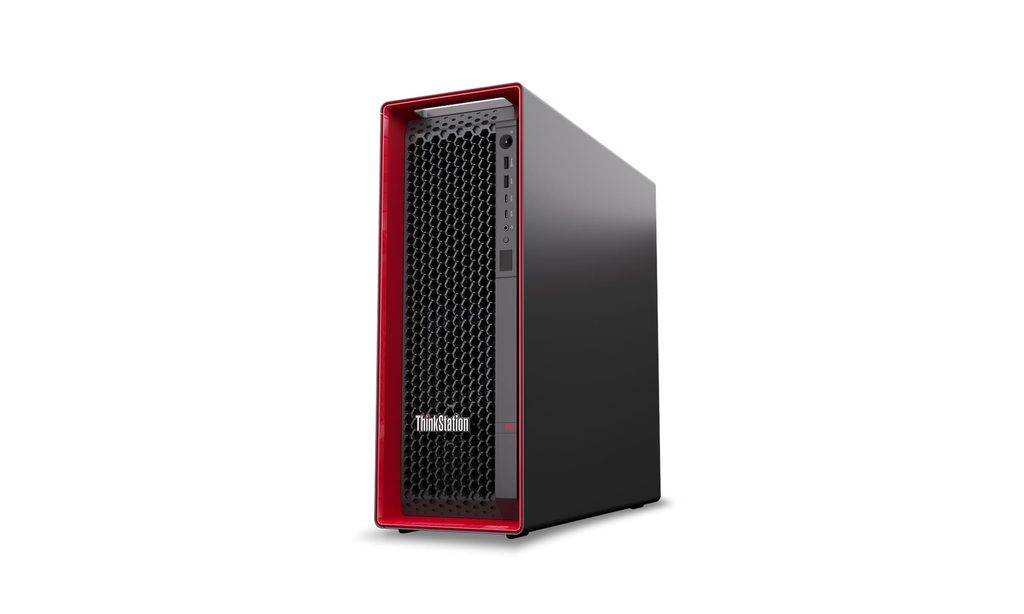
The ThinkStation P5 is designed to sit on a hard, flat surface. Placing the tower on a carpeted floor can block the lower air intakes and lead to dust accumulation inside the chassis. On a desk, the tower occupies a significant area, and the rear of the machine requires at least 10 cm of clearance from a wall to allow the warm air to exhaust freely. The front mesh must also remain unobstructed to ensure the fans can draw in cool air. The black chassis with red accents is a standard aesthetic for the ThinkStation line, intended to fit into professional engineering or studio environments.
Front and Rear Connectivity
The physical ports are distributed between the front and the rear of the tower. The front panel includes two USB-A ports, two USB-C ports, and a headphone jack. These are positioned for temporary connections like external drives or headsets. The rear panel houses the permanent connections, including additional USB ports, the 10Gb Ethernet port, and the video outputs from the graphics cards. The 10Gb Ethernet port provides a high-speed wired connection for moving large files across a local network. Because the graphics cards are separate components, the monitors must be plugged into the horizontal ports on the card brackets rather than any vertical ports on the motherboard.
Internal Component Layout and Upgrades
Opening the side panel reveals a structured interior where the cables are routed behind the motherboard tray. This keeps the main airflow path clear of obstructions. The eight memory slots are positioned on either side of the processor and are covered by plastic shrouds that direct air over the modules. Adding more RAM involves removing these shrouds by pressing the red release tabs. The PCIe slots for graphics cards include plastic retention clips that hold the heavy cards in place during transport. This internal organization is a factor for those who plan to add more storage or memory as their project sizes increase over several years.
Noise Profile in Professional Environments
In a quiet office, the ThinkStation P5 is audible but does not produce high-pitched sounds. The large diameter of the internal fans allows them to move a high volume of air at lower speeds, which results in a lower-frequency sound profile. When the system is under a full processing load, the sound increases but remains consistent. The chassis is constructed from heavy-gauge steel, which helps dampen vibrations from the spinning hard drives and fans. Placing the tower under a desk can further reduce the perceived noise level for the user, provided there is enough space for the heat to dissipate.
External Peripheral Integration
The ThinkStation P5 does not include a monitor, and the choice of display depends on the installed graphics card. High-end NVIDIA RTX cards support multiple 4K or 8K monitors through DisplayPort connections. The system includes built-in Wi-Fi antennas in some configurations, but the 10Gb Ethernet port is the primary method for high-speed data transfer. The rear of the chassis also includes a serial port in some models, which is used for connecting to older industrial or scientific equipment. The power cable is a standard heavy-duty cord that connects directly to the internal power supply at the rear.
3. Performance by Use Case
The performance of the ThinkStation P5 is determined by the specific Xeon processor and the NVIDIA RTX graphics card configuration.
| Use Case | Software | Rating | Reason |
| 3D Modeling & CAD | SolidWorks, AutoCAD | Sufficient | Xeon and RTX Ada drivers are optimized for these tasks |
| 8K Video Editing | Premiere Pro, DaVinci | Sufficient | High memory bandwidth and GPU VRAM handle large files |
| Data Simulation | MATLAB, ANSYS | Sufficient | ECC memory prevents crashes during long calculations |
| Software Development | Visual Studio, Docker | Sufficient | High core counts reduce compilation and build times |
| AI & Machine Learning | TensorFlow, PyTorch | Sufficient | Dual GPU support and high VRAM accelerate training |
The ratings above reflect the capabilities of the hardware when running professional software. Performance in specific applications will depend on the complexity of the project and the amount of memory available to the system.
4. Official Specs (with plain explanations)
| Category | Specification | Notes |
| CPU | Intel Xeon W-2400 Series | Professional-grade processors, supports ECC memory |
| Graphics | Up to 2x NVIDIA RTX 6000 Ada | Professional GPUs, high video memory capacity |
| Memory | Up to 512GB DDR5-4800 | Eight slots, Error Correction Code (ECC) support |
| Storage | Up to 6 drives (M.2 and 3.5″) | Mixed NVMe and SATA internal drive bays |
| Power | 750W or 1000W (92% Efficiency) | High-wattage internal power supply units |
| Cooling | Front-to-back Airflow | Multi-channel thermal management with internal fans |
| Ports | USB-C, USB-A, 10GbE, Serial | Front and rear physical data connections |
| Chassis | 40.6L Tower | Tool-less entry with Aston Martin mesh design |
This series is sold with different CPUs, memory, and storage depending on the release year and generation. Please match the specifications on your current seller page with the official information above.
Source: Lenovo Official Product Page
The technical specifications listed above represent the hardware foundation of the ThinkStation P5. These components determine how the machine handles professional software and how it physically fits into a stationary workspace. Understanding these individual parts helps in identifying which specific configuration appears on a retail listing.
5. Main Variations in This Series
The ThinkStation P5 series includes several hardware combinations that change the processing speed and graphical output. These variations are determined by the specific model chosen at the time of purchase.
- Processor options range from the Intel Xeon W3-2423 to the Xeon W7-2495X, which changes the number of processing cores and the total cache memory.
- Graphics configurations include single or dual NVIDIA RTX cards, ranging from entry-level T-series to the high-capacity Ada Generation models.
- Power supply units are available in 750W or 1000W versions, which dictates the maximum number of internal components the system can support.
- Memory configurations start with a single 16GB module but can occupy all eight slots to reach the 512GB maximum capacity.
- Storage setups vary between models, with some featuring front-accessible drive bays for quick physical access to hard drives.
6. What to Check on the Sales Page
When viewing a ThinkStation P5 listing, the specific Xeon model and the power supply wattage are the most important details to verify. Sellers often list different hardware configurations under the same series name.
- CPU Model: Check whether you are getting a Xeon W3, W5, or W7 processor.
- Graphics Card: Verify the specific NVIDIA RTX model and the amount of video memory (VRAM).
- Power Supply: Confirm if the unit has the 750W or 1000W power supply for future expansion.
- Memory Configuration: Check the number of RAM modules installed and the total capacity.
- Storage Bays: Verify if the model includes the front-accessible storage flex bay.
- CPU Generation: Check whether you are getting the {Xeon W-2400} processors.
The specifications on a retail page can sometimes be generalized. Matching the manufacturer’s part number with the official datasheet is the most accurate way to confirm the internal hardware.
7. Disclaimer & Buying Advice
This buying guide for the ThinkStation P5 is based on official manufacturer specifications and recurring real-world user experiences. It is completely independent, not sponsored, and does not guarantee specific performance for every unit. Hardware configurations such as the processor, memory, and storage can differ by generation and region, so please double-check the exact specifications listed on your seller’s page before purchasing.
8. Beginner Guide
If you are new to choosing computer hardware and want to understand the basics of these components, you can [Start Here] to learn more about how to read specifications.