
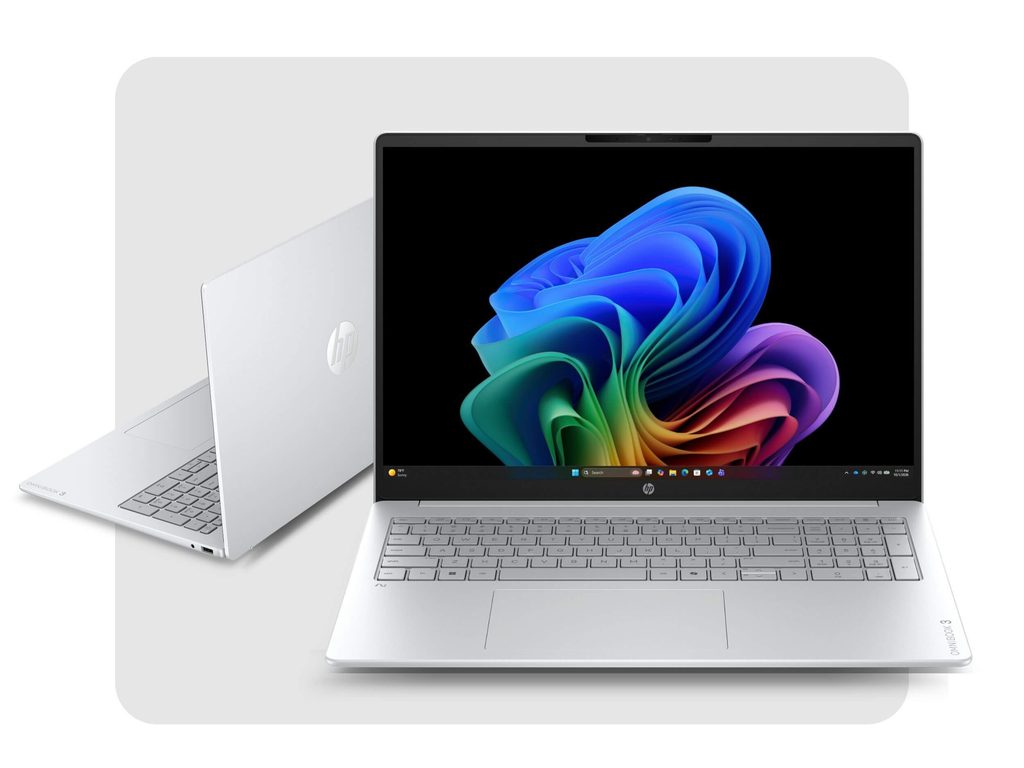
Image Source: HP Official
Who Is It For?
The OmniBook 3 series consists of mainstream thin Windows laptops with Intel Core Ultra, Snapdragon, or AMD processors, DDR5 memory, and 15.6-inch to 17.3-inch displays for users who need everyday productivity on a budget while still moving between home and work. Students who write papers and take notes, remote workers who live in Office and browsers, and households that share a machine for web, video, and light multitasking fit the daily pattern.
Memory is often soldered or limited in upgradeability, storage is typically a single M.2 drive, and the thin design limits sustained high loads. Battery life supports mixed work but shortens under continuous screen-on use. If this form factor or power doesn’t quite fit your daily work, exploring other lineup categories would be a better path.
1. Memory and Thin Chassis Limits
Memory configuration at purchase
Memory uses DDR5 modules, commonly 16 GB, 24 GB, or 32 GB. On many configurations the memory is soldered or uses limited slots, so capacity is effectively permanent after purchase. Once large numbers of browser tabs, Office files, and background apps fill the available memory, later expansion may be difficult or impossible. Confirm the exact installed amount and whether slots are present on the sales page.
Storage and expansion
Storage uses a single M.2 NVMe SSD in most models (256 GB, 512 GB, or 1 TB). A second bay is rare. The original drive can sometimes be replaced, but expansion without removing the primary SSD is limited. Verify the installed capacity and upgrade path.
Port layout and charging
Typical ports include two USB-C ports with Power Delivery and DisplayPort support, two USB-A ports, HDMI, and a 3.5 mm combo jack. Charging relies on a 65 W USB-C adapter. The thin chassis restricts internal cooling volume, so sustained multi-core loads raise temperatures more quickly than thicker machines. These interfaces and the physical envelope cannot be altered after purchase.
These constraints keep the series oriented toward everyday portable productivity while limiting later capacity growth.
2. Daily Carry Weight and Meeting Use
1.6–2.0 kg in a standard bag
Recent OmniBook 3 models typically weigh between 1.64 kg and 2.01 kg depending on screen size. The chassis fits most backpacks and laptop bags. On a café table or airplane tray the larger 16-inch or 17-inch footprint leaves limited free surface for a mouse or notebook beside it.
Fan noise and thermal behavior
Air intake occurs on the underside. Under light productivity and video calls the system stays relatively quiet. Under sustained multi-core loads the fan becomes audible in a quiet room. Soft surfaces can restrict airflow and raise surface temperatures during longer sessions.
Battery for mixed daily use
Battery capacities generally range from about 41 Wh to 68 Wh. Mixed document work, email, and web browsing commonly cover a school or work day on a single charge. The compact 65 W USB-C charger travels easily for overnight top-ups.
3. Performance by Use Case
Configurations use Intel Core Ultra, Snapdragon, or AMD Ryzen AI processors with integrated graphics. All ratings assume typical everyday productivity and light multitasking.
| Use Case | Software | Rating | Reason |
|---|---|---|---|
| Office productivity and video calls | Word, Excel, Teams, Zoom | Sufficient | Modern CPUs and 16 GB+ memory keep concurrent work smooth |
| Multi-tab browsing and light multitasking | Chrome, Edge, multiple apps | Sufficient | DDR5 capacity sustains browser loads |
| Light photo viewing and document editing | Photos, PDFs, basic editing | Adequate | Integrated graphics handle simple media |
| Sustained 4K video export or heavy rendering | Premiere, DaVinci Resolve | Not enough | Thin cooling and integrated graphics limit prolonged high loads |
| Modern AAA gaming | Recent titles at high settings | Not enough | No discrete GPU and limited thermal headroom |
Lower memory configurations reduce the margin on the first two rows. Discrete graphics are absent across the series.
4. Official Specs (with plain explanations)
| Category | Specification | Notes |
|---|---|---|
| Display | 15.6″ / 16″ / 17.3″ FHD or 2K IPS | Anti-glare options |
| Processor | Intel Core Ultra / Snapdragon / AMD Ryzen AI | Soldered |
| Graphics | Integrated Intel / Qualcomm / Radeon | Shared memory |
| Memory | 16–32 GB DDR5 | Often limited upgrade |
| Storage | 256 GB–1 TB M.2 NVMe | Single bay typical |
| Battery | Approx. 41–68 Wh | Built-in |
| Adapter | 65 W USB-C | Compact |
| Weight | 1.64–2.01 kg | Depends on size |
| Ports | 2× USB-C, 2× USB-A, HDMI, 3.5 mm | Fixed layout |
This series is sold with different processors, memory, and storage depending on the generation and configuration. Please match the specifications on your current seller page with the official information above.
Source: HP Official Product Page
The memory configuration and thin chassis listed above directly determine long-term capacity limits and daily portability.
5. Main Variations in This Series
Processor choice among Core Ultra, Snapdragon, or Ryzen AI variants changes multi-core headroom and battery efficiency. Memory starting at 16 GB versus 24 GB or 32 GB affects how many apps and tabs remain open. Display size of 15.6-inch versus 16-inch or 17.3-inch changes both weight and desk footprint. Storage of 256 GB versus 512 GB or 1 TB determines how much local data stays onboard. Touchscreen options appear on select models. Each of these choices is permanent after purchase except for the replaceable M.2 drive where available.
6. What to Check on the Sales Page
Confirm the exact hardware listed for the SKU you are considering, because the same series name covers multiple sizes and processors.
- Exact processor model (Core Ultra, Snapdragon, or Ryzen AI variant).
- Installed DDR5 memory amount and whether slots are present.
- Primary SSD capacity and upgrade path.
- Display size (15.6″, 16″, or 17.3″) and resolution.
- Included adapter wattage and exact weight of the configuration.
Matching these five items against the official sheet prevents receiving a lower-capacity or different-size configuration under the same series name.
7. Disclaimer & Buying Advice
This buying guide for the OmniBook 3 is based on official manufacturer specifications and recurring real-world user experiences. It is completely independent, not sponsored, and does not guarantee specific performance for every unit. Hardware configurations such as the processor, memory, and storage can differ by generation and region, so please double-check the exact specifications listed on your seller’s page before purchasing.
8. Beginner Guide
The memory configuration that is often fixed or limited and the thin chassis that limit sustained cooling define the daily limits of this series more than any other factor. Start Here walks through how those constraints interact with common everyday productivity and portable-use patterns before any purchase decision.


[…] HP OmniBook 3 — Mid-to-low range model suitable for daily tasks […]