
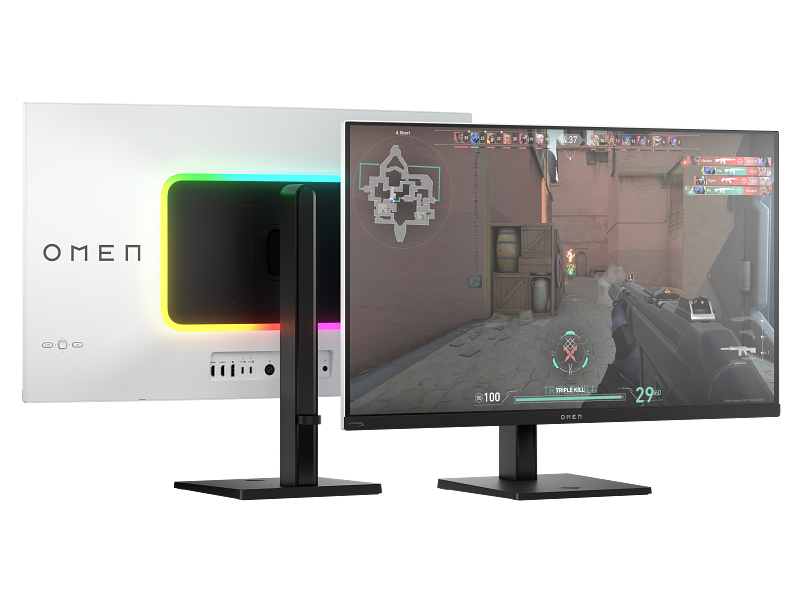
Image Source: HP Official
Who Is It For?
On the HP OMEN Transcend 32, a 31.5-inch QD-OLED panel runs 4K 3840×2160 at 240 Hz with USB-C Power Delivery up to 140 W. A person who plays high-frame 4K titles in a dim room, then plugs one USB-C cable into a laptop for video and charge, works on that single rectangle. OMEN Gear Switch can hand the keyboard and USB devices between a desktop GPU and that laptop without replugging. The same panel lists about 250 nits typical in SDR. A sunlit office of white spreadsheets all day hits ABL (automatic brightness limiter: the screen dims large bright areas) and shows reflections on the glossy QD-OLED glass. Numbered Omen 24/27/32 LCD models use IPS or VA, not this Transcend chassis.
If this form factor or screen size doesn’t quite fit your daily work, exploring other lineup categories would be a better path.
1. Transcend 32 Versus Numbered Omen LCDs
OMEN Transcend as a monitor name, on HP’s current gaming-display pages, is the 32-class QD-OLED. Numbered Omen monitors (Omen 24, 27, 27q, 32q, 32c, 27k, 34c) stay LCD. Mixing those codes on a marketplace card is a different panel, watt budget, and port set.
| Tier | Typical names | Rough position |
|---|---|---|
| OMEN Transcend 32 | Transcend 32 OLED, 9R181AA / 9R181E9 class | 31.5″ QD-OLED, 4K 240 Hz, 140 W USB-C, Gear Switch |
| Numbered Omen LCD | Omen 24, 27, 27q, 32q, 32c, 34c | IPS or VA, FHD/QHD, 165–180 Hz class, no Transcend 140 W OLED row |
| Later HyperX Omen OLED | OLED 27q / 27qs / 34 (2026 announcements) | Separate OLED SKUs; not the Transcend 32 sheet |
The Transcend 32 official row is one size: 31.5-inch class, 16:9, QD-OLED, 3840×2160, 240 Hz, 0.03 ms GtG, Display P3 99%, sRGB 100%, Adobe RGB 97.5%, SDR 250 nits typical, HDR peak 1000 nits at 3% APL, VESA DisplayHDR True Black 400, Dolby Vision, FreeSync Premium Pro, G-SYNC Compatible, VESA Adaptive-Sync. USB-C upstream carries DisplayPort Alt Mode and 140 W PD. DisplayPort 2.1 ×1 and HDMI 2.1 ×2 take a desktop GPU and a console. Factory calibration is listed as max ΔE2000 2.0.
Numbered Omen LCDs keep Fast IPS or curved VA, 1080p or 1440p, 165–180 Hz on current HP gaming-monitor grouping, and they do not inherit 140 W USB-C or QD-OLED contrast. Omen 27k is a 4K LCD at a lower Hz with its own KVM; it is still not the Transcend 32 OLED.
2026 HyperX-branded Omen OLED 27-inch 1440p and 34-inch ultrawide announcements are extra OLED codes. Until a listing prints Transcend on those SKUs, they are not this 32-inch 4K sheet.
2. Glossy QD-OLED, 250 Nits SDR, and ABL
SDR 250 nits and a bright window
Typical SDR brightness on the Transcend 32 sheet is 250 nits. HDR lists 1000 nits at 3% APL (a small bright patch) and True Black 400 for dark-scene HDR. ABL lowers the whole field when the image is mostly white. Full-screen Excel, a browser of white tabs, or a code editor with a light theme in a sunlit room sits on that 250-nit SDR ceiling plus dimming. Game HDR in a dim room uses the contrast of QD-OLED (listed 1,500,000:1). Those two lighting setups are not the same product day.
Glossy glass and text on QD-OLED
QD-OLED here is a glossy, emissive panel: each pixel makes its own light. Blacks can go to off. The glass reflects lamps and windows more than a matte IPS Omen 27. Recurring QD-OLED behavior on desktop UIs is colored fringing on thin fonts. HP lists factory calibration and a user recalibration path; that does not remove the subpixel layout of this panel family. All-day documentation work is a mismatch of coating and pixel structure, not of 240 Hz.
Static UI and the OLED warranty window
Taskbars, HUDs, and pinned chat stay on the same pixels. OLED aging (burn-in) is the long-term result of that pattern. HP’s three-year coverage on this SKU is the sheet’s warranty line; pixel-shift and screen savers in the OSD are the daily controls. A dashboard that never moves is a different risk from a full-screen game that changes every frame. The listing does not make this an IPS document panel.
140 W USB-C is one port, not every port
One USB-C upstream is full-featured: video (DP Alt Mode), data, and up to 140 W PD. Other USB-C ports on the hub are 15 W class. USB-A downstream is 7.5 W. A 140 W laptop can charge and display on that one cable if the laptop accepts 140 W on USB-C. A 65 W brick laptop also charges; a desktop GPU still needs DisplayPort or HDMI for full 4K 240 Hz if the USB-C path is taken by the laptop. Gear Switch (KVM) swaps USB devices between two sources. Confirm both PCs are wired to the printed inputs before assuming one cable runs the house.
This chassis is a dim-room 4K 240 Hz OLED with a docking port. It is not a 350-nit matte office IPS.
3. 32-Inch Depth, Brick, and a Quiet Fan
Width of a 31.5-inch 16:9 slab
Head width is about 719 mm. With stand, HP lists about 719 × 617 × 243 mm fully raised and about 8.8 kg. Dual 24-inch FHD offices do not describe this desk. One Transcend 32 occupies the center; a second monitor needs leftover width past 72 cm plus gap. Viewing distance for 4K at 140 ppi is a desk arm’s length, not a TV sofa. Windows scaling at 150% is a common OS result at this density for UI size.
External brick and the cable nest
Reviews and the in-box list include a large external AC adapter. 140 W out to a laptop plus OLED peak draw is why that brick exists. DisplayPort, two HDMI 2.1, USB-C 140 W, extra USB-C, three USB-A, and a 3.5 mm jack sit on a rear hub that faces outward on the reviewed chassis. The nest is on the back of a 24 cm stand depth. A 60 cm desk puts the feet near the keyboard. VESA 100×100 mm (bracket included on HP’s sheet) clears the stand after removal.
Graphene film and a cooling fan
HP specifies graphene film and a cooling fan, listed up to 22 dB. The fan is part of the OLED thermal path. A silent-library claim is not on the sheet. Night play in a quiet room can still hear a spin-up under HDR peak; idle is lower. This is not a fanless IPS Omen 24.
Speakers, light, and two machines
Four 3 W HyperX-tuned speakers and ARGB sit on the chassis. They fill a small room at moderate OSD volume; they do not replace headphones for directional game audio. Gear Switch plus PiP/split screen is the two-PC layout: desktop on DP, laptop on USB-C 140 W, USB devices following the switch. Console on HDMI 2.1 takes 4K at high Hz within HDMI 2.1 limits. Three video sources are physically present; two at once is the PiP/KVM story, not three full 240 Hz desktops.
4. One Size: 31.5-Inch 4K Only
Transcend monitor pages that HP titles OMEN Transcend 32 OLED are this one diagonal. There is no official Transcend 24 or Transcend 27 monitor sheet in the same family. 27-inch Omen LCDs and 2026 HyperX Omen OLED 27q live on other product codes.
| Size | Common resolution | Aspect ratio | Notes |
|---|---|---|---|
| 31.5 inch (32-class) | 4K UHD 3840×2160 | 16:9 | Only Transcend monitor size; 140 ppi; glossy QD-OLED |
A 27-inch 1440p Omen LCD is denser or coarser depending on SKU, but it is not this 4K OLED. A 32-inch Omen 32q/32c is QHD VA/IPS at 165 Hz class. Anyone searching “Omen Transcend 27” is usually hitting the Transcend laptop or a different OLED code. The monitor SKU to match is 31.5-inch 3840×2160 240 Hz with 140 W USB-C on the spec PDF.
240 Hz at 4K needs a GPU and a cable that hold that mode: DP 2.1 or HDMI 2.1 or the full-featured USB-C path as printed. A USB-C 15 W port on the hub is not that path.
5. Performance by Use Case
The table uses the only Transcend monitor SKU: 31.5-inch QD-OLED, 3840×2160, 240 Hz, ~250 nits SDR, 140 W USB-C, Gear Switch. Numbered Omen LCDs are out of scope.
| Use Case | Software / Task | Rating | Reason |
|---|---|---|---|
| 4K PC play, plugged GPU | Current titles at 4K 240 Hz cap | Sufficient | QD-OLED 240 Hz, 0.03 ms GtG, FreeSync Premium Pro / G-SYNC Compatible |
| Console 4K on HDMI 2.1 | PS5 / Xbox on HDMI | Sufficient | Two HDMI 2.1 ports; Hz follows the console’s 4K output |
| Color work, dim room | Photo/video on calibrated SDR/HDR | Adequate | Factory ΔE row and P3 99%; glossy + ABL still limit bright-room stills |
| USB-C laptop desk | One cable video + up to 140 W | Sufficient | Full-featured USB-C PD; KVM swaps the docked PC |
| All-day white office | Excel, docs, sunlit window | Not enough | SDR 250 nits, ABL on white fields, glossy QD-OLED reflections, static UI |
A numbered Omen 27 IPS does not inherit the 4K 240 Hz row. This OLED does not inherit 350-nit matte office behavior. GPU power, not the panel name, sets whether 4K 240 Hz is reached in a given title — fps numbers are not claimed here.
6. Official Specs (with plain explanations)
| Category | Specification | Notes |
|---|---|---|
| Size / panel | 31.5″ QD-OLED, flat 16:9 | Not numbered Omen IPS/VA |
| Resolution | 3840×2160 at 240 Hz | 140 ppi; 0.03 ms GtG |
| Brightness | SDR 250 nits typ.; HDR 1000 nits (3% APL) | True Black 400; ABL on full-white |
| Color | P3 99%, sRGB 100%, Adobe RGB 97.5% | Factory max ΔE2000 2.0 |
| Video | DP 2.1 ×1, HDMI 2.1 ×2, USB-C DP Alt | 24–240 Hz on those paths |
| USB-C PD | One upstream up to 140 W | Other USB-C 15 W; USB-A 7.5 W |
| Audio | 4× 3 W, 3.5 mm out | HyperX-tuned speakers |
| Stand / VESA | Height ~100 mm, tilt, pivot | VESA 100×100, bracket included |
| Cooling | Graphene film + fan (up to 22 dB) | External AC adapter in box |
This line is sold with different tier names, sizes, refresh rates, and panels depending on the exact model and region. Please match the specifications on your current seller page with the official information above.
Source: HP Official Product Page
The 250-nit SDR row is the bright-office limit in section 2. The 140 W USB-C row is the single-cable laptop path. The fan row is the night-room noise path in section 3. Numbered Omen LCD Hz and USB-C figures do not belong in this table.
7. Main Variations in This Line
The Transcend monitor itself does not split by inch. Variation is mostly neighboring HP names that get mixed in search.
Panel family is the first fork. Transcend 32 = QD-OLED 4K 240 Hz. Omen 27/32q/32c = LCD. Those LCDs do not gain OLED contrast or 140 W PD by sharing the Omen logo.
Video source is the second fork on this SKU. Desktop on DP 2.1, console on HDMI 2.1, laptop on 140 W USB-C. Gear Switch is the USB/KVM layer between two of those, not a third full desktop.
Firmware and lighting are a third fork. ARGB, OMEN Light Studio, and OSD pixel-care options are chassis features. They do not change nits or Hz.
Region and part number (9R181AA versus 9R181E9 class) should match the same 31.5-inch OLED row. A listing that only says “Omen 32 OLED” still needs 240 Hz, 140 W, and QD-OLED printed.
Later HyperX Omen OLED 27/34 codes, if they appear, are separate sizes and Hz. Treat them as new SKUs, not as Transcend 32 variants.
8. What to Check on the Sales Page
“OMEN 32” can mean Transcend 32 OLED, Omen 32q, or Omen 32c. USB-C 140 W and QD-OLED are the Transcend markers.
- Line / Tier / Size: Check whether you are getting the OMEN Transcend 32 OLED model, not a numbered Omen 32q/32c LCD or a 27-inch Omen under the same brand name.
- Panel and Hz: Check QD-OLED, 3840×2160, 240 Hz — not 1440p 165 Hz VA.
- USB-C: Check the full-featured 140 W PD port, not a 15 W hub-only C.
- Cables and brick: Check that DP, HDMI, USB-C-to-C, and the external adapter are listed in the box.
- Stand and VESA: Check height/pivot and the 100×100 mm bracket if an arm will replace the stand.
A laptop named OMEN Transcend 14/16 is a different product. The monitor PDF is the 31.5-inch display.
9. Disclaimer & Buying Advice
This buying guide for the HP OMEN Transcend 32 is based on official manufacturer specifications and recurring real-world user experiences. It is completely independent, not sponsored, and does not guarantee specific performance for every unit. Tier name, screen size, refresh rate, panel type, and ports can differ by model and region, so please double-check the exact specifications listed on your seller’s page before purchasing.
10. Beginner Guide
If QD-OLED versus IPS, ABL on white pages, and 140 W USB-C versus a 15 W hub port still blur together, Start Here maps those monitor terms before you open an Omen listing.

[…] HP Omen Transcend 32 — Premium QD-OLED monitor for gaming and creation […]