Image Source: ASUS Official
Who Is It For?
The Vivobook 16 is used by office professionals and students who require a large screen for multitasking but do not perform heavy 3D rendering or professional video editing. It fits the needs of data analysts who work with large spreadsheets and benefit from the 16:10 aspect ratio and the numeric keypad. It also serves as a primary computer for home users who want a large display for web browsing and video playback without the weight of a traditional desktop replacement. The lightweight plastic design makes it a choice for those who prioritize a large viewing area in a portable format for daily commutes.
If this form factor or power doesn’t quite fit your daily work, exploring other lineup categories would be a better path.
1. Check Before You Buy
The 16:10 Aspect Ratio and Vertical Space
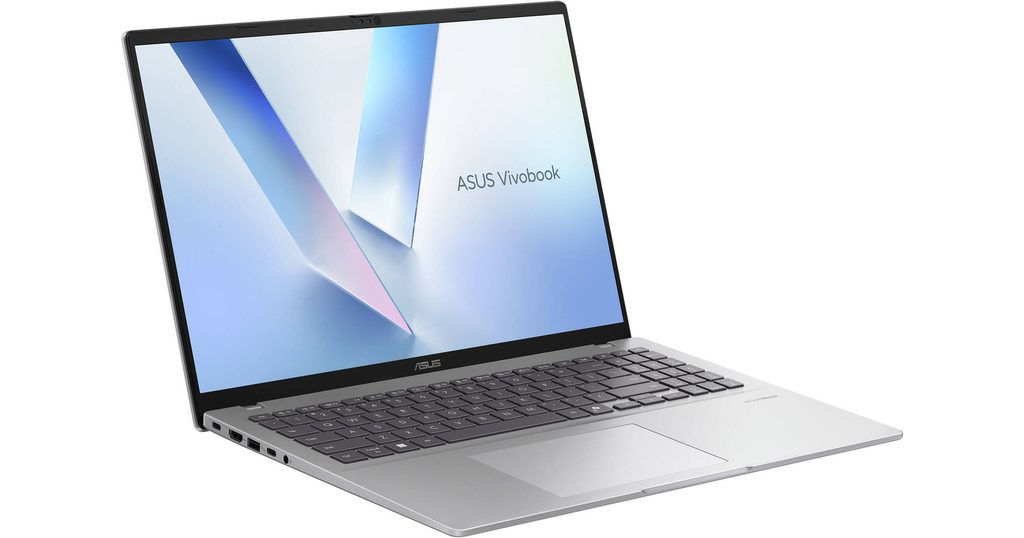
The Vivobook 16 features a 16-inch screen with a 16:10 aspect ratio. This format is taller than the traditional 16:9 widescreen found on older laptops. The extra vertical space allows for more lines of text to be visible in a word processor or more rows to appear in a spreadsheet without scrolling. For those who work with long documents or perform extensive web research, this physical screen height provides a different viewing experience. The resolution is 1920 x 1200, which maintains a standard level of detail for a screen of this size. The matte finish on the display reduces reflections from overhead lights, but the 300-nit brightness level is intended for indoor use rather than direct sunlight.
Plastic Build and Structural Flexibility
The chassis of the Vivobook 16 is constructed primarily from plastic materials. This choice of material keeps the weight at approximately 1.88kg, which is relatively low for a 16-inch laptop. However, plastic has more physical flexibility than aluminum. Pressing on the center of the keyboard or the lid results in a visible dip in the surface. This flexibility is a characteristic of the material and does not indicate a mechanical failure. The surface features an “ASUS Antimicrobial Guard” coating, which is designed to inhibit the growth of bacteria on the most frequently touched areas. The hinge allows the screen to open 180 degrees, letting the laptop lay flat on a desk surface.
Memory Expansion and Soldered RAM
The internal memory of the Vivobook 16 uses a hybrid design. A portion of the RAM, typically 8GB, is soldered directly to the motherboard and cannot be removed or replaced. There is one additional physical slot that holds a removable memory stick. If a unit is purchased with 8GB, it usually means the expansion slot is empty. If it comes with 16GB, the slot is occupied by an 8GB stick. To increase the memory to 24GB, the 8GB stick must be removed and replaced with a 16GB stick. This design limits the maximum possible memory compared to laptops with two open slots. Knowing the soldered amount is necessary for planning future hardware changes.
USB-C Port Limitations and Charging
The USB-C port on the Vivobook 16 is often limited to data transfer only. In many configurations of this series, the USB-C port does not support Power Delivery (charging the laptop) or DisplayPort (connecting a monitor). This means the laptop must be charged using the dedicated barrel-style DC-in port and the included power adapter. Connecting an external monitor requires using the HDMI 1.4 port. Some newer or higher-tier versions of the Vivobook 16 may include a USB-C port with more features, but the standard models require checking the specific port symbols on the sales page. The HDMI 1.4 standard also limits external 4K monitors to a 30Hz refresh rate, which results in less smooth mouse movement on high-resolution screens.
Thermal Management and Fan Activity
The cooling system consists of a single fan and heat pipes that move thermal energy away from the processor. During basic tasks like typing or browsing, the fan often remains at a low speed or stays off. When the processor is under a heavy load, such as during a large file export or a video call with many participants, the fan speed increases. This results in a steady whirring sound from the vents located near the hinge and the bottom of the laptop. The heat is primarily exhausted through the rear, and the area above the keyboard will feel warm to the touch during these periods. The plastic chassis does not dissipate heat as quickly as metal, so the internal temperatures are managed by the system software.
2. How It Fits a Real Desk Setup
Physical Footprint and Workspace
The Vivobook 16 occupies a desk space of approximately 35.8 cm by 24.9 cm. Because it is a 16-inch device, it requires a larger area than standard 14-inch office laptops. The port distribution is spread across both sides of the machine. The right side typically houses the majority of the ports, including the HDMI, two USB-A ports, the USB-C port, and the power input. This layout means that cables for power and external monitors will protrude from the right side. For right-handed users who use an external mouse close to the laptop, these cables can interfere with the mouse movement area. The left side usually contains a single USB-A port, which is often used for a wireless mouse dongle or a thumb drive.
Keyboard Layout and Numeric Keypad
The keyboard includes a full numeric keypad on the right side, which is a standard feature for the 16-inch model. This shifts the main QWERTY keys and the touchpad slightly to the left of the center of the chassis. For those who perform heavy data entry or financial calculations, the numeric keypad is a physical tool built into the device. The keys have a 1.4mm travel distance, providing a tactile response that is consistent across the layout. The touchpad is large and centered under the spacebar rather than the chassis, which aligns with the typing position. Because the chassis is thin, the front edge of the laptop is low, which reduces the angle of the wrists during typing.
Audio and Video for Meetings
The speakers are located on the bottom of the chassis and fire downwards. The sound quality is influenced by the surface the laptop is sitting on; a hard desk reflects the sound toward the user, while a soft surface like a lap or a bed will dampen the audio. The webcam is located at the top of the screen and includes a physical privacy shutter that can be slid across the lens. This provides a visual confirmation that the camera is covered when not in use. The dual microphones use AI noise-canceling technology to filter out background sounds during video calls. The camera resolution is typically 720p, which provides a standard image quality for video conferencing in well-lit rooms.
External Connectivity and Charging
Connecting the Vivobook 16 to a desk setup involves using the HDMI port for a monitor and the USB-A ports for peripherals. Because the USB-C port often lacks video output, a docking station that relies on DisplayPort Alt Mode will not function for external screens. Users who require multiple monitors will need to use a USB-to-HDMI adapter that uses its own video driver. The power adapter uses a barrel connector, so the charging cable is separate from the data ports. The inclusion of three USB-A ports allows for the simultaneous connection of a mouse, a keyboard, and an external storage drive without needing a USB hub.
Daily Carry and Portability
The primary characteristic of the Vivobook 16 is its weight relative to its screen size. At approximately 1.88kg, it is manageable for carrying between a home office and a workplace. However, the 16-inch size means the laptop has a large physical footprint. It requires a bag specifically designed for 16-inch devices. Many standard backpacks intended for 15-inch laptops will not accommodate the width and depth of this chassis. The power adapter is also designed to be compact, which contributes to the total travel weight. The plastic material is durable enough for daily transport, but the physical flex of the lid means that heavy objects should not be placed on top of the laptop when it is inside a bag.
3. Performance by Use Case
The performance of the Vivobook 16 is determined by the specific processor and the amount of RAM installed. The following ratings assume a configuration with 16GB of RAM and a mid-tier Intel Core i5 or Ryzen 5.
| Use Case | Software | Rating | Reason |
| Office Productivity | Excel, Word, Outlook | Sufficient | Fast response times and large screen for multitasking |
| Web Browsing | Chrome, Edge (20+ tabs) | Sufficient | 16GB RAM handles many active tabs without lag |
| Video Meetings | Zoom, Teams, Google Meet | Sufficient | Integrated graphics and microphones handle calls well |
| Photo Editing | Photoshop, Lightroom | Adequate | Possible for basic edits, but screen color accuracy is standard |
| 3D Gaming | AAA Games (Modern) | Not enough | Integrated graphics are not intended for heavy 3D games |
The ratings above reflect the capabilities of the hardware when connected to a power outlet. Performance in specific applications will depend on the complexity of the project files and the thermal mode selected in the MyASUS software.
4. Official Specs (with plain explanations)
| Category | Specification | Notes |
| CPU | Intel Core i3/i5/i7 or AMD Ryzen 5/7 | Standard mobile processors for daily productivity tasks |
| Graphics | Intel UHD / Iris Xe or AMD Radeon | Integrated graphics sharing system memory for visuals |
| Memory | 8GB / 16GB DDR4 | One soldered module with one replaceable expansion slot |
| Storage | 256GB / 512GB / 1TB NVMe SSD | Single internal slot for a high-speed storage drive |
| Display | 16-inch WUXGA (1920 x 1200) | Taller 16:10 aspect ratio with matte anti-glare coating |
| Weight | Approx. 1.88 kg (4.14 lbs) | Standard weight for a 16-inch plastic chassis laptop |
| Battery | 42Wh or 50Wh Lithium-ion | Small to mid-range capacity for this screen size |
| Ports | USB-C, USB-A, HDMI 1.4, DC-in | Basic physical connections for standard office peripherals |
This series is sold with different CPUs, memory, and storage depending on the release year and generation. Please match the specifications on your current seller page with the official information above.
Source: ASUS Official Product Page
The technical specifications listed above represent the hardware foundation of the Vivobook 16. These components determine how the machine handles software and how it physically fits into a mobile or stationary setup. Understanding these individual parts helps in identifying which specific configuration appears on a retail listing.
5. Main Variations in This Series
The Vivobook 16 series includes several hardware combinations that change the processing speed and battery duration. These variations are often tied to the specific model number, such as X1605 for Intel versions or M1605 for AMD versions.
- Processor options range from entry-level i3 or Ryzen 5 to mid-tier i7 or Ryzen 7, which changes the speed of data processing.
- Battery capacities are offered in 42Wh or 50Wh versions, which affects the total time the device runs without a charger.
- Memory configurations often start with 8GB soldered to the board, but some retail units include an additional 8GB stick in the expansion slot.
- The display brightness is typically 300 nits, but some regional variants may feature lower brightness levels or different color accuracy ratings.
- Chassis colors include Indie Black, Cool Silver, and Transparent Silver, with the finish applied to the plastic surfaces.
6. What to Check on the Sales Page
When viewing a Vivobook 16 listing, the specific processor generation and the USB-C port features are the most important details to verify. Sellers often list different hardware versions under the same series name.
- CPU Generation: Check whether you are getting the Intel 12th/13th Gen or AMD Ryzen 5000/7000 series processors.
- Memory Configuration: Confirm if the RAM is 8GB or 16GB and if the expansion slot is occupied.
- USB-C Features: Verify if the USB-C port supports “Power Delivery” or “DisplayPort” if you need those features.
- Battery Capacity: Check if the unit includes the 42Wh or 50Wh battery for your runtime needs.
- Screen Brightness: Confirm if the display is 300 nits or a different level for your lighting environment.
The specifications on a retail page can sometimes be generalized. Matching the manufacturer’s part number with the official datasheet is the most accurate way to confirm the internal hardware.
7. Disclaimer & Buying Advice
This buying guide for the Vivobook 16 is based on official manufacturer specifications and recurring real-world user experiences. It is completely independent, not sponsored, and does not guarantee specific performance for every unit. Hardware configurations such as the processor, memory, and storage can differ by generation and region, so please double-check the exact specifications listed on your seller’s page before purchasing.
8. Beginner Guide
If you are new to choosing computer hardware and want to understand the basics of these components, you can [Start Here] to learn more about how to read specifications.