Image Source: Tech Reviewer / Hands-on Photo
Who Is It For?
The ASUS ROG Zephyrus G16 is for individuals who need a high-performance computer that can be carried in a standard backpack without causing physical strain. It fits the needs of those who move between a home office, a workplace, and a third location daily. The inclusion of a high-quality OLED screen and a full-size SD card reader makes it a tool for visual work, such as photo editing or color grading, while the dedicated GPU allows for gaming during personal time. It is not for those who want the absolute highest possible frame rates at the cost of portability, nor is it for those who plan to upgrade their RAM in the future.
“If this form factor or power doesn’t quite fit your daily work, exploring other lineup categories would be a better path.”
1. Check Before You Buy
The ASUS ROG Zephyrus G16 is a 16-inch laptop that belongs to the slim gaming category. Unlike the thicker Strix series, this model uses a CNC-milled aluminum body that is significantly thinner and lighter. This physical change dictates several hardware constraints that are different from standard gaming machines. The most significant factor for the 2024 model is the memory configuration. The RAM is soldered directly to the motherboard, which means there are no physical slots to add more memory later. The capacity chosen at the time of purchase is the maximum the laptop will ever have.
Thermal Constraints in a Thin Chassis
Because the chassis is less than 1.5 cm thick in some areas, the cooling system operates under different physical limits. The laptop uses a tri-fan system where a third fan helps move air across the voltage regulator modules and the GPU. In high-performance modes, these fans spin at high revolutions per minute, creating a high-pitched sound profile. The aluminum body also acts as a heat sink, meaning the area above the keyboard and the bottom of the laptop can become hot to the touch during long sessions of heavy calculation or gaming. This heat is a result of the metal conducting thermal energy away from the internal chips.
OLED Display and Surface Reflections
The 16-inch OLED panel provides high contrast and fast response times, but it comes with a glossy glass finish. Unlike matte screens that diffuse light, this glossy surface reflects windows, lamps, and bright clothing. In a room with many light sources, these reflections are visible on dark areas of the screen. The OLED technology also carries a risk of permanent image retention if static elements are left at high brightness for extended periods. The software includes “OLED Care” features to mitigate this, such as pixel shifting and taskbar hiding, which change the visual behavior of the operating system.
Power Limits and Performance Scaling
While the laptop can be configured with an RTX 4080 or 4090, these chips do not run at the same wattage as they do in larger, thicker laptops. The power limit is restricted to prevent the thin chassis from melting internal components or becoming too hot for the user. This means that while the hardware name is the same, the actual performance in frames per second or rendering time will be lower than a “full-power” gaming laptop of the same generation. The laptop also requires the included proprietary charger to reach its maximum performance state; using a standard USB-C charger will limit the GPU power significantly.
2. How It Fits a Real Desk Setup
Port Layout and Desk Cable Management
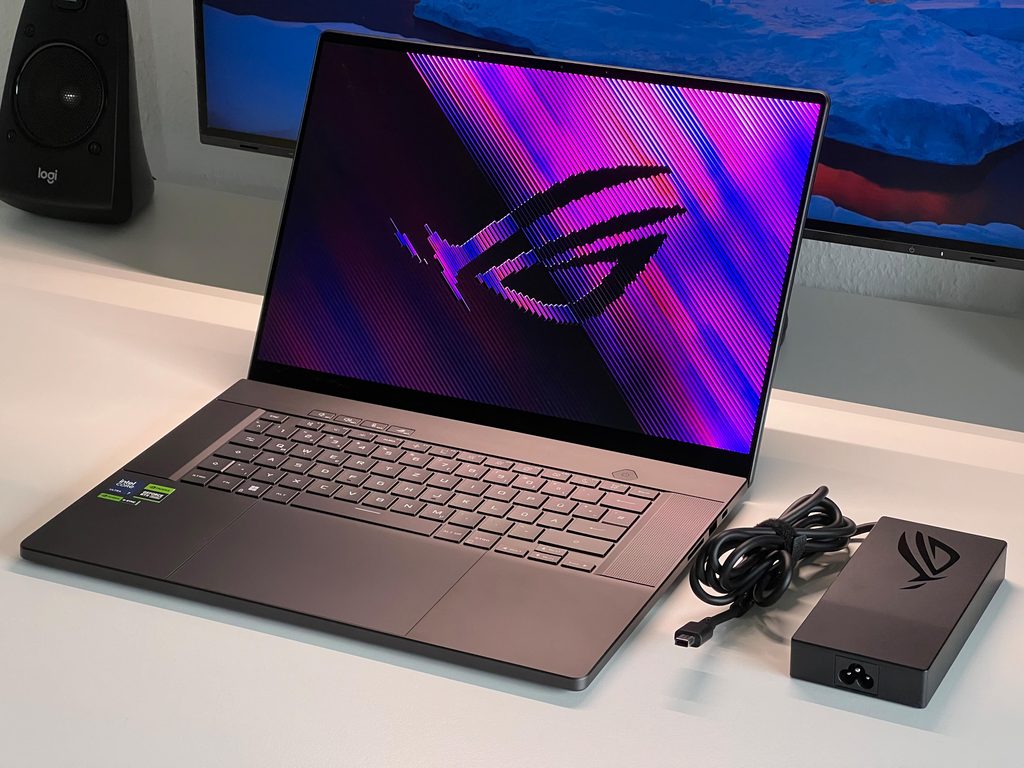
The ASUS ROG Zephyrus G16 occupies a footprint similar to a large productivity laptop rather than a traditional gaming station. The hinge design, known as the “stealth hinge,” allows the screen to open wide without lifting the back of the laptop off the desk. This keeps the profile low and prevents the exhaust heat from blowing directly onto the bottom of the screen panel. On a desk, the laptop looks more like a professional workstation, especially with the “Slash Lighting” on the lid turned off. This lighting is a single diagonal LED strip that can be customized, but it does not offer the full-color RGB found on other gaming models.
The port layout is distributed on both sides, which affects cable management. The left side houses the power jack, HDMI 2.1, a Thunderbolt 4 port, and a USB-A port. The right side includes a full-size SD card reader, which is a specific addition for those who move photos or videos from cameras. Having the SD card reader on the right side means that a mouse user might find the inserted card or cables interfering with their hand movement if the desk space is narrow. The power cable uses a rectangular connector that sits flush against the side, but it does block adjacent ports if not angled correctly.
Keyboard, Touchpad, and Speaker Placement
The keyboard has a 1.7mm travel distance, providing a tactile feel that is quieter than mechanical keyboards. The glass touchpad is exceptionally large, covering a significant portion of the palm rest. While this is useful for navigation without a mouse, it requires the user to rest their palms on the metal surface. In winter, this metal can feel cold, while under load, it can feel quite warm. The speakers are located on the sides of the keyboard, firing upward. This placement ensures that the sound is not muffled when the laptop is placed on a soft surface like a lap or a couch, though the fans will still need clear air intake from the bottom.
3. Performance by Use Case
The ratings below are based on the 2024 model with an Intel Core Ultra 9 and an RTX 4070 GPU. Higher or lower GPU tiers will shift the gaming and rendering results.
| Use Case | Software | Rating | Reason |
| AAA Gaming | Cyberpunk 2077, Starfield | Sufficient | OLED and G-Sync provide a smooth experience at 2.5K. |
| Video Editing | Premiere Pro, DaVinci Resolve | Sufficient | Dedicated GPU and SD card reader facilitate 4K workflows. |
| 3D Rendering | Blender, Maya | Adequate | Performance is limited by the thin chassis’s thermal ceiling. |
| Daily Office | Excel, Chrome, Zoom | Sufficient | Thin profile and large battery support mobile productivity. |
| Portability | Commuting, Travel | Sufficient | At 1.85kg, it is one of the lightest 16-inch gaming laptops. |
| Future Upgrades | Adding RAM/Storage | Not enough | RAM is soldered; only storage can be expanded after purchase. |
The performance of this series is heavily influenced by the “Armoury Crate” or “G-Helper” software settings. Switching between Silent, Performance, and Turbo modes will significantly change the fan noise and the speed of the processor.
4. Official Specs (with plain explanations)
| Category | Specification | Notes |
| CPU | Intel Core Ultra 7 155H / Ultra 9 185H | ARM-like efficiency cores, integrated AI NPU |
| Graphics | NVIDIA RTX 4050 to 4090 Laptop GPU | Lower TGP compared to Strix series |
| Memory | 16GB / 32GB LPDDR5X (Soldered) | Fixed on motherboard, no expansion slots |
| Storage | Up to 2TB PCIe 4.0 NVMe | Two M.2 slots, one usually occupied |
| Display | 16-inch 2.5K OLED (240Hz) | Glossy finish, high color accuracy, G-Sync |
| Weight | 1.85 kg (4.08 lbs) | CNC aluminum chassis, thin profile |
| Battery | 90Wh | High capacity for a slim chassis |
| Ports | USB4, HDMI 2.1, SD Express 7.0 | Full-size SD card reader included |
This series is sold with different CPUs, memory, and storage depending on the release year and generation. Please match the specifications on your current seller page with the official information above.
Source: ASUS Official Product Page
The specifications listed above define a device that prioritizes a balance between high-performance hardware and a portable physical form. The choice of components reflects a shift toward a thinner design compared to traditional gaming laptops, which influences how the machine handles heat and how the internal parts are arranged.
5. Main Variations in This Series
- The 2024 redesign features a CNC-milled aluminum chassis and soldered LPDDR5X memory, while older versions may have one upgradeable RAM slot.
- Graphics options range from the RTX 4050 to the RTX 4090, but the total graphics power (TGP) is capped at lower levels than the Strix series to manage heat in the thinner body.
- The display is a 2.5K OLED panel with a 240Hz refresh rate, which differs from the Mini-LED or IPS panels found in previous generations or other ROG lines.
- Power delivery varies between a proprietary slim rectangular plug for full performance and USB-C Power Delivery for lighter tasks.
6. What to Check on the Sales Page
Because the Zephyrus G16 has undergone a major redesign, the sales page might list older models (2023) alongside the new ones (2024). The differences in weight, screen type, and RAM upgradeability are vast between these years.
- CPU Generation: Check whether you are getting the Intel Core Ultra (2024) or the 13th Gen Core i9 (2023) processors.
- Memory Type: Confirm if the RAM is “LPDDR5X” (soldered) or “DDR5” (partially upgradeable).
- Display Panel: Verify if the screen is “OLED” or “Mini-LED/IPS,” as this affects contrast and reflections.
- GPU Wattage: Look for the TGP (Total Graphics Power) rating; the 2024 model usually has lower wattage than the 2023 model.
- Chassis Material: Ensure the description mentions “CNC Aluminum” if you are looking for the 1.85kg lightweight version.
7. Disclaimer & Buying Advice
This buying guide for the ASUS ROG Zephyrus G16 is based on official manufacturer specifications and recurring real-world user experiences. It is completely independent, not sponsored, and does not guarantee specific performance for every unit. Hardware configurations such as the processor, memory, and storage can differ by generation and region, so please double-check the exact specifications listed on your seller’s page before purchasing.
8. Beginner Guide
If you are unsure about how these technical specifications will affect your daily use, you can [Start Here] to learn the basics of laptop hardware.