Image Source: ASUS Official
Who Is It For?
The ROG Ally is used by individuals who want to access their PC game library in a portable format. It fits the needs of tech enthusiasts who prefer the Windows ecosystem and want the flexibility to use the device as a desktop computer when docked. It also serves as a secondary device for those who already have a primary gaming desktop but want to continue their progress while away from their desk. The 7-inch screen and integrated controllers make it a choice for those who prioritize a self-contained gaming experience over the larger screen of a traditional laptop.
If this form factor or power doesn’t quite fit your daily work, exploring other lineup categories would be a better path.
1. Check Before You Buy
Windows 11 Interface on a Small Screen
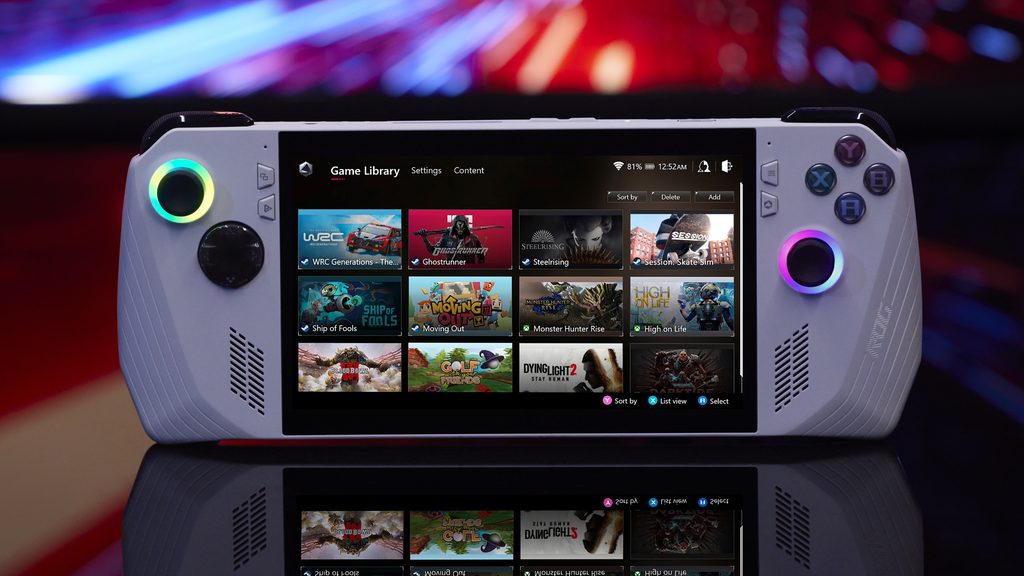
The ROG Ally operates on Windows 11, which is the same operating system found on standard desktop and laptop computers. This means the device can run almost any software compatible with Windows. However, navigating the standard Windows desktop on a 7-inch touchscreen requires precision. ASUS provides the Armoury Crate SE software, which acts as an overlay to manage games and system settings using the joysticks and buttons. When the software is not active, the user must rely on the touchscreen or the right joystick (which simulates a mouse) to interact with small icons and menus. This interaction model is a physical characteristic of using a full desktop operating system in a handheld format.
Variable Refresh Rate and Visual Smoothness
The 7-inch display features a 120Hz refresh rate and Variable Refresh Rate (VRR) technology. VRR allows the screen to synchronize its refresh speed with the number of frames the graphics chip produces. This reduces visual tearing and stuttering during gameplay, which is common when the hardware cannot maintain a perfectly consistent speed. The 500-nit brightness level is intended for indoor use, as direct sunlight on the glossy screen surface creates reflections that interfere with visibility. The 1080p resolution provides a sharp image on a screen of this size, but running games at this full resolution requires more power than running them at 720p.
Thermal Management and MicroSD Slot Proximity
The cooling system consists of two fans and heat pipes that move thermal energy away from the AMD processor. The air is drawn in through the back and exhausted through vents located on the top edge of the device. A specific physical detail of the original ROG Ally (Z1 and Z1 Extreme) is the location of the MicroSD card slot, which is positioned near one of the top exhaust vents. During intensive tasks, the heat from the exhaust vent affects the temperature of the MicroSD card and the reader. This thermal exposure is a factor in the long-term reliability of the storage expansion in that specific area. The Ally X model features a revised internal layout that moves the MicroSD slot away from the primary heat source.
Battery Capacity and Power Profiles
The battery capacity varies significantly between the original models (40Wh) and the Ally X (80Wh). Handheld gaming PCs consume power at a high rate when running 3D applications. The system includes several power profiles, such as “Silent” (10W), “Performance” (15W), and “Turbo” (25W or 30W when plugged in). The “Turbo” mode allows the processor to run at its maximum speed but results in the shortest battery duration. When the device is not connected to a wall outlet, the battery runtime is determined by the selected power profile and the screen brightness. The Ally X model provides more energy for the components, allowing for longer sessions between charges.
Internal Upgradability and Maintenance
The ROG Ally allows for the internal SSD to be replaced by the user. Accessing the drive requires removing the back panel, which is held in place by several screws. The original models use the M.2 2230 format, which is shorter and less common than standard desktop drives. The Ally X model supports the standard M.2 2280 format, providing more options for high-capacity storage upgrades. The joysticks and buttons are also modular to a degree, but replacing them requires disassembling the internal components. The memory (RAM) is soldered to the motherboard and cannot be increased after purchase, making the initial choice of 16GB or 24GB a permanent hardware limit.
2. How It Fits a Real Desk Setup
Handheld Ergonomics and Physical Controls
The ROG Ally is designed to be held with both hands, with the controls positioned around the screen. The joysticks use a standard offset layout, and the back of the device features two macro buttons that can be assigned to specific functions. The weight of 608g or 678g is distributed across the grips, but holding the device without arm support for long periods can lead to physical fatigue. The Ally X model features deeper grips and revised button placement to change the hand position. The joysticks include RGB lighting rings that can be customized through the software to show different colors or system status.
Docking and Desktop Replacement
The inclusion of a USB-C port (or two on the Ally X) allows the ROG Ally to function as a desktop computer. Connecting a USB-C dock or a compatible charging dock allows the device to drive an external monitor, keyboard, and mouse. This setup effectively turns the handheld into a stationary workstation for web browsing or document editing. The original models also feature a proprietary XG Mobile port, which allows for the connection of an external ASUS graphics card station. This external hardware provides more 3D processing power and additional ports, but it is a separate unit that requires its own power source and desk space.
Audio Performance and Haptic Feedback
The speakers are located on the front of the device, firing directly toward the user. This placement ensures that the audio is not muffled by the user’s hands. The sound quality is sufficient for hearing game dialogue and environmental effects, and the system supports Dolby Atmos for a wider soundstage. The device also includes haptic vibration motors that provide physical feedback during games. The intensity of this vibration can be adjusted in the settings. When the fans are spinning at maximum speed in “Turbo” mode, the noise can compete with the built-in speakers, leading many users to connect a headset via the 3.5mm audio jack or Bluetooth.
Software Integration and Armoury Crate SE
The primary way to interact with the device’s settings is through the Armoury Crate SE software. This interface is designed to be navigated using the joysticks and buttons rather than a mouse. It allows the user to change power profiles, adjust the RGB lighting, and launch games from different platforms like Steam, Epic Games, or Xbox. The software also includes a “Command Center” overlay that can be summoned during a game to change brightness or toggle system monitors. Because the device runs Windows, it also receives standard Windows Updates and driver updates from ASUS, which are managed through the MyASUS and Armoury Crate applications.
Portability and Travel
The ROG Ally is intended for use in locations where a traditional laptop is not practical, such as on a train, a plane, or a sofa. The device fits into a dedicated carrying case, which is necessary to protect the joysticks and the screen from damage during transport. The power adapter is a 65W USB-C unit that is similar in size to a phone charger, contributing to a low total travel weight. Because the device relies on a constant wireless connection for many game platforms, the Wi-Fi signal strength in different environments is a factor in the mobile experience.
3. Performance by Use Case
The performance of the ROG Ally is determined by the specific processor and the power limit set by the user.
| Use Case | Software | Rating | Reason |
| Indie Gaming | Hades, Dead Cells | Sufficient | High frame rates possible even at low power levels |
| AAA Gaming | Cyberpunk 2077, Elden Ring | Adequate | Requires lower settings or upscaling for smooth play |
| Retro Emulation | PS2, GameCube, Switch | Sufficient | Processor architecture handles emulation tasks easily |
| Web & Media | Chrome, YouTube, Netflix | Sufficient | 7-inch screen and 16GB+ RAM handle these tasks fast |
| Video Editing | Premiere Pro (1080p) | Adequate | Possible for quick edits, but screen size is a limit |
The ratings above reflect the capabilities of the integrated Radeon graphics. Performance will vary based on the specific game optimization and whether the device is connected to a power outlet.
4. Official Specs (with plain explanations)
| Category | Specification | Notes |
| CPU | AMD Ryzen Z1 / Z1 Extreme | Handheld-optimized processors, Zen 4 architecture |
| Graphics | AMD Radeon Graphics (RDNA 3) | Integrated graphics, performance varies by chip |
| Memory | 16GB / 24GB LPDDR5 / LPDDR5X | Soldered to the board, non-upgradable |
| Storage | 512GB / 1TB NVMe SSD (M.2 2230 / 2280) | Internal storage, user-replaceable drive |
| Display | 7-inch FHD (1920×1080) | 120Hz, 500 nits, Variable Refresh Rate |
| Weight | 608g (Original) / 678g (Ally X) | Lightweight chassis with integrated controllers |
| Battery | 40Wh (Original) / 80Wh (Ally X) | Integrated lithium-ion, capacity varies by model |
| Ports | ROG XG Mobile, USB-C, Audio Jack | Proprietary GPU port and standard connections |
This series is sold with different CPUs, memory, and storage depending on the release year and generation. Please match the specifications on your current seller page with the official information above.
Source: ASUS Official Product Page
The technical specifications of the ROG Ally define its role as a portable computer that runs a full version of the Windows operating system. These components are integrated into a chassis that includes physical joysticks, buttons, and a cooling system. Understanding these individual parts is necessary to identify the capabilities of a specific unit found on a retail website.
5. Main Variations in This Series
The ROG Ally series features several hardware combinations that change the processing speed and battery duration. These variations are determined by the specific model chosen at the time of purchase.
- The processor is available in two versions: the Ryzen Z1 (6 cores) and the Ryzen Z1 Extreme (8 cores). The Z1 Extreme version features more graphics processing units, which changes the frame output in 3D applications.
- The ROG Ally X is a revised model that features 24GB of RAM and an 80Wh battery, which is double the capacity of the original model.
- Storage sizes range from 512GB to 1TB, and the Ally X model utilizes the standard M.2 2280 size, while the original models use the smaller M.2 2230 format.
- The chassis color is primarily white for the original Z1 and Z1 Extreme models, while the Ally X model features a black chassis with revised ergonomics.
- Connectivity includes Wi-Fi 6E and Bluetooth 5.2, providing modern wireless standards for internet and peripheral devices.
6. What to Check on the Sales Page
When viewing an ROG Ally listing, the specific processor and the battery capacity are the most important details to verify. Sellers often list different versions under the same series name.
- CPU Model: Check whether you are getting the Ryzen Z1 or the Ryzen Z1 Extreme processor.
- Battery Capacity: Confirm if the unit has the 40Wh (Original) or 80Wh (Ally X) battery.
- Memory Capacity: Verify if the unit includes 16GB or 24GB of RAM, as this cannot be changed later.
- Storage Size: Check if the 512GB or 1TB SSD meets your game library requirements.
The specifications on a retail page can sometimes be generalized. Matching the manufacturer’s part number with the official datasheet is the most accurate way to confirm the internal hardware.
7. Disclaimer & Buying Advice
This buying guide for the ROG Ally is based on official manufacturer specifications and recurring real-world user experiences. It is completely independent, not sponsored, and does not guarantee specific performance for every unit. Hardware configurations such as the processor, memory, and storage can differ by generation and region, so please double-check the exact specifications listed on your seller’s page before purchasing.
8. Beginner Guide
If you are new to handheld gaming PCs and want to understand how these components work, you can [Start Here] to learn more about how to read specifications.