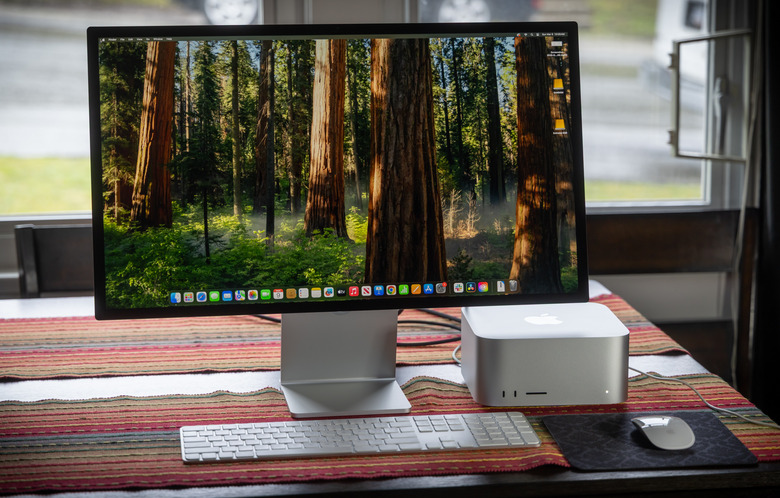
Image Source: Tech Reviewer / Hands-on Photo
Who Is It For?
The Mac Studio is used by video editors who work with multiple streams of 4K or 8K footage and require the high bandwidth of unified memory. It fits the needs of software developers who compile large codebases and benefit from the multi-core performance of the Max and Ultra chips. It also serves as a workstation for 3D artists and photographers who manage high-resolution textures and large image libraries. The compact size and high port count make it a choice for those who need a powerful stationary computer that can be easily moved between different studio locations or home offices.
If this form factor or power doesn’t quite fit your daily work, exploring other lineup categories would be a better path.
1. Check Before You Buy
Unified Memory Architecture and Fixed Capacity
The Mac Studio utilizes a unified memory architecture, where the RAM is located on the same physical package as the processor. This design allows the CPU and the GPU to access the same data pool simultaneously without the need to copy information between separate memory banks. However, this architecture means the memory is soldered and cannot be changed, added to, or replaced after the device is manufactured. If a unit is purchased with 32GB of memory, that capacity remains for the life of the device. For those running multiple professional applications or working with large video files, the memory choice made on the sales page is a permanent hardware limit.
Internal Storage and External Expansion
The internal SSD in the Mac Studio is not intended for user upgrades. While the device contains physical modules for storage, the system controller links these specifically to the original hardware. Replacing or adding internal storage requires specialized tools and is not supported as a standard upgrade path. Users who require more space after purchase must utilize the external ports. The 10Gb Ethernet port and the Thunderbolt 4 ports provide high-speed paths for external drive arrays or network-attached storage. The 512GB base storage is often utilized for the operating system and applications, while larger project files are moved to external hardware.
Thermal Management and Acoustic Profile
The cooling system in the Mac Studio consists of two large fans that draw air through a perforated base and exhaust it through a circular vent at the rear. These fans are designed to run continuously at a low speed. In a quiet room, a consistent low-frequency hum is present, even when the system is not performing intensive tasks. When the processor is under a heavy load, such as during a 3D render or a high-resolution video export, the fans increase their speed to move more air. The M2 Ultra model generates more heat and uses a copper heatsink, which is more efficient at conducting thermal energy than the aluminum version found in the M2 Max model.
Port Standards and Display Connectivity
The Mac Studio features an HDMI 2.1 port that supports 8K resolution at 60Hz or 4K resolution at 240Hz. The Thunderbolt 4 ports also support DisplayPort signals, allowing for multiple high-resolution monitors to be connected simultaneously. The M2 Ultra model can drive up to eight displays, while the M2 Max model supports up to five. The front-facing ports include an SDXC card slot (UHS-II), which allows for the direct transfer of files from cameras. The presence of two USB-A ports on the rear ensures that older peripherals like keyboards or license dongles can be connected without the use of adapters.
Physical Weight and Desktop Stability
The Mac Studio is a dense device, with the M2 Ultra model weighing 3.6kg. This weight, combined with the rubber ring on the base, ensures the device remains stationary on a desk even when multiple heavy cables are connected to the rear. The height of 9.5cm allows it to fit under some monitor stands, but it is taller than the Mac mini. The air intake is located at the bottom, so the device must be placed on a hard, flat surface. Placing the Mac Studio on a soft surface or a cloth will block the air intake holes and cause the internal temperatures to rise.
2. How It Fits a Real Desk Setup
Footprint and Cable Management
The Mac Studio occupies a square area of 19.7cm by 19.7cm on a desk. Because the majority of the ports are located on the rear, the cables for power, monitors, and Ethernet are routed away from the user. This keeps the front workspace clear for a keyboard and mouse. The 10Gb Ethernet port is a standard feature that allows for high-speed wired networking, which is useful for those who move large files across a local network. The power cable uses a standard three-prong connection and does not require an external power brick, as the power conversion hardware is located inside the chassis.
Front-Facing Accessibility
The inclusion of ports on the front of the Mac Studio is a physical design choice that differs from the Mac mini or the iMac. The two USB-C or Thunderbolt 4 ports and the SDXC card slot are positioned for temporary connections. This allows for the quick attachment of external drives or the insertion of camera cards without reaching around to the back of the unit. For those who frequently swap storage media, this front-facing access reduces the need for external USB hubs on the desk. The status indicator light is also located on the front, glowing white when the system is active and pulsing when it is in sleep mode.
Noise and Environment
The fans in the Mac Studio are always active. The sound is a steady, low-pitched air movement that does not typically change in pitch during standard office tasks. In a very quiet environment, this sound is a constant factor. The rear exhaust vent should have at least several inches of clearance from walls or other objects to allow the warm air to dissipate. Because the device draws air from the bottom, the desk surface should be kept clean of dust to prevent the internal cooling fins from becoming clogged over time. The chassis is made of a single piece of aluminum, which also acts as a secondary heat sink.
Peripheral Requirements
The Mac Studio is sold as a standalone computer and does not include a monitor, keyboard, or mouse. These must be purchased separately or reused from a previous system. The device includes built-in Wi-Fi 6E and Bluetooth 5.3 for wireless peripherals. The internal speaker is intended for system sounds and basic audio alerts; it does not provide the frequency range or volume required for media production or music playback. A 3.5mm headphone jack with support for high-impedance headphones is located on the rear for direct audio connection to headsets or powered speakers.
Vertical Space and Monitor Stands
With a height of 9.5cm, the Mac Studio is taller than many other compact desktops. When planning a desk setup, the clearance under a monitor must be measured if the intent is to place the computer directly beneath the screen. Some adjustable monitor stands provide enough height, while fixed stands may require the Mac Studio to be placed to the side. The aluminum finish is designed to match other Apple peripherals, such as the Studio Display or the Magic Keyboard. The device does not have a built-in battery and must remain connected to a wall outlet for operation.
3. Performance by Use Case
The performance of the Mac Studio is determined by the specific chip and the amount of unified memory configured at purchase.
| Use Case | Software | Rating | Reason |
| 8K Video Editing | Final Cut Pro, DaVinci | Sufficient | Media engine handles multiple ProRes streams |
| 3D Rendering | Blender, Octane | Sufficient | High GPU core counts accelerate rendering tasks |
| Software Development | Xcode, Docker | Sufficient | High core counts and fast SSD speeds reduce wait times |
| Professional Audio | Logic Pro, Pro Tools | Sufficient | Handles hundreds of tracks and plugins with low latency |
| High-End Gaming | Resident Evil, Myst | Adequate | Performance depends on software optimization for Mac |
The ratings above reflect the capabilities of the hardware when running native software optimized for Apple silicon. Performance in specific applications will depend on the complexity of the project and the amount of memory available to the system.
4. Official Specs (with plain explanations)
| Category | Specification | Notes |
| CPU | Apple M2 Max or M2 Ultra | System-on-chip architecture, integrated processing cores |
| Graphics | 30-core to 76-core GPU | Integrated on-chip, shares unified memory |
| Memory | 32GB to 192GB Unified Memory | Soldered to chip, non-upgradable after purchase |
| Storage | 512GB to 8TB SSD | Fixed internal storage, no user-accessible slots |
| Ports | Thunderbolt 4, USB-A, HDMI, 10Gb Ethernet | Front and rear physical connectivity options |
| Display Support | Up to 8 displays (Ultra) or 5 (Max) | Supports 8K resolution and high refresh rates |
| Dimensions | 3.7 x 7.7 x 7.7 inches | Compact square footprint, 9.5cm height |
| Weight | 5.9 lbs (Max) / 7.9 lbs (Ultra) | Ultra model uses a copper thermal module |
This series is sold with different CPUs, memory, and storage depending on the release year and generation. Please match the specifications on your current seller page with the official information above.
Source: Apple Official Product Page
The technical specifications of the Mac Studio define its capabilities as a stationary workstation designed for high-density data processing. These components are integrated into a single silicon package, which dictates how the system manages memory and heat. Understanding these fixed hardware traits is necessary to identify the capabilities of a specific unit found on a retail website.
5. Main Variations in This Series
The Mac Studio series is primarily divided by the choice of the system-on-chip, which changes the internal cooling hardware and the total number of available ports.
- The M2 Max version features two USB-C ports on the front, while the M2 Ultra version upgrades these to Thunderbolt 4 ports.
- The M2 Ultra model is physically heavier than the M2 Max model because it utilizes a larger copper thermal expansion block to manage heat.
- Memory capacities start at 32GB for the Max and 64GB for the Ultra, with the maximum limit reaching 192GB on the highest-tier Ultra configurations.
- Graphics core counts vary significantly, ranging from 30 cores in the base Max model to 76 cores in the top-tier Ultra model.
- Storage options are identical across both chip types, starting at 512GB and reaching 8TB, though these are configured at the time of manufacture.
6. What to Check on the Sales Page
When viewing a Mac Studio listing, the specific chip model and the memory capacity are the most important details to verify. Sellers often list different hardware generations under the same series name.
- Chip Model: Check whether you are getting the M2 Max or the M2 Ultra processor.
- Memory Capacity: Confirm if the unit has 32GB, 64GB, 96GB, 128GB, or 192GB of unified memory.
- Storage Size: Check if the 512GB, 1TB, 2TB, 4TB, or 8TB SSD meets your local file requirements.
- GPU Core Count: Verify the specific number of GPU cores (e.g., 30-core vs 38-core on the Max).
- CPU Generation: Check whether you are getting the M2 Max / M2 Ultra processors.
The specifications on a retail page can sometimes be generalized. Matching the manufacturer’s part number with the official datasheet is the most accurate way to confirm the internal hardware.
7. Disclaimer & Buying Advice
This buying guide for the Mac Studio is based on official manufacturer specifications and recurring real-world user experiences. It is completely independent, not sponsored, and does not guarantee specific performance for every unit. Hardware configurations such as the processor, memory, and storage can differ by generation and region, so please double-check the exact specifications listed on your seller’s page before purchasing.
8. Beginner Guide
If you are new to choosing computer hardware and want to understand the basics of these components, you can [Start Here] to learn more about how to read specifications.