
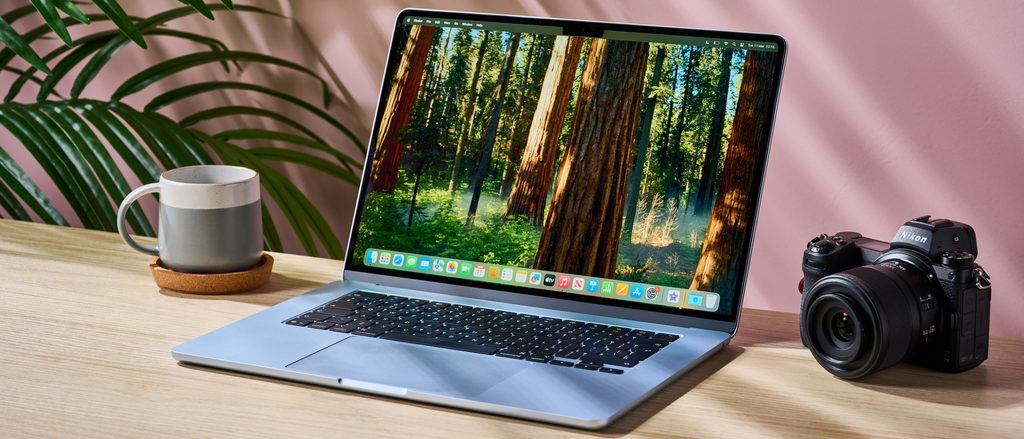
Image Source: Tech Reviewer / Hands-on Photo
Who Is It For?
The MacBook Air 15 is used by students and office professionals who require a large screen for multitasking but prioritize a thin and silent device. It fits the needs of writers and researchers who work with multiple documents side-by-side and benefit from the 15.3-inch display. It also serves as a primary computer for home users who want a large viewing area for media consumption and web browsing without the weight and thickness of a Pro-series laptop. The fanless design makes it a choice for those who work in quiet environments and do not perform sustained, high-intensity tasks like professional 3D rendering or long-form 4K video editing.
If this form factor or power doesn’t quite fit your daily work, exploring other lineup categories would be a better path.
1. Check Before You Buy
The Fanless Design and Thermal Behavior
The MacBook Air 15 does not contain an internal fan. It relies on its aluminum chassis to dissipate heat generated by the processor. This design results in completely silent operation, regardless of the tasks being performed. In a quiet environment like a library or a bedroom, the device produces no mechanical noise. However, when the system is under a heavy load for an extended period, such as during a long video export or a complex data calculation, the internal temperature rises. To prevent overheating, the system reduces the speed of the processor, a process known as thermal throttling. This reduction in speed continues until the temperature drops to a safe level.
Unified Memory and Storage Constraints
The memory in the MacBook Air 15 is “unified,” meaning it is located on the same chip as the processor and is shared between the CPU and the graphics processor. This allows for fast data access but means the memory is soldered and cannot be upgraded after purchase. If a unit is purchased with 8GB of memory, that capacity remains for the life of the device. Similarly, the storage is provided by NAND chips (the physical components that hold data) that are soldered to the board. In the 256GB version of the M2 model, the system uses a single NAND chip, which results in slower data read and write speeds compared to models with 512GB or more. The M3 model uses two NAND chips for the 256GB version, which changes the data transfer behavior.
Physical Dimensions and Portability
While the MacBook Air 15 is very thin at 1.15 cm, its 15.3-inch screen results in a wide and deep physical footprint. It weighs 1.51 kg, which is heavier than the 13-inch version but lighter than many other 15-inch laptops. Carrying the device requires a bag or sleeve specifically designed for 15-inch or 16-inch laptops. The wide chassis means that when the laptop is placed on a small airplane tray or a compact cafe table, it occupies most of the available surface area. The weight is distributed evenly across the aluminum body, allowing the lid to be opened with one hand without the base lifting off the desk.
Display Characteristics and the Notch
The 15.3-inch Liquid Retina display features a resolution of 2880 x 1864 and a brightness of 500 nits. The screen includes a “notch” at the top center, which is a physical cutout that houses the 1080p FaceTime HD camera. This notch sits in the menu bar area of the operating system. The display uses IPS technology, which ensures that colors and brightness remain consistent when the screen is viewed from the side. The glossy surface of the screen provides vibrant colors but reflects overhead lights and windows. In brightly lit environments, these reflections are visible on the display.
Battery Management and Charging
The 66.5Wh battery provides the energy required for the processor and the large screen. The system uses software to manage the health of the battery, sometimes limiting the charge to 80% to extend the physical lifespan of the cells. The laptop includes a MagSafe 3 port for charging, which uses a magnetic connector that detaches easily if the cable is pulled. It can also be charged through either of the two Thunderbolt ports. The choice of power adapter varies; some retail units include a 35W dual USB-C port adapter, while others include a 70W fast-charger. Fast-charging allows the battery to reach 50% in approximately 30 minutes.
2. How It Fits a Real Desk Setup
Screen Real Estate and Multitasking
On a desk, the 15.3-inch screen provides significantly more space than the 13-inch model. This allows for two windows to be placed side-by-side with enough width to read text comfortably in both. The 16:10 aspect ratio provides more vertical space than traditional widescreen laptops, which is useful for viewing long documents or webpages. The high resolution ensures that text remains sharp even when the font size is reduced to fit more information on the screen. When the laptop is used as the primary display, the large area reduces the need for an external monitor for many daily tasks.
Port Layout and Peripheral Connectivity
The MacBook Air 15 has a limited number of physical ports, all located on the left side of the chassis. This includes the MagSafe charging port and two Thunderbolt / USB 4 ports. The right side contains only a 3.5mm headphone jack. This layout means that all wired peripherals, such as external drives or monitors, must be connected to the left side. If a desk setup requires cables to come from the right, they must be routed behind or under the laptop. The Thunderbolt ports support high-speed data transfer and video output, but connecting more than two wired devices requires the use of an external USB-C hub or a docking station.
Audio and Video Experience
The system features a six-speaker sound system with force-canceling woofers. The speakers are located under the keyboard and fire upwards toward the screen, which reflects the sound toward the user. This results in a wider soundstage and more bass than the four-speaker system in the 13-inch model. The 1080p FaceTime HD camera provides a clear image for video conferencing, and the three-microphone array is designed to capture voice while reducing background noise. Because the speakers are integrated into the chassis, the sound quality is influenced by the surface the laptop is sitting on; a hard desk reflects the sound better than a soft surface like a lap.
External Display Support
The M2 model supports one external display with up to 6K resolution at 60Hz. The M3 model also supports one external display when the lid is open, but it can support two external displays if the laptop lid is closed (clamshell mode). This is a physical change in how the graphics processor manages the video signal. When using two external monitors with the M3 model, an external keyboard and mouse are required because the laptop’s own screen, keyboard, and trackpad are not accessible. This setup is a factor for those who intend to use the MacBook Air 15 as a desktop replacement with multiple screens.
Keyboard and Trackpad Interaction
The Magic Keyboard features a full-height function row and a Touch ID sensor in the top-right corner for signing in and authorizing payments. The keys have a 1mm travel distance, providing a tactile response that is consistent across the layout. The Force Touch trackpad is large and does not have a physical diving-board mechanism; instead, it uses haptic motors to simulate the feeling of a click. This allows the user to click anywhere on the surface with the same amount of pressure. The trackpad supports multi-finger gestures for navigating the operating system, which is a primary method of interaction for Mac users.
3. Performance by Use Case
The performance of the MacBook Air 15 is determined by the Apple silicon chip and the amount of unified memory configured at purchase.
| Use Case | Software | Rating | Reason |
| Office Productivity | Excel, Word, Outlook | Sufficient | Fast response times and large screen for multitasking |
| Web Browsing | Safari, Chrome (20+ tabs) | Sufficient | 16GB+ memory handles many active tabs without lag |
| Photo Editing | Photoshop, Lightroom | Sufficient | Color-accurate screen and fast chip handle edits well |
| Video Editing | Final Cut Pro (1080p) | Sufficient | Media engine handles ProRes and H.264 efficiently |
| 3D Rendering | Blender, Maya | Adequate | Fanless design leads to heat and speed reduction over time |
The ratings above reflect the capabilities of the hardware when running native software optimized for Apple silicon. Performance in specific applications will depend on the complexity of the project and the amount of memory available to the system.
4. Official Specs (with plain explanations)
| Category | Specification | Notes |
| CPU | Apple M2 or M3 Chip (8-core) | System-on-chip, integrated processing cores |
| Graphics | 10-core GPU | Integrated on-chip, shares unified memory |
| Memory | 8GB / 16GB / 24GB Unified Memory | Soldered to chip, non-upgradable after purchase |
| Storage | 256GB to 2TB SSD | Soldered to board, non-upgradable after purchase |
| Display | 15.3-inch Liquid Retina (2880 x 1864) | 500 nits brightness, wide color (P3) |
| Weight | 1.51 kg (3.3 lbs) | Aluminum chassis, 1.15 cm thickness |
| Battery | 66.5Wh Lithium-polymer | Integrated battery, charged via MagSafe or USB-C |
| Ports | 2x Thunderbolt / USB 4, MagSafe 3 | Physical connections located on the left side |
This series is sold with different CPUs, memory, and storage depending on the release year and generation. Please match the specifications on your current seller page with the official information above.
Source: Apple Official Product Page
The technical specifications of the MacBook Air 15 define its role as a large-format, lightweight laptop that operates without internal moving parts. These components are integrated into a single silicon package, which dictates how the system manages data and heat. Understanding these fixed hardware traits is necessary to identify the capabilities of a specific unit found on a retail website.
5. Main Variations in This Series
The MacBook Air 15 series is primarily divided by the generation of the Apple silicon chip and the internal memory and storage configurations.
- The M2 version was the initial release of the 15-inch model, while the M3 version introduced a newer processor architecture with improved graphics features.
- Memory configurations start at 8GB and can be increased to 16GB or 24GB at the time of manufacture, but these cannot be changed later.
- Storage options range from 256GB to 2TB, utilizing solid-state drive technology that is permanently attached to the main circuit board.
- The M3 model supports connecting to two external displays when the laptop lid is closed, whereas the M2 model supports one external display.
- Color options include Midnight, Starlight, Space Gray, and Silver, with the Midnight finish on the M3 model featuring a coating to reduce visible fingerprints.
6. What to Check on the Sales Page
When viewing a MacBook Air 15 listing, the specific chip generation and the memory capacity are the most important details to verify. Sellers often list different hardware configurations under the same series name.
- CPU Generation: Check whether you are getting the M2 or the M3 chip.
- Memory Capacity: Confirm if the unit has 8GB, 16GB, or 24GB of unified memory.
- Storage Size: Check if the 256GB, 512GB, 1TB, or 2TB SSD meets your local file requirements.
- Power Adapter: Verify if the listing includes the 35W Dual Port or the 70W Fast Charger.
- Keyboard Layout: Ensure the physical keyboard layout (e.g., US English, ISO) matches your preference.
The specifications on a retail page can sometimes be generalized. Matching the manufacturer’s part number with the official datasheet is the most accurate way to confirm the internal hardware.
7. Disclaimer & Buying Advice
This buying guide for the MacBook Air 15 is based on official manufacturer specifications and recurring real-world user experiences. It is completely independent, not sponsored, and does not guarantee specific performance for every unit. Hardware configurations such as the processor, memory, and storage can differ by generation and region, so please double-check the exact specifications listed on your seller’s page before purchasing.
8. Beginner Guide
If you are new to choosing computer hardware and want to understand the basics of these components, you can [Start Here] to learn more about how to read specifications.

[…] Apple MacBook Air 15 — Mid-range large-screen option […]