Image Source: Tech Reviewer / Hands-on Photo
Who Is It For?
The hardware configuration of the ASUS ROG Strix G16 is built for individuals who prioritize high frame rates in games and fast processing times in creative software. It fits a lifestyle where the laptop stays on a desk for most of the day but can be moved between locations when necessary. The 16:10 screen and the inclusion of a full-size Ethernet port make it a tool for those who need a stable wired connection and extra vertical screen space for multitasking. It is not a device for those who need to work on small airplane trays or carry a light bag for long walks.
“If this form factor or power doesn’t quite fit your daily work, exploring other lineup categories would be a better path.”
1. Check Before You Buy
The ASUS ROG Strix G16 is a 16-inch laptop designed for high-performance tasks that require significant cooling and power. Because it uses the Intel HX series processors and high-wattage NVIDIA graphics, the internal components generate a large amount of heat during operation. The physical design of the series incorporates a thick chassis to accommodate three separate cooling fans and a full-width heatsink at the rear. This thickness is a permanent characteristic of the series and affects how the device fits into standard laptop bags.
Thermal Management and Acoustic Profile
The cooling system in this series utilizes liquid metal on the processor instead of traditional thermal paste. This material transfers heat to the copper pipes more rapidly. During high-load scenarios, the three fans rotate at high speeds to move air through the vents located on the sides and the entire back edge. This results in a measurable increase in noise levels, which is audible in a quiet room. The software allows for different fan profiles, but reducing fan speed results in higher internal temperatures and a reduction in clock speeds to prevent hardware damage.
Portability and Power Requirements
The weight of the laptop is 2.5 kilograms, but the total travel weight includes the 330W power adapter. This adapter is a large, heavy brick that is necessary to reach the full performance levels of the GPU and CPU. While the laptop supports 100W charging via the USB-C port on the left side, this method does not provide enough electricity to run the dedicated graphics card at its maximum wattage. Using a smaller USB-C charger is sufficient for office tasks but results in battery drain or reduced frame rates during gaming or video rendering.
Display Characteristics and Aspect Ratio
The 16:10 aspect ratio provides more vertical space compared to traditional 16:9 screens. This means more lines of code or rows in a spreadsheet are visible at once. The screen is surrounded by thin bezels, but the bottom chin is larger to accommodate the hinge mechanism. The QHD+ panel option offers higher pixel density and color accuracy, while the FHD+ option consumes less power. Both panels are matte to reduce reflections from overhead lights, but the maximum brightness levels vary between the two configurations.
Internal Expansion and Maintenance
The bottom panel is held in place by several screws, including a pop-open screw that helps lift the plastic cover. Inside, there are two slots for DDR5 memory and two slots for M.2 NVMe storage. This means the laptop is not limited to the RAM or SSD capacity chosen at the time of purchase. However, the wireless card is also a separate module, which can be replaced if hardware compatibility issues arise with certain routers. The battery is large at 90Wh, but the high power draw of the HX processor means the operating time away from a wall outlet is limited when the dedicated GPU is active.
2. How It Fits a Real Desk Setup
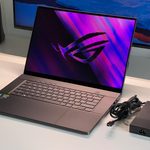
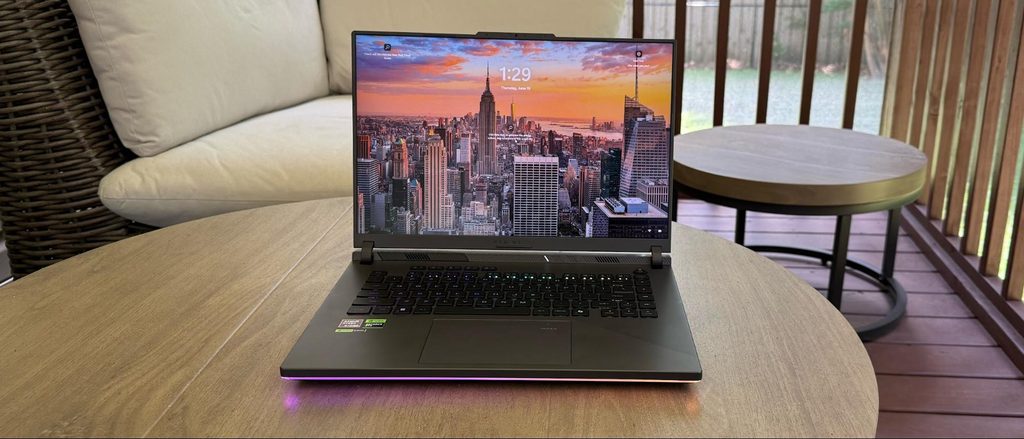
Placing the ASUS ROG Strix G16 on a desk requires more depth than a standard 14-inch or 15-inch office laptop. The rear of the laptop extends past the hinge to house the cooling fins, which means the screen sits slightly forward. This design choice keeps the heat away from the keyboard area but increases the total footprint. The power jack is located on the left side, along with the Ethernet port and HDMI 2.1. This leaves the right side mostly clear for mouse movement, as only two USB-A ports are located there.
The RGB lighting is a prominent feature of this series. A light bar runs along the front edge of the chassis, casting a glow onto the desk surface. The keyboard also features per-key or four-zone RGB lighting, depending on the specific model. These lights can be synchronized with other peripherals, but they also increase the visibility of the device in a professional environment. The plastic deck has a smooth finish that resists some smudges, but the oils from hands will eventually leave visible marks on the palm rest area.
The keyboard includes dedicated hotkeys at the top for volume control and fan speed, which are separate from the standard function row. The key travel is 2.0mm, which provides a distinct tactile feel when typing. The touchpad is large and centered, but it can be disabled during gaming to prevent accidental inputs. Because the exhaust vents blow hot air out of the sides, placing items like chocolate or sensitive electronics directly next to the laptop vents during long sessions results in those items becoming warm.
The 720p webcam is located in a small notch at the top of the display. This notch also serves as a tab to help lift the lid with one finger. The hinge is stiff enough to prevent the screen from wobbling when typing on an uneven surface. For those using external monitors, the HDMI 2.1 port and the Thunderbolt 4 port both support high-resolution outputs, allowing the laptop to serve as the center of a multi-screen workstation.
3. Performance by Use Case
The following ratings are based on the middle-tier configuration, typically featuring an Intel i7 or i9 processor and an RTX 4060 or 4070 GPU. Performance varies if the entry-level RTX 4050 or the high-end RTX 4080 is selected.
| Use Case | Software | Rating | Reason |
| AAA Gaming | Cyberpunk 2077, Starfield | Sufficient | High TGP allows for high frame rates at native resolution. |
| Video Editing | Premiere Pro, DaVinci Resolve | Sufficient | Dedicated GPU and HX CPU handle 4K timelines and rendering. |
| Professional 3D | Blender, AutoCAD | Sufficient | Large VRAM and high core count support complex 3D modeling. |
| Office Work | Excel, Word, Chrome | Sufficient | 16:10 screen shows more data; 16GB+ RAM handles many tabs. |
| Portability | Carrying in a backpack | Not enough | 2.5kg weight and large 330W adapter are heavy for daily travel. |
| Battery Life | Unplugged productivity | Adequate | 90Wh battery lasts a few hours in eco mode, but not a full day. |
The ratings above reflect the capabilities of the hardware under standard operating conditions. Actual performance depends on the specific power profile selected in the software and the ambient temperature of the room.
4. Official Specs (with plain explanations)
| Category | Specification | Notes |
| CPU | Intel Core i7-13650HX to i9-14900HX | High-power HX series, 24-core maximum |
| Graphics | NVIDIA RTX 4050 to 4080 Laptop GPU | Dedicated GPU, TGP up to 175W |
| Memory | Up to 32GB DDR5-5600 | Two SO-DIMM slots, user-replaceable |
| Storage | Up to 2TB PCIe 4.0 NVMe | Two M.2 slots, expansion possible |
| Display | 16-inch QHD+ 240Hz or FHD+ 165Hz | 16:10 aspect ratio, G-Sync supported |
| Weight | 2.50 kg (5.51 lbs) | Laptop body only, excluding power adapter |
| Battery | 90Wh | High capacity, supports 100W USB-C charging |
| Ports | Thunderbolt 4, HDMI 2.1, RJ45 | Rear and side-mounted physical connections |
This series is sold with different CPUs, memory, and storage depending on the release year and generation. Please match the specifications on your current seller page with the official information above.
Source: ASUS Official Product Page
The specifications listed above represent the core hardware components that define the performance and physical footprint of the device. These parts determine how the laptop handles heat, how much data it can store, and the visual clarity of the built-in screen during various tasks.
5. Main Variations in This Series
- The graphics processing unit ranges from the RTX 4050 to the RTX 4080, which changes the total power draw and the size of the internal cooling system.
- Display options include a Nebula Display with a 240Hz refresh rate and QHD+ resolution or a standard FHD+ panel with a 165Hz refresh rate.
- Processor choices span across the 13th and 14th generation Intel HX series, affecting the number of available cores for multi-threaded work.
- Memory configurations typically start at 16GB, but the two physical slots allow for a maximum of 64GB through manual upgrades after purchase.
6. What to Check on the Sales Page
When looking at a specific listing for the ASUS ROG Strix G16, the internal components can vary significantly even if the model name looks the same. Small differences in the model number can mean a different screen or a different GPU power limit.
- CPU Generation: Check whether you are getting the 13th or 14th Gen Intel Core processors.
- GPU Wattage (TGP): Verify if the RTX graphics card is rated for the full 140W or 175W, as lower wattage versions perform differently.
- Screen Resolution and Refresh Rate: Confirm if the panel is the 240Hz QHD+ Nebula Display or the 165Hz FHD+ version.
- RAM Configuration: Check if the 16GB or 32GB is provided as a single stick or two sticks, as this affects memory bandwidth.
- Included Accessories: Some regions include a ROG backpack or mouse, while others sell the laptop and power brick only.
7. Disclaimer & Buying Advice
This buying guide for the ASUS ROG Strix G16 is based on official manufacturer specifications and recurring real-world user experiences. It is completely independent, not sponsored, and does not guarantee specific performance for every unit. Hardware configurations such as the processor, memory, and storage can differ by generation and region, so please double-check the exact specifications listed on your seller’s page before purchasing.
8. Beginner Guide
If you are new to choosing computer hardware and want to understand the basic terms used in this guide, you can [Start Here] to learn more about how to match a laptop to your needs.