
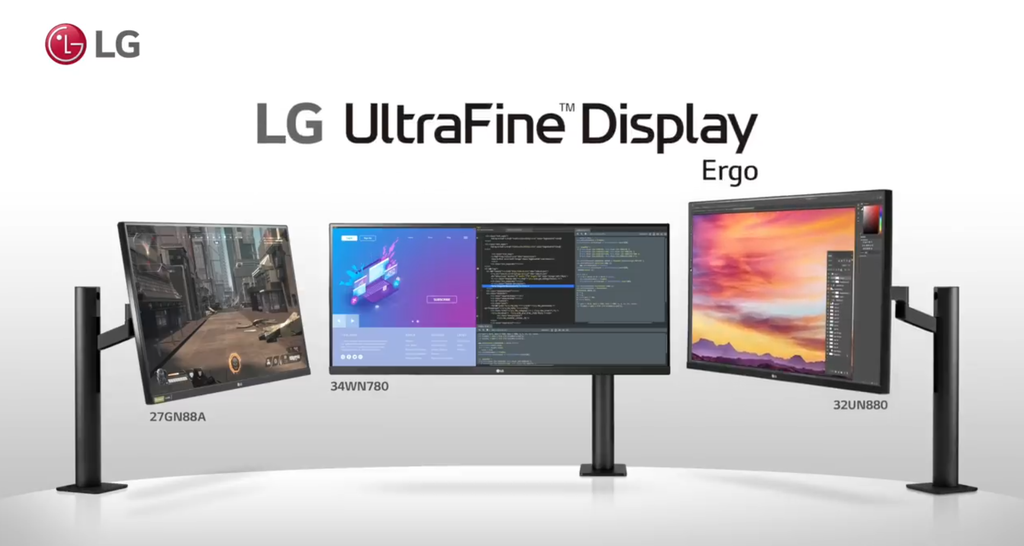
Image Source: LG Official
Who Is It For?
The LG UltraFine series fits users who require extreme pixel density and deep integration with the macOS ecosystem. This series suits professional photographers, video editors, and graphic designers who need a “Retina” experience—where individual pixels are invisible at a normal viewing distance—on a desktop screen. Because the Mac-specific models (4K and 5K) lack physical buttons and rely on software for adjustments, they fit users who prefer controlling brightness and volume directly through their computer keyboard. The UltraFine OLED Pro models fit high-end colorists who require the per-pixel dimming of an OLED panel for HDR (High Dynamic Range) mastering.
However, this series does not fit competitive gamers, as the refresh rate—how many times the image updates each second—is physically limited to 60Hz. It is not for users in highly bright environments with windows directly behind them, as the glossy or semi-glossy coatings on the Mac-centric models reflect light like a mirror. The series also does not fit Windows PC users who require easy access to physical menu buttons, as many UltraFine models omit these entirely. If this form factor or the specific port limitations don’t quite fit your daily work, exploring other lineup categories would be a better path.
1. How This Line Is Grouped
LG divides the UltraFine name into two distinct categories: the Mac-centric IPS models and the professional-grade OLED models. While they share the “UltraFine” branding, their physical technology and intended desk use are different.
| Tier | Typical Names | Rough Position |
| Mac-Centric 4K | 24MD4KL | 24-inch, 4K, Thunderbolt 3, built for Mac. |
| Mac-Centric 5K | 27MD5KL | 27-inch, 5K, Thunderbolt 3, built for Mac. |
| Professional OLED | 27EP950, 32EP950 | 27-32 inch, 4K, RGB OLED, for color grading. |
| OLED Pro (High-End) | 32BP95E | 32-inch, 4K, OLED with self-calibration sensor. |
Mac-Centric UltraFine (MD Series)
The 24-inch and 27-inch MD models are the result of a partnership between LG and Apple. These monitors use Thunderbolt 3, a high-speed cable standard that carries video, data, and power simultaneously. The 27-inch model features a 5K resolution (5120 x 2880), which provides the exact same pixel density as an iMac or a MacBook Pro screen. These models are physically minimalist, featuring no buttons on the front, sides, or back. They are intended to be “plug-and-play” extensions of a Mac laptop or desktop.
UltraFine OLED Pro (EP and BP Series)
The OLED Pro models move away from the Mac-only focus and target the broader professional film and photography industry. These use RGB OLED panels, which differ from the OLED panels found in TVs. In an RGB OLED, every pixel is made of red, green, and blue sub-pixels that produce their own light. This allows for a 1,000,000:1 contrast ratio, meaning black areas of the screen are completely dark. These models include standard physical buttons and a wider variety of ports, including DisplayPort and HDMI, making them compatible with both Windows and Mac workstations.
2. Check Before You Buy
The Absence of Physical Controls
On the 24MD4KL and 27MD5KL models, there are no physical buttons for power, brightness, or volume. The monitor turns on automatically when it detects a signal from a Thunderbolt cable. To change the brightness, the user must use the slider in the macOS System Settings or the brightness keys on an Apple keyboard. While this works seamlessly on a Mac, a Windows user may find it difficult or impossible to adjust the monitor’s settings without third-party software workarounds.
Thunderbolt 3 vs. Standard USB-C
The UltraFine 5K requires a Thunderbolt 3 connection to reach its full 5120 x 2880 resolution. Thunderbolt 3 is a specific hardware standard that uses the USB-C connector shape but offers much higher bandwidth (40Gbps). If this monitor is plugged into a standard USB-C port on a budget laptop that does not support Thunderbolt, the screen may remain black or be limited to a lower 4K resolution. Checking the “lightning bolt” icon next to the computer’s port is a physical requirement before purchasing the 5K model.
Glossy Screen Reflections
The Mac-centric UltraFine models feature a glossy screen surface. Glossy screens make colors look more vibrant and blacks look deeper because there is no matte layer to scatter the light. However, in a room with overhead fluorescent lights or a window, the screen will show a clear reflection of the room. This can cause eye strain as the user’s eyes struggle to focus on the screen content and the reflection simultaneously. The OLED Pro models typically use a matte or semi-matte finish to avoid this issue.
OLED Burn-in and Static Elements
The UltraFine OLED Pro models are susceptible to “burn-in,” which is permanent image retention. This occurs when static elements, such as a software taskbar or a window border, are displayed at high brightness for thousands of hours. While these monitors include “Pixel Shift” technology to move the image slightly and prevent wear, they are not intended for 12-hour-a-day office work involving static spreadsheets. They are physically optimized for video playback and photo editing where the image content changes frequently.
3. How It Fits a Real Desk Setup
Single-Cable Power Delivery
The UltraFine series acts as a power source for laptops. The 27-inch 5K model provides up to 94W of power delivery through the Thunderbolt cable. This is enough to charge a 16-inch MacBook Pro even while it is performing heavy video rendering. On a real desk, this eliminates the need for the laptop’s original power brick, leaving only one thin cable running from the monitor to the computer. The 24-inch model provides 85W, which fits smaller laptops and tablets.
Stand Ergonomics and Stability
The stands for the 24-inch and 27-inch Mac-centric models offer height and tilt adjustments but do not allow the screen to “swivel” (turn left and right) or “pivot” (rotate to a vertical position). The base is a heavy, flat square that provides good stability, but the neck of the stand is known to have a slight “wobble” if the desk is not sturdy. If the user bumps the desk while typing, the screen may shake for a second or two.
VESA Mounting and the Rear Cover
For users who prefer a monitor arm, the UltraFine series supports the VESA 100x100mm standard (the standard screw pattern for mounting). However, the 5K model requires the user to remove the original stand and snap on a specific VESA cover plate included in the box. Because the ports are located directly in the center of the back, some large, square monitor arm plates may partially block the USB-C ports. Using a monitor arm with a smaller, circular or “X-shaped” plate is often necessary.
Integrated Camera and Speakers
The 27-inch 5K model includes a built-in webcam, microphone, and stereo speakers. The camera is located at the top center of the frame. Because the monitor lacks physical controls, the volume of the speakers is controlled by the computer. The speakers are “down-firing,” meaning the sound bounces off the desk surface. This fits a minimalist desk setup where the user does not want external speakers or a separate webcam cluttering the workspace.
4. Sizes and Models in This Line
The UltraFine line is focused on specific sizes that maximize PPI (Pixels Per Inch). PPI is a measure of how many pixels are packed into one inch of the screen; higher PPI results in sharper text and images.
| Size | Common Resolution | PPI | Notes |
| 24″ | 3840 x 2160 (4K) | 183 | Extremely sharp for its size; uses two Thunderbolt ports. |
| 27″ | 5120 x 2880 (5K) | 218 | Matches Apple’s “Retina” standard; built-in camera. |
| 27″ | 3840 x 2160 (4K) | 163 | OLED Pro model; focuses on contrast over density. |
| 32″ | 3840 x 2160 (4K) | 138 | OLED Pro model; large workspace for video grading. |
The 24-inch 4K model (24MD4KL) is unique because it features two Thunderbolt 3 ports. This allows for “daisy-chaining,” where the user connects the first monitor to the Mac, and then a second 4K monitor or a high-speed hard drive to the first monitor. This is a physical requirement for users with limited ports on their laptops.
The 27-inch 5K model (27MD5KL) is the flagship for Mac users. At 218 PPI, text looks as sharp as a printed book. This resolution is exactly double that of a standard 1440p monitor, which allows macOS to scale the interface perfectly without any “blurriness” that can occur on non-standard resolutions.
The 32-inch OLED Pro (32EP950) is a large-format professional tool. While the PPI is lower than the 5K model, the 32-inch size provides more physical room for complex video timelines in software like DaVinci Resolve. This model is significantly more expensive due to the RGB OLED panel technology.
5. Performance by Use Case
The performance of an UltraFine monitor is defined by its color gamut—the range of colors it can show—and its contrast.
| Use Case | Software / Task | Rating | Reason |
| Photo Editing | Photoshop, Lightroom | Sufficient | 99% P3 color coverage ensures accurate print/web colors. |
| Video Grading | DaVinci Resolve, Premiere | Sufficient | OLED models provide true black for HDR mastering. |
| Mac Productivity | Safari, Xcode, Pages | Sufficient | High PPI makes text extremely sharp and easy to read. |
| Competitive Gaming | Valorant, CS2 | Not enough | 60Hz refresh rate and slow response times cause blur. |
| Console Gaming | PS5, Xbox Series X | Adequate | 4K is supported, but lacks 120Hz and VRR features. |
| General Office | Excel, Outlook | Sufficient | Excellent clarity, but glossy screen may reflect office lights. |
The “Sufficient” rating for Mac productivity is due to the P3 color gamut. P3 is a color standard that includes 25% more colors than the standard sRGB used on most office monitors. This is a physical requirement for users who need to see vibrant reds and greens in their digital work.
6. Official Specs (with plain explanations)
| Category | Specification | Notes |
| Panel Type | IPS or RGB OLED | IPS = wide angles; OLED = perfect blacks. |
| Resolution | 4K (UHD) or 5K | Total number of pixels; 5K has 14.7 million pixels. |
| Brightness | 400 – 500 nits | Nits = unit of brightness; 500 is very bright for indoors. |
| Refresh Rate | 60Hz | The screen updates 60 times per second. |
| Color Gamut | 98% – 99% DCI-P3 | The percentage of professional film colors shown. |
| Connectivity | Thunderbolt 3, USB-C | Thunderbolt is required for 5K resolution. |
| Contrast Ratio | 1,000:1 (IPS) / 1M:1 (OLED) | The difference between the brightest and darkest points. |
This line is sold with different tier names, sizes, refresh rates, and panels depending on the exact model and region. Please match the specifications on your current seller page with the official information above.
Source: LG Official Product Page
The “nits” measurement is important for these monitors. At 500 nits, the UltraFine 5K is significantly brighter than a standard office monitor (which is usually 250-300 nits). This helps the screen remain visible even when there is some ambient light reflecting off the glossy surface.
7. Main Variations in This Line
The most significant variation is the panel technology. The “MD” models use IPS (In-Plane Switching) panels, which are known for consistent colors and wide viewing angles. These are the standard for most professional work. The “EP” and “BP” models use OLED, which is a premium technology where each pixel is its own light source.
Another variation is the inclusion of a calibration sensor. The 32BP95E model includes a motorized self-calibration sensor that hangs over the top of the screen. This sensor automatically checks the monitor’s color accuracy and makes adjustments without the user needing to buy a separate calibration tool.
The 24-inch model (24MD4KL) is a variation that replaces the older 21.5-inch UltraFine. It is the only model in the line that features three downstream USB-C ports in addition to the two Thunderbolt ports, acting as a more capable USB hub for peripherals like keyboards and mice.
8. What to Check on the Sales Page
- Line / Tier / Size: Check whether you are getting the UltraFine “MD” (Mac-centric) or “EP/BP” (OLED Pro) model, as they serve very different purposes.
- Thunderbolt 3 Support: Ensure your computer has a Thunderbolt 3 or 4 port if you are buying the 5K model. A standard USB-C port will not work at full resolution.
- Model Year: Look for the “KL” suffix (e.g., 27MD5KL), which indicates the updated version with USB-C compatibility and better power delivery.
- Included Cables: Verify that the box includes the official Thunderbolt 3 cable (usually marked with a lightning bolt), as standard USB-C cables will not support the 5K signal.
- Warranty for OLED: If buying an OLED Pro model, check the seller’s policy on “burn-in” or permanent image retention.
9. Disclaimer & Buying Advice
This buying guide for the LG UltraFine Series is based on official manufacturer specifications and recurring real-world user experiences. It is completely independent, not sponsored, and does not guarantee specific performance for every unit. Tier name, screen size, refresh rate, panel type, and ports can differ by model and region, so please double-check the exact specifications listed on your seller’s page before purchasing.
10. Beginner Guide
If you are new to monitor terms like refresh rate (Hz), panel type (IPS/OLED), and resolution (4K/5K), read the basics in our [Start Here]. Understanding the difference between a standard USB-C port and a Thunderbolt port is essential before choosing an LG UltraFine monitor for your Mac or PC.

[…] LG UltraFine 27MD5KL — High-resolution 5K display optimized for macOS […]