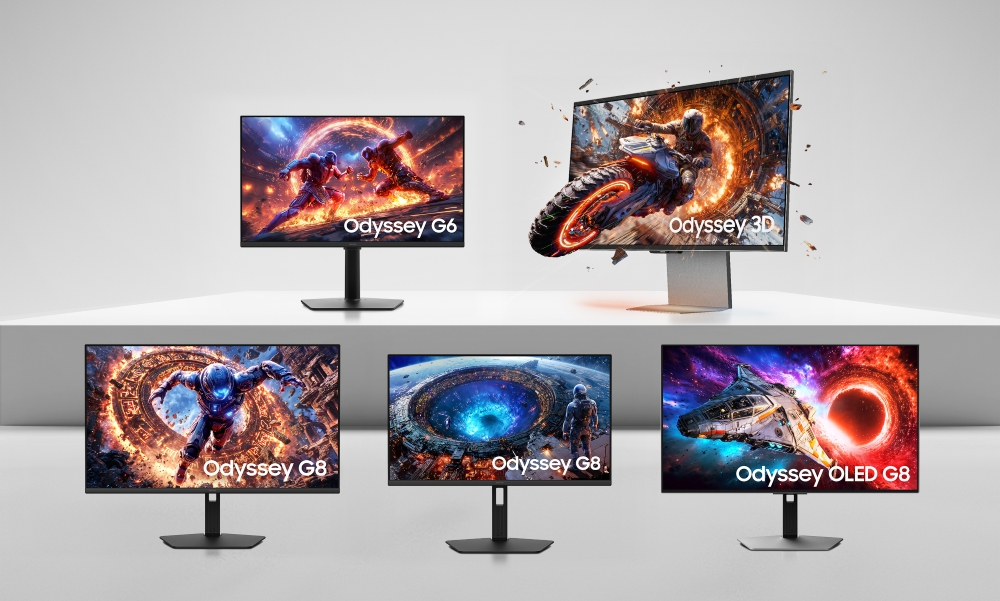
Image Source: Samsung Official
Who Is It For?
The Samsung Odyssey series fits users who prioritize high-immersion gaming and deep contrast in light-controlled environments. This series suits players of cinematic RPGs (Role-Playing Games) and racing simulators who benefit from the aggressive 1000R curvature—a physical arc that matches the human field of view—found on many Odyssey models. Because the lineup includes QD-OLED (Quantum Dot Organic Light Emitting Diode) and Mini-LED options, it fits enthusiasts who play in dark rooms and want “infinite” contrast or high-peak brightness for HDR (High Dynamic Range) content.
However, this series does not fit professional architects or graphic designers who require perfectly straight lines, as the heavy curvature physically distorts linear geometry on the screen. It is not for users with shallow desks, as the “V-shaped” stands are physically deep and occupy significant surface area. The Odyssey OLED models do not fit users who primarily perform 10-hour workdays of static spreadsheet management due to the physical risk of “burn-in”—permanent image retention—and subpixel layouts that can make text appear less sharp than on a standard LCD. If this form factor or the aggressive gaming aesthetic doesn’t quite fit your daily work, exploring other lineup categories would be a better path.
1. How This Line Is Grouped
Samsung organizes the Odyssey line into a numbered hierarchy, moving from entry-level displays to flagship ultrawide and specialty monitors. The “G” prefix followed by a number indicates the performance tier and feature set.
| Tier | Typical Names | Rough Position |
| Entry | Odyssey G3 | 1080p, flat, 144Hz, basic gaming features. |
| Mainstream | Odyssey G5 | 1440p, 1000R curve, 144Hz-165Hz, VA panels. |
| Performance | Odyssey G6 / G7 | 1440p to 4K, 240Hz, high-speed VA or IPS. |
| Flagship | Odyssey G8 / G9 | OLED or Mini-LED, 240Hz+, Ultrawide (21:9/32:9). |
| Specialty | Odyssey Ark | 55-inch, 1000R curve, rotating “Cockpit Mode.” |
Entry and Mainstream (G3 and G5)
The Odyssey G3 is the only flat monitor in the lower tiers, featuring a 1080p (Full HD) resolution. It fits users with limited desk space or entry-level graphics cards. The Odyssey G5 is the core mainstream model, introducing the 1000R curvature. These models typically use VA (Vertical Alignment) panels, which are known for high contrast—the difference between the brightest and darkest points—but can exhibit “black smearing,” where dark objects leave a faint trail during fast movement.
Performance and Neo (G6, G7, and Neo)
The G6 and G7 tiers increase the refresh rate—how many times the image updates each second—to 240Hz. The “Neo” designation (e.g., Neo G7, Neo G8) indicates the use of Mini-LED backlighting. Unlike standard LCDs, Mini-LEDs use thousands of tiny lights that can be dimmed in specific zones. This allows the monitor to show bright highlights and deep blacks simultaneously, which is a physical requirement for high-quality HDR gaming.
Flagship and OLED (G8, G9, and OLED)
The G8 and G9 models represent the current peak of the line. The Odyssey OLED G8 (34-inch) and OLED G9 (49-inch) use self-emissive pixels that do not require a backlight. This results in a 0.03ms response time—the time it takes for a pixel to change color—which is physically impossible for any LCD to reach. The G9 models are “Super Ultrawide,” featuring a 32:9 aspect ratio, which is equivalent to two 27-inch monitors placed side-by-side without a plastic border in the middle.
2. Check Before You Buy
The 1000R Curvature and Visual Distortion
The 1000R curve is a defining physical characteristic of the Odyssey G5, G7, G8, and G9 (non-OLED) models. While this curve increases immersion by wrapping the screen around the user’s vision, it distorts straight lines. In software like Excel or AutoCAD, a straight horizontal line will appear to bend downward at the edges. This is a physical property of the screen shape and cannot be corrected via software. Users who perform precision drafting or architectural work may find this distortion interferes with their accuracy.
Scanlines and High-Refresh VA Panels
A recurring physical phenomenon in high-refresh Odyssey VA panels (specifically the G7 and Neo G8) is the appearance of “scanlines.” These are faint, horizontal lines that become visible when the monitor is set to its maximum refresh rate (240Hz) or when displaying specific colors like bright orange or blue. This is a characteristic of the panel’s driving hardware and is more noticeable to users who sit close to the screen. Reducing the refresh rate to 144Hz or 120Hz often makes these lines disappear, but this limits the monitor’s performance.
OLED Purple Tint and Ambient Light
The Odyssey OLED models (G6, G8, G9) use a QD-OLED panel that lacks a traditional polarizing layer. In a room with bright overhead lights or a window directly facing the screen, the “blacks” on the monitor can take on a dark purple or gray tint. This is a physical reaction of the panel to external light. To see the “infinite contrast” and true blacks that OLED is known for, the monitor must be used in a room where the user can control and dim the lighting.
Tizen Smart OS and Input Delays
Newer Odyssey models (G6, G8, G9, and Ark) include Samsung’s Tizen Smart OS, the same software found on Samsung TVs. This allows the monitor to run apps like Netflix or YouTube without a computer. However, this introduces a software layer that can cause a delay when switching between inputs or turning the monitor on. Unlike a “dumb” monitor that displays a signal instantly, these smart models require navigating a menu or waiting for the OS to boot, which adds several seconds to the daily workflow.
3. How It Fits a Real Desk Setup
Stand Depth and the “V-Shape” Footprint
Odyssey monitors typically use a wide, V-shaped stand with long legs. On a desk with a depth of 60 cm (24 inches), the front legs of an Odyssey G7 or G9 stand can extend 30 cm forward. This occupies half of the desk’s depth, leaving limited room for a large mousepad or a keyboard. The stand provides height, tilt, and swivel adjustments, but the physical depth is a requirement for balancing the heavy, curved panels.
Weight and VESA Mounting
Because of the internal cooling, Mini-LED backlights, and heavy curvature, Odyssey monitors are significantly heavier than standard office screens. An Odyssey Neo G9 (49-inch) weighs approximately 14.5 kg (32 lbs) without the stand. For users who prefer a monitor arm, the VESA 100×100 standard is supported, but a standard budget arm will physically fail or sag under this weight. A high-capacity, heavy-duty gas-spring arm is a physical requirement for the larger Odyssey models.
Cable Management and CoreSync Lighting
The back of the monitor features a circular “CoreSync” or “Infinity Core” lighting zone. This LED ring can be set to match the colors on the screen, reflecting light off the wall behind the monitor. This provides “bias lighting,” which can reduce eye strain in dark rooms. Samsung includes a plastic cover for the port area and a channel in the stand to route cables. However, the ports face downwards or outwards depending on the model, and the thick cables required for 4K 240Hz can be difficult to bend within the tight space of the rear cover.
Viewing Distance for Ultrawide Models
The Odyssey G9 (49-inch) and Neo G9 (57-inch) are physically massive, measuring up to 140 cm (55 inches) in width. On a standard desk, these monitors fill the user’s entire field of vision. To avoid neck strain from constantly turning the head, a viewing distance of at least 80 cm to 100 cm (31-39 inches) is necessary. This requires a desk with a depth of at least 80 cm, as a standard 60 cm desk will place the screen too close to the user’s face.
4. Sizes and Models in This Line
The Odyssey line covers a wide range of sizes, with specific aspect ratios—the ratio of width to height—assigned to different tiers.
| Size | Common Resolution | Aspect Ratio | Notes |
| 24″ / 25″ | 1920 x 1080 (FHD) | 16:9 | G3 and G4; flat screens for high-speed eSports. |
| 27″ / 32″ | 2560 x 1440 (QHD) | 16:9 | G5, G6, G7; the standard for 1440p gaming. |
| 28″ / 32″ | 3840 x 2160 (4K) | 16:9 | G7 and G8; high detail for 4K gaming. |
| 34″ | 3440 x 1440 (UWQHD) | 21:9 | OLED G8; curved ultrawide for cinematic games. |
| 49″ | 5120 x 1440 (DQHD) | 32:9 | G9 series; equivalent to two 27-inch screens. |
| 57″ | 7680 x 2160 (DUHD) | 32:9 | Neo G9; equivalent to two 32-inch 4K screens. |
| 55″ | 3840 x 2160 (4K) | 16:9 | Odyssey Ark; a massive, curved 16:9 display. |
The 27-inch and 32-inch models are the most common for desktop use. At 1440p, the 27-inch model has a higher pixel density—how many pixels are packed into an inch—making text look sharper than on the 32-inch model at the same resolution.
The 49-inch “Super Ultrawide” (G9) is a specialized variation. It provides a 32:9 aspect ratio, which fits racing simulators and flight simulators perfectly, as it provides a wider peripheral view. However, many console games and streaming services (like Netflix) do not support this width and will display large black bars on the sides of the screen.
The 57-inch Neo G9 is a unique model that provides “Dual UHD” resolution. This is physically the same as placing two 32-inch 4K monitors side-by-side. To run this monitor at its full 240Hz refresh rate, the user must have a graphics card that supports DisplayPort 2.1, which is a physical hardware requirement currently found only on the latest high-end cards.
5. Performance by Use Case
The performance of an Odyssey monitor is defined by its panel type (VA, IPS, or OLED) and its refresh rate.
| Use Case | Software / Task | Rating | Reason |
| Competitive FPS | Valorant, CS2, Apex | Sufficient | High refresh rates (240Hz+) and low input lag. |
| Cinematic RPGs | Cyberpunk 2077, Elden Ring | Sufficient | 1000R curve and high contrast (VA/OLED) enhance immersion. |
| Console Gaming | PS5, Xbox Series X | Sufficient | HDMI 2.1 support (on G7+) allows 4K 120Hz. |
| Office Work | Excel, Word, Outlook | Adequate | Sharp text on 4K, but curve distorts lines and OLED has burn-in risk. |
| Video Editing | Premiere Pro, Resolve | Adequate | Ultrawide space is good, but curve affects perspective. |
| Photo Editing | Photoshop, Lightroom | Not enough | Curvature distorts geometry; VA color shift affects accuracy. |
The “Sufficient” rating for cinematic gaming is due to the high contrast ratios. Contrast is the difference between the brightest and darkest parts of an image. Odyssey VA panels typically offer a 2500:1 to 4000:1 contrast ratio, which is much higher than the 1000:1 found on standard IPS office monitors.
6. Official Specs (with plain explanations)
| Category | Specification | Notes |
| Refresh Rate | 144Hz to 360Hz | How many times the image updates each second. |
| Response Time | 1ms (GtG) / 0.03ms (OLED) | Time for a pixel to change color; lower is better. |
| Brightness | 250 nits to 2000 nits (Peak) | Nits = unit of brightness; 400+ is good for indoors. |
| Panel Type | VA, IPS, or QD-OLED | VA = contrast; IPS = angles; OLED = perfect blacks. |
| Curvature | Flat, 1800R, or 1000R | 1000R is the most aggressive “human-eye” curve. |
| Connectivity | HDMI 2.1, DP 1.4 / 2.1 | HDMI 2.1 is required for 4K 120Hz on consoles. |
| Sync Tech | G-Sync / FreeSync Premium | Prevents “tearing” (split images) during gaming. |
This line is sold with different tier names, sizes, refresh rates, and panels depending on the exact model and region. Please match the specifications on your current seller page with the official information above.
Source: Samsung Official Product Page
The “GtG” (Gray to Gray) response time is a measure of how quickly a pixel can shift. A 0.03ms GtG rating on an OLED model means that fast-moving objects will have zero “ghosting” or trailing blur, which is a physical requirement for the clearest possible motion.
7. Main Variations in This Line
The most significant variation is the panel technology. “Standard” Odyssey models use traditional LED backlights. “Neo” models use Mini-LED backlights for better HDR. “OLED” models use self-emissive pixels for the best contrast and speed but lower peak brightness for full-white screens.
Another variation is the “Smart” vs. “Non-Smart” models. Models with the “S” suffix or those released after 2023 often include the Tizen Smart OS and a remote control. These function like a hybrid between a monitor and a TV. Older models or the entry-level G3/G5 are “dumb” monitors that only display the signal from the connected computer.
The “G7” name is used for two very different monitors: the original 1440p 240Hz curved VA model and the newer G70B, which is a flat 4K 144Hz IPS model. A buyer must check the specific model number (e.g., G75T vs. G70B) to ensure they are getting the screen shape and panel type they expect.
8. What to Check on the Sales Page
- Line / Tier / Size: Check whether you are getting the Odyssey G-series model, not a Samsung “Smart Monitor” (M-series) or “ViewFinity” (Professional) model.
- Panel Type: Confirm if the model is “VA,” “IPS,” or “OLED.” This is the most important factor for contrast and viewing angles.
- Curvature: Verify if the screen is “Flat,” “1800R” (subtle), or “1000R” (aggressive).
- HDMI Version: For 4K 120Hz gaming on consoles, ensure the model has HDMI 2.1.
- Refresh Rate: Verify the Hz (e.g., 144Hz, 240Hz). Ensure your computer’s graphics card can reach these speeds at the monitor’s resolution.
9. Disclaimer & Buying Advice
This buying guide for the Samsung Odyssey Series is based on official manufacturer specifications and recurring real-world user experiences. It is completely independent, not sponsored, and does not guarantee specific performance for every unit. Tier name, screen size, refresh rate, panel type, and ports can differ by model and region, so please double-check the exact specifications listed on your seller’s page before purchasing.
10. Beginner Guide
If you are new to monitor terms like refresh rate (Hz), panel type (VA/IPS/OLED), and resolution (1080p/1440p/4K), read the basics in our [Start Here]. Understanding how these technical specs interact with your gaming hardware and desk space will help you determine if the performance-focused Samsung Odyssey series fits your specific needs.