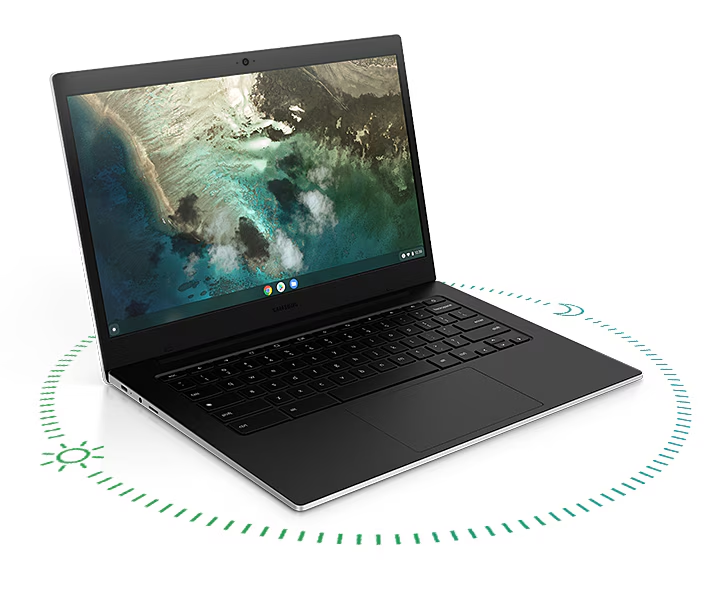
Image Source: Samsung Official
Who Is It For?
The Galaxy Chromebook Go runs Chrome OS on a 14-inch HD panel inside a 1.45 kg chassis built for students or light mobile workers who rely on browser tabs, Google Workspace, and cloud storage. Users who write papers, join video calls, stream media, and keep most files online fit the daily pattern. The thin 15.9 mm body and long battery support all-day classroom or café use, yet local storage is limited to eMMC capacities of 32–128 GB plus a microSD card. Native Windows applications and heavy local video editing are unavailable. The machine depends on internet access or offline Chrome apps for most tasks. If this form factor or power doesn’t quite fit your daily work, exploring other lineup categories would be a better path.
1. Chrome OS Limits and Fixed Local Capacity
Chrome OS and app restrictions
The operating system is Chrome OS. It runs web apps, Android apps from the Play Store, and Linux containers on supported models, but it cannot install native Windows .exe programs. Any workflow that requires desktop Windows software must move to a different machine or a remote desktop solution. Confirm on the product page that Chrome OS update support matches the expected lifespan.
eMMC storage and microSD expansion
Internal storage uses eMMC modules of 32 GB, 64 GB, or 128 GB. After the operating system and basic apps occupy space, free capacity for offline files is modest. A microSD card slot allows additional storage that travels with the device, yet the card is slower than an internal SSD and can be removed. Higher local media libraries require external drives or cloud accounts.
Port layout and charging
Two USB-C ports, one USB-A 3.2 port, a 3.5 mm headphone jack, and a microSD reader are fixed. One USB-C port accepts the 45 W USB-C charger. There is no HDMI port, so external displays need a USB-C adapter or dock. Optional LTE models add a Nano-SIM slot. These interfaces cannot be altered after purchase.
These constraints keep the machine oriented toward cloud-centric school and light work while requiring the correct storage and connectivity choices at purchase.
2. Daily Carry Weight and School-Day Battery
1.45 kg in a backpack
The closed chassis measures 327.1 × 225.6 × 15.9 mm and weighs 1.45 kg. It fits standard 14-inch sleeves and most student backpacks without noticeable bulk. On a desk or cafeteria table the 14-inch footprint leaves room for a notebook or mouse beside it.
Fan and thermal behavior
The low-power Celeron processor produces little heat. Under light browsing and document work the system stays silent or near-silent. Heavier multi-tab loads or video playback may spin the fan, but noise remains low enough for classroom use.
Battery for a full school or work day
The 42.3 Wh battery supports long stretches of web browsing, document editing, and video streaming. Real-world mixed use commonly reaches a full day on a single charge. The compact 45 W USB-C charger travels easily for overnight top-ups or continuous high-brightness sessions.
3. Performance by Use Case
The series uses an Intel Celeron N4500 processor with integrated UHD Graphics and 4 GB or 8 GB of memory. All ratings assume typical Chrome OS workloads.
| Use Case | Software | Rating | Reason |
|---|---|---|---|
| Web browsing and Google Workspace | Chrome, Docs, Sheets, Gmail | Sufficient | Low-power CPU and 4–8 GB memory keep multiple tabs and documents responsive |
| Video calls and media streaming | Meet, Zoom (web), YouTube | Sufficient | Integrated graphics handle 720p–1080p streams without strain |
| Light photo viewing and Android apps | Photos, basic editing apps | Adequate | Limited memory and storage constrain larger libraries |
| Native Windows desktop software | .exe applications | Not enough | Chrome OS cannot run native Windows programs |
| Heavy local video editing or 4K export | Premiere, DaVinci Resolve | Not enough | eMMC storage, low RAM, and integrated graphics lack the sustained power |
Lower 4 GB configurations reduce the margin on the first three rows. Cloud or Android alternatives are required for more demanding creative work.
4. Official Specs (with plain explanations)
| Category | Specification | Notes |
|---|---|---|
| Display | 14″ HD (1366×768) TFT | Non-touch; matte |
| Processor | Intel Celeron N4500 | Soldered |
| Graphics | Intel UHD Graphics | Integrated |
| Memory | 4 GB or 8 GB LPDDR4X | Soldered |
| Storage | 32 / 64 / 128 GB eMMC + microSD | Expandable via card |
| Battery | 42.3 Wh | Built-in |
| Adapter | 45 W USB-C | Included |
| Weight | 1.45 kg | With battery |
| Ports | 2× USB-C, 1× USB-A 3.2, microSD, 3.5 mm | Optional LTE Nano-SIM |
This series is sold with different memory and storage capacities depending on the region and configuration. Please match the specifications on your current seller page with the official information above.
Source: Samsung Official Product Page
The limited eMMC storage and Chrome OS environment listed above directly determine offline capacity and software choices.
5. Main Variations in This Series
Memory starting at 4 GB versus 8 GB changes how many browser tabs and apps remain open before the system slows. Storage of 32 GB versus 64 GB or 128 GB determines how much offline material stays local before a microSD card is required. Wi-Fi-only versus optional LTE models alter connectivity away from known networks. The 14-inch HD panel is fixed across the main line; smaller 11.6-inch variants exist in some markets with lower weight and capacity. Each of these choices is permanent after purchase except for the microSD card.
6. What to Check on the Sales Page
Confirm the exact hardware listed for the SKU you are considering, because the same series name covers multiple storage and connectivity options.
- Exact memory amount (4 GB or 8 GB).
- Installed eMMC capacity (32 GB, 64 GB, or 128 GB).
- Whether the model includes LTE and a Nano-SIM slot.
- Presence of the microSD card reader.
- Included 45 W USB-C adapter and Chrome OS update support end date.
Matching these five items against the official sheet prevents receiving a lower-capacity or Wi-Fi-only configuration under the same series name.
7. Disclaimer & Buying Advice
This buying guide for the Galaxy Chromebook Go is based on official manufacturer specifications and recurring real-world user experiences. It is completely independent, not sponsored, and does not guarantee specific performance for every unit. Hardware configurations such as the memory, storage, and connectivity can differ by generation and region, so please double-check the exact specifications listed on your seller’s page before purchasing.
8. Beginner Guide
The limited eMMC storage and Chrome OS software boundaries define the daily limits of this series more than any other factor. [Start Here] walks through how those constraints interact with common student and light-mobile patterns before any purchase decision.