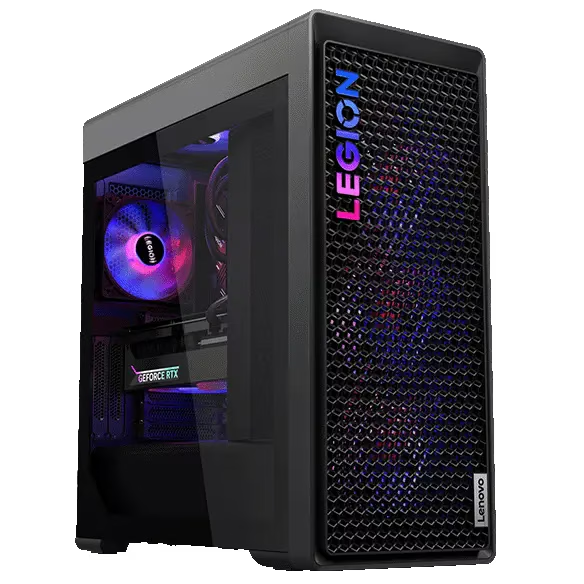
Image Source: Lenovo Official
Who Is It For?
The Legion Tower 7i occupies a mid-size 34-liter tower chassis designed for permanent desk or floor placement where high-end gaming, content creation, or multi-monitor workstations run for hours. Users who build large game libraries, stream, edit video, or keep multiple high-resolution displays active fit the daily pattern. The fixed external power supply (850 W or 1200 W) and active cooling replace any portable elements. Four UDIMM slots and multiple M.2 plus 3.5-inch bays allow substantial later expansion. Fan noise rises under sustained loads, and the chassis claims permanent floor or desk space. If this form factor or power doesn’t quite fit your daily work, exploring other lineup categories would be a better path.
1. Case Volume and Expansion Limits
34-liter tower footprint that stays fixed
The chassis measures approximately 211 × 446 × 490 mm and weighs around 17–18 kg. The volume never changes after purchase. On a desk it claims significant depth and height; on the floor it requires clear side and rear clearance for airflow and cable routing. Confirm the exact exterior dimensions listed for the chosen model so the intended placement remains clear.
Fixed high-wattage power supply
Power is supplied by an 850 W or 1200 W fixed unit. The PSU occupies internal volume and must remain connected to a wall outlet at all times. There is no battery or low-power portable mode. Verify the exact wattage and efficiency rating on the sales page.
Memory, storage, and PCIe slots
Four DDR5 UDIMM (or CUDIMM) slots support up to 128 GB. Storage includes up to four M.2 NVMe slots (some PCIe 5.0 capable) plus two 3.5-inch drive bays. Expansion slots typically include one PCIe 5.0 x16, one PCIe 4.0 x16 (x4 electrical), and additional lower slots. Opening the side panel grants access, yet maximum supported capacities are fixed by the motherboard. Check the number of free slots and supported maximums before ordering.
These physical limits keep the machine oriented toward permanent high-performance placement and allow extensive internal upgrades.
2. Desk or Floor Space, Fan Noise, and Multi-Monitor Use
Surface and clearance requirements
The tower needs open space on both sides and the rear for intake and exhaust. Placing it against a wall or inside a closed cabinet restricts airflow and raises temperatures under load. Cable management for multiple displays, peripherals, and the power cord requires additional rear clearance.
Fan behavior under load
Multiple case fans and the GPU cooler keep the system relatively quiet at idle. Under full CPU and GPU loads the fans ramp and become clearly audible in a quiet room. Higher configurations with larger GPUs produce a steadier, louder airflow. Confirm whether the chosen model includes liquid cooling or relies on air cooling.
Multi-monitor and peripheral capacity
Discrete NVIDIA GeForce RTX graphics support multiple displays via HDMI and DisplayPort outputs. Front and rear USB ports (including Thunderbolt 4 on newer generations), 2.5 GbE Ethernet, and a full audio cluster handle keyboards, mice, external drives, and headsets. These interfaces are fixed after purchase.
3. Performance by Use Case
Configurations range from Core Ultra or previous Core i7/i9 processors paired with RTX 40- or 50-series graphics. All ratings assume the unit remains plugged into a suitable wall outlet; there is no battery mode.
| Use Case | Software | Rating | Reason |
|---|---|---|---|
| High-end AAA gaming and ray tracing | Modern titles at 4K/high settings | Sufficient | High-TGP discrete GPU and strong cooling sustain frame rates |
| 4K video editing and multi-stream export | Premiere, DaVinci Resolve | Sufficient | Multi-core CPU, large RAM capacity, and fast M.2 storage keep work moving |
| Multi-monitor productivity and streaming | Office, browsers, OBS | Sufficient | Multiple display outputs and high memory handle concurrent loads |
| Always-on media server or light NAS roles | Local file serving, Docker | Adequate | Expansion bays and dual Ethernet options support continuous use |
| Portable or battery-powered work | Any mobile scenario | Not enough | No battery; fixed high-wattage PSU requires continuous wall power |
Lower GPU or memory configurations reduce the margin on the first three rows. Maximum performance is only available with adequate case airflow and the rated PSU.
4. Official Specs (with plain explanations)
| Category | Specification | Notes |
|---|---|---|
| Chassis | ~34 L tower, approx. 211 × 446 × 490 mm | Transparent side option |
| Processor | Intel Core Ultra / previous Core i7–i9 | Socketed |
| Graphics | NVIDIA GeForce RTX 40/50-series | Discrete, high TGP |
| Memory | 4× DDR5 UDIMM, up to 128 GB | Upgradable |
| Storage | Up to 4× M.2 + 2× 3.5″ bays | Upgradable |
| Power Supply | 850 W or 1200 W fixed | Always required |
| Weight | Around 17–18 kg | Without packaging |
| Ports | Multiple USB-A/C, Thunderbolt 4 (select), HDMI, DP, Ethernet, audio | Fixed layout |
This series is sold with different processors, graphics, memory, and storage depending on the generation and configuration. Please match the specifications on your current seller page with the official information above.
Source: Lenovo Official Product Page
The fixed 34-liter volume and available UDIMM / M.2 / 3.5-inch slots listed above directly determine placement and later expansion.
5. Main Variations in This Series
Processor choice among Core Ultra or previous high-core Intel chips changes multi-threaded rendering and streaming headroom. Graphics selection from mid-range to flagship RTX models alters 4K gaming and export performance. Memory starting capacity and the four UDIMM slots determine whether capacity can grow later. Storage of one versus multiple M.2 drives plus 3.5-inch bays changes how much local game and media libraries stay internal. PSU wattage of 850 W versus 1200 W affects headroom for future GPU upgrades. Each of these choices is fixed after purchase except for the modules and cards that fit the available slots.
6. What to Check on the Sales Page
Confirm the exact hardware listed for the SKU you are considering, because the same series name covers multiple performance levels.
- Exact processor model and core count.
- GPU model and VRAM capacity.
- Number of UDIMM slots filled and maximum supported RAM.
- Number of M.2 slots and 3.5-inch bays plus pre-installed storage.
- Power supply wattage (850 W or 1200 W) and whether liquid cooling is included.
Matching these five items against the official sheet prevents receiving a lower-expansion or lower-power configuration under the same series name.
7. Disclaimer & Buying Advice
This buying guide for the Legion Tower 7i is based on official manufacturer specifications and recurring real-world user experiences. It is completely independent, not sponsored, and does not guarantee specific performance for every unit. Hardware configurations such as the processor, graphics, memory, and storage can differ by generation and region, so please double-check the exact specifications listed on your seller’s page before purchasing.
8. Beginner Guide
The fixed mid-size tower volume and the number of free UDIMM, M.2, and 3.5-inch slots define the daily limits of this series more than any other factor. Start Here walks through how those constraints interact with common desk, floor, and always-on gaming or creation patterns before any purchase decision.