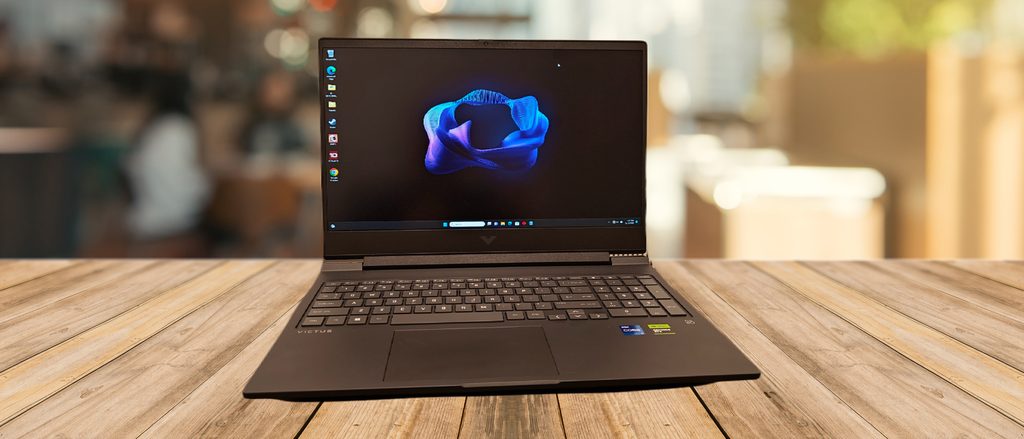
Image Source: Tech Reviewer / Hands-on Photo
Who Is It For?
The Victus 16 places a 16.1-inch gaming chassis and a separate 200–230 W brick on a desk for evening competitive matches or short creative timelines after work. A student who keeps the machine on a dorm desk for daytime notes and switches to the discrete graphics for night sessions fits the stationary pattern this series supports. A home user who runs local game servers or light multi-stream edits while browser tabs stay open also matches the fixed-desk flow.
The roughly 2.3–2.5 kg body plus the brick makes repeated campus walks or room-to-room carries less practical than pure desk use. Two SO-DIMM slots let memory capacity change later, and dual M.2 bays on many units allow storage to expand without full drive replacement. The 70–83 Wh pack sustains light browser or document work for several hours away from the wall, yet any sustained graphics load ends that window quickly. If this form factor or power doesn’t quite fit your daily work, exploring other lineup categories would be a better path.
1. 230 W Brick, Dual Slots, and Fixed 16.1-Inch Panel
Dedicated 200–230 W brick versus limited USB-C power
The series ships with a Smart AC adapter rated 200 W on lower GPU models and 230 W on higher ones. Full graphics output requires this dedicated brick; the USB-C port supports Power Delivery but stays well below the combined CPU-plus-GPU draw needed for gaming or rendering. On a desk this leaves one permanent extra cable. Any attempt to run high-load titles or exports from a portable charger alone forces the discrete graphics into a restricted state. Confirm the exact adapter wattage listed for the chosen SKU.
Two SO-DIMM sockets and dual M.2 layout
Memory uses two accessible SO-DIMM sockets that accept DDR5 modules in dual-channel configuration, typically up to a combined 32 GB. Storage frequently includes two M.2 slots so capacity can grow by adding a second drive rather than swapping the original. After purchase an owner can raise RAM for larger project files or more open tabs, and game libraries or video archives can expand without removing the factory SSD. Check the product page to see whether both memory sockets and both drive bays are already occupied.
16.1-inch panel locked at purchase
Screen options stay fixed once ordered: primarily 1920×1080 IPS at 144 Hz, with higher configurations offering QHD up to 165 Hz or 240 Hz. The lid does not detach or tilt beyond the hinge range. Color coverage and brightness remain those of the selected panel for the life of the machine. Anyone needing external higher resolution must rely on the HDMI or USB-C DisplayPort output. Verify the exact resolution and refresh rate printed on the sales listing before ordering.
These physical limits keep full graphics power tied to the wall outlet and lock the internal display choice for the ownership period.
2. Desk Depth, Bottom Intake, and Carry Mass
Chassis footprint on a narrow surface
The chassis measures roughly 369 × 259 × 23–24 mm. On a small café table or folding desk the rear vents and the power brick leave limited free surface for a mouse. The 16.1-inch lid needs clear depth in front of the keyboard so the screen can open fully without striking a wall or secondary monitor stand. Daily placement therefore favors a dedicated desk rather than shared or temporary ones.
Underside intake under sustained load
Cooling air enters through the bottom panel and exits at the rear and side vents. Soft bedding, a thick sleeve, or a closed bag blocks the intake and drives internal temperatures up within minutes of graphics activity. On a hard desk the fans ramp under prolonged load and become audible in a quiet room; they stay quieter during light browser or document work. The plastic underside also transfers heat to the surface beneath it during long sessions.
2.3–2.5 kg notebook plus brick for any move
The machine alone starts at about 2.3 kg. Adding the 230 W adapter and cable pushes the total past 3 kg. A short walk between rooms remains manageable; repeated daily transit in a backpack across a campus or commute adds noticeable mass and requires a sleeve large enough for the 16.1-inch lid. The 70–83 Wh battery covers several hours of mixed office work but empties far sooner once the discrete graphics engage, so any mobile session still needs the brick nearby for serious tasks.
3. Performance by Use Case
Mid-range configurations pair an Intel Core HX or AMD Ryzen HS processor with an RTX 4050, 4060 or 4070 Laptop GPU at up to 120 W TGP. All heavy graphics work assumes the dedicated brick is connected; battery mode sharply restricts the discrete chip.
| Use Case | Software | Rating | Reason |
|---|---|---|---|
| 1080p competitive gaming | Valorant, CS2, Fortnite | Sufficient | Full TGP sustains high frame rates while plugged in |
| 1080p / 1440p AAA titles | Cyberpunk, modern games with DLSS | Adequate | 120 W limit and 6–8 GB VRAM keep playable settings with upscaling |
| Short multi-stream editing | Premiere, DaVinci Resolve | Adequate | Timeline playback holds when powered; battery drains rapidly |
| Coding and browser multitasking | VS Code, Chrome, Docker | Sufficient | Dual-channel RAM and CPU cores handle concurrent loads |
| Battery-only heavy gaming or export | Any GPU-intensive title or render | Not enough | Discrete GPU power collapses and runtime shrinks to a short window |
Lower GPU options or single-channel 16 GB RAM configurations reduce the margin on the middle three rows.
4. Official Specs (with plain explanations)
| Category | Specification | Notes |
|---|---|---|
| Display | 16.1″ FHD 144 Hz IPS (QHD up to 240 Hz on some) | Fixed at purchase; anti-glare |
| Processor | Up to Intel Core i7 HX or AMD Ryzen 7 HS | Soldered; generation varies by SKU |
| Graphics | RTX 4050 / 4060 / 4070 Laptop GPU | Up to 120 W TGP with Dynamic Boost |
| Memory | 2× SO-DIMM DDR5, max typically 32 GB | Removable sticks, dual-channel capable |
| Storage | Up to 2× M.2 NVMe PCIe Gen4 | Dual-bay layout on many units |
| Battery | 70 Wh or 83 Wh 4/6-cell | User-accessible on most boards |
| Adapter | 200–230 W Smart AC | Separate brick required for full power |
| Weight | Starting at 2.32–2.46 kg | With battery |
| Ports | USB-A, USB-C (DP + limited PD), HDMI, Ethernet | Side-mounted |
This series is sold with different CPUs, memory, and storage depending on the release year and generation. Please match the specifications on your current seller page with the official information above.
Source: HP Official Product Page
The dual M.2 layout and adapter wattage listed above directly set later upgrade paths and the permanent desk cable.
5. Main Variations in This Series
GPU choice among RTX 4050, 4060 and 4070 changes sustained frame rates and export speed once the machine is plugged in. Screen selection between 144 Hz FHD and higher-refresh QHD panels alters motion clarity and pixel density for the life of the unit. Starting RAM of 8 GB or 16 GB versus dual-channel 32 GB affects how many browser tabs or project layers stay open before swapping begins. CPU options from mid-range HX/HS to higher-core variants alter multi-core rendering and compile times. Each of these choices is fixed after purchase except for the two SO-DIMM modules and the second M.2 bay where present.
6. What to Check on the Sales Page
Confirm the exact hardware listed for the SKU you are considering, because the same series name covers multiple generations and graphics levels.
- CPU Generation: Check whether you are getting the 13th-generation HX, newer Core HX, or AMD Ryzen HS equivalents.
- GPU model and listed TGP so the up-to-120 W ceiling is clear.
- Whether both SO-DIMM slots are already filled and the number of M.2 bays present.
- Exact screen resolution and refresh rate (FHD 144 Hz or QHD higher-refresh variants).
- Included adapter wattage (200 W or 230 W) and battery rating of 70 Wh or 83 Wh.
Matching these five items against the official sheet prevents receiving a lower-power or older configuration under the same series name.
7. Disclaimer & Buying Advice
This buying guide for the Victus 16 is based on official manufacturer specifications and recurring real-world user experiences. It is completely independent, not sponsored, and does not guarantee specific performance for every unit. Hardware configurations such as the processor, memory, and storage can differ by generation and region, so please double-check the exact specifications listed on your seller’s page before purchasing.
8. Beginner Guide
The 230 W brick and dual-slot layout set the daily power and upgrade boundaries of this series more than any other factor. Start Here walks through how those fixed constraints interact with common desk and light-carry patterns before any purchase decision.