Image Source: Tech Reviewer / Hands-on Photo
Who Is It For?
The Dell Inspiron 16 is for individuals who need a large screen for productivity but do not require the extreme power of a professional workstation. It fits the needs of office workers who manage large spreadsheets, students who need to view multiple research windows side-by-side, and home users who use their laptop for a mix of entertainment and personal tasks. The 16:10 screen and full keyboard make it a tool for those who spend several hours a day typing and reading. It is not for those who prioritize the lightest possible weight for constant travel, nor is it for professional gamers who require high-refresh-rate screens and high-wattage graphics cards.
“If this form factor or power doesn’t quite fit your daily work, exploring other lineup categories would be a better path.”
1. Check Before You Buy
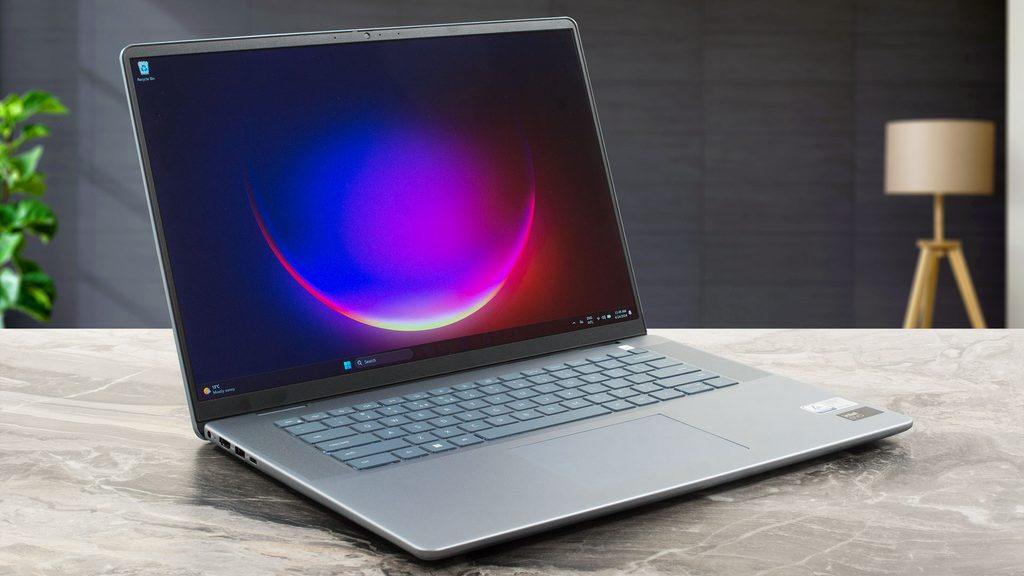
The Dell Inspiron 16 is a large-format laptop that occupies a middle ground between a portable 14-inch device and a heavy 17-inch workstation. Dell achieves this 16-inch screen size using a 16:10 aspect ratio, which makes the display taller than traditional widescreen laptops. This physical change means that when you open a document or a website, you can see more lines of text without scrolling. However, the larger screen also results in a wider and deeper chassis, which requires a laptop bag specifically designed for 16-inch devices.
Memory Architecture and Upgradeability
You must verify a significant technical detail on the sales page: the memory (RAM) configuration. In many models within the Inspiron 16 series, such as the 5630 or 5635, Dell solders the memory directly to the motherboard. This design allows the laptop to be thinner, but it removes your ability to add more RAM later. If a listing shows 8GB of LPDDR5 memory, you must accept that capacity as permanent. Other models, like the 5640, feature two physical SO-DIMM slots so you can remove the existing sticks and install higher-capacity ones. Confirming whether the memory is soldered or upgradeable before finalizing a purchase will save you from future performance bottlenecks.
Screen Brightness and Environment
Dell often rates the standard display for this series at 250 nits or 300 nits of brightness. In a typical indoor office or a room with controlled lighting, this brightness level offers comfortable reading and writing. However, if you use the laptop in a very bright environment, such as next to a large window with direct sunlight or in an outdoor setting, the screen may appear dim. The matte finish on the screen helps to diffuse reflections from overhead lights, but it does not increase the actual brightness of the panel. Users who frequently work in high-light environments will quickly notice the limitations of a 250-nit panel.
Thermal Design and Fan Behavior
The Inspiron 16 uses a “lift hinge” design where the back of the laptop rises slightly when the screen is opened. This creates a small gap between the bottom of the laptop and the desk surface, allowing the internal fan to pull in air more effectively. During basic tasks like web browsing or typing, the fan remains at a low speed or stays off. When the processor is under a heavy load, such as during a system update or when many browser tabs are open, the fan speed increases. The exhaust vent is located near the hinge, so warm air is pushed toward the bottom of the screen. This results in the area above the keyboard becoming warm to the touch during sustained use.
Port Selection and Charging
The physical ports on the Inspiron 16 include a mix of modern and traditional connections. The USB-C port on Intel-based models typically supports Thunderbolt 4, which allows for high-speed data transfer and the connection of multiple external monitors through a single cable. This port also supports Power Delivery, meaning the laptop can be charged using a compatible USB-C adapter instead of the standard barrel-style charger. However, the HDMI port on many models is version 1.4, which limits external 4K monitors to a 30Hz refresh rate. Users planning to connect high-resolution external screens should check if the USB-C port or the HDMI port meets their specific resolution requirements.
2. How It Fits a Real Desk Setup
The Dell Inspiron 16 occupies a footprint of approximately 35.6 cm by 25.1 cm. On a standard desk, this leaves enough room for a mouse and a notebook, but it is noticeably larger than a 13-inch or 14-inch laptop. The inclusion of a full-size keyboard with a dedicated numeric keypad (numpad) on the right side shifts the main typing area and the touchpad slightly to the left. This asymmetrical layout requires a period of adjustment for those who are used to centered keyboards. The touchpad is large and centered relative to the spacebar, providing ample room for multi-finger gestures.
Typing and Input Experience
The keyboard features a 1.5mm key travel, which provides a tactile response when typing. Because the chassis is wide, the keys are not cramped, and the dedicated numpad is useful for those who frequently enter data into spreadsheets or use calculators. The power button is located at the top right of the keyboard and often doubles as a fingerprint reader for secure login. On a desk, the lift hinge provides a slight tilt to the keyboard, which some find more comfortable for long typing sessions. The palm rest area is spacious, allowing the wrists to sit fully on the laptop surface.
Audio and Visual Communication
The speakers are located on either side of the keyboard, firing upward toward the user. This placement prevents the sound from being muffled by the desk or a lap, resulting in clearer audio for video calls and media. The webcam is a 1080p sensor, which provides a sharper image than the 720p cameras found on older or entry-level laptops. A physical privacy shutter is built into the webcam housing, allowing the user to slide a plastic cover over the lens when the camera is not in use. This provides a physical guarantee that the camera is blocked without needing to use tape or external covers.
Cable Management and Connectivity
Most of the ports are located on the left side of the laptop, including the power input, HDMI, and USB-C. The right side typically houses a USB-A port and the SD card reader. This layout means that most cables will be concentrated on the left side of the desk, which is beneficial for right-handed mouse users as it keeps the right side clear of obstructions. The full-size SD card reader is a physical slot that allows for the direct insertion of memory cards from cameras, eliminating the need for an external dongle for photo transfers.
Portability and Daily Travel
While the Inspiron 16 is relatively thin, its weight of nearly 1.9 kg is noticeable when carried for long periods. It is light enough to move between rooms or take to a local cafe, but it may cause shoulder strain if carried in a messenger bag during a long commute. The 65W power adapter is a standard brick with a long cable, adding to the total weight in a backpack. The aluminum lid provides a rigid feel that protects the screen from pressure when the laptop is inside a bag, but the plastic base is more susceptible to scratches if placed on rough surfaces.
3. Performance by Use Case
The following ratings are based on a middle-tier configuration featuring an Intel Core i5 or Ryzen 5 processor and 16GB of RAM.
| Use Case | Software | Rating | Reason |
| Office Work | Excel, Word, Outlook | Sufficient | 16:10 screen and numpad support efficient data entry and reading. |
| Web Browsing | Chrome, Edge (20+ tabs) | Sufficient | 16GB of RAM allows for smooth switching between many open tabs. |
| Video Calls | Zoom, Microsoft Teams | Sufficient | 1080p webcam and upward-firing speakers provide clear communication. |
| Photo Editing | Photoshop, Lightroom | Adequate | Sufficient for basic edits, but screen brightness may be a limit. |
| Video Editing | 1080p Simple Cuts | Adequate | Can handle basic video tasks, but slow for 4K or complex effects. |
| AAA Gaming | Modern Heavy Titles | Not enough | Integrated graphics or low-power GPUs cannot run heavy games well. |
The performance of the Inspiron 16 is consistent for daily productivity. However, because it is a slim laptop, it is not intended for sustained high-load tasks like 24/7 video rendering, which may lead to the fans running at maximum speed and the processor slowing down to manage heat.
4. Official Specs (with plain explanations)
| Category | Specification | Notes |
| CPU | Intel Core i5/i7 or AMD Ryzen 5/7 | 13th/14th Gen Intel or 7000/8000 AMD |
| Graphics | Integrated or NVIDIA RTX 2050/3050/4050 | Dedicated GPU varies by specific model |
| Memory | 8GB to 32GB LPDDR5 or DDR5 | Soldered or slots depending on model |
| Storage | 256GB to 2TB M.2 PCIe NVMe SSD | Single internal replaceable drive slot |
| Display | 16-inch FHD+ (1920×1200) or 2.5K | 16:10 aspect ratio, matte finish |
| Weight | 1.82 kg to 1.90 kg (4.01 to 4.19 lbs) | Aluminum and plastic hybrid construction |
| Battery | 54Wh or 64Wh | Integrated battery, supports ExpressCharge |
| Ports | HDMI, USB-C, USB-A, SD Card Reader | Standard physical connection array |
This series is sold with different CPUs, memory, and storage depending on the release year and generation. Please match the specifications on your current seller page with the official information above.
Source: Dell Official Product Page
The specifications listed above represent the hardware components that define the physical size and technical limits of the Inspiron 16. These parts determine how much information the screen can show at once, how heavy the device feels in a bag, and how the system handles multiple open applications.
5. Main Variations in This Series
- Dell divides the processor architecture between Intel Core and AMD Ryzen models, which alters the internal graphics system and USB-C speed.
- Memory configurations vary significantly; some models use soldered LPDDR5 memory that you cannot upgrade, while others feature DDR5 slots for future expansion.
- Display panels differ in resolution and brightness, as standard FHD+ panels offer 250 to 300 nits while higher-tier panels provide 2.5K resolution.
- Graphics options range from integrated chips that share system RAM to dedicated NVIDIA RTX graphics cards with separate video memory.
- The chassis material often features an aluminum exterior lid, but the internal frame and bottom base may be constructed from plastic or aluminum depending on the specific sub-series.
6. What to Check on the Sales Page
When reviewing a listing for the Inspiron 16, the specific model number and the internal components will determine the actual performance and longevity of the machine.
- CPU Generation: Check whether you are getting the 13th/14th Gen Intel or the 7000/8000 series AMD processors.
- Memory Type: Confirm if the system uses soldered LPDDR5 RAM or upgradeable DDR5 memory slots.
- Screen Brightness: Check whether the screen offers 250 nits or 300 nits, especially if you plan to work in brightly lit spaces.
- Graphics Card: Check if the laptop relies on integrated Intel/AMD graphics or includes a dedicated NVIDIA RTX card.
- Battery Capacity: Confirm if the unit includes the 54Wh or the larger 64Wh battery for longer unplugged use.
The sales page may also list the specific version of Windows included, which is typically Windows 11 Home or Pro.
7. Disclaimer & Buying Advice
This buying guide for the Dell Inspiron 16 is based on official manufacturer specifications and recurring real-world user experiences. It is completely independent, not sponsored, and does not guarantee specific performance for every unit. Hardware configurations such as the processor, memory, and storage can differ by generation and region, so please double-check the exact specifications listed on your seller’s page before purchasing.
8. Beginner Guide
If you are setting up a new laptop for the first time and want to understand how to manage your battery and screen settings, you can [Start Here] to read our basic hardware and setup guides.