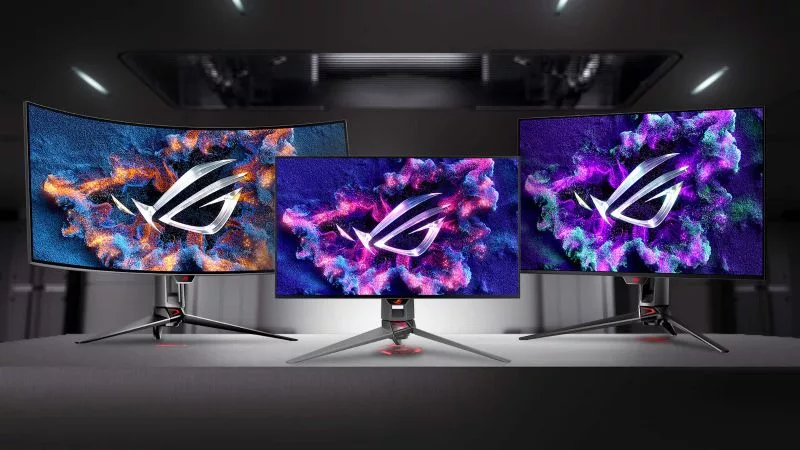
Image Source: ASUS Official
Who Is It For?
The ASUS ROG Swift series fits users who require the highest possible technical specifications for competitive gaming or high-end visual immersion. This series suits professional eSports players who need ultra-high refresh rates—how many times the image updates each second—reaching up to 540Hz on specific TN panel models. Because the series includes flagship OLED (Organic Light Emitting Diode) options, it fits enthusiasts who play in dark, light-controlled rooms and want “infinite” contrast where black areas of the screen are completely dark. The inclusion of dedicated G-Sync hardware modules in many models fits users with NVIDIA graphics cards who want the most stable variable refresh rate performance available.
However, this series does not fit users on a strict budget or those looking for a subtle office aesthetic, as the chassis often features aggressive angles and integrated RGB lighting. It is not for users with very shallow desks, as the signature tripod stands are physically deep and occupy significant surface area. The OLED models in this line do not fit users who primarily perform 10-hour workdays involving static spreadsheets or text-heavy coding due to the physical risk of “burn-in” (permanent image retention) and specific subpixel layouts that can make text appear less sharp than on a standard LCD. If this form factor or the high price point doesn’t quite fit your daily work, exploring other lineup categories would be a better path.
1. How This Line Is Grouped
The ROG Swift line is the flagship tier of ASUS gaming monitors, identified by the “PG” prefix in the model names. It is positioned above the ROG Strix (XG) and TUF Gaming (VG) lines. The series is grouped by the target gaming genre and the panel technology used to achieve specific performance goals.
| Tier | Typical Names | Rough Position |
| Pro eSports | PG248QP, PG259QN | 24-25 inch, ultra-high Hz (360Hz-540Hz), TN or Fast IPS. |
| High-End Mainstream | PG279QM, PG27AQN | 27 inch, 1440p resolution, high-speed IPS panels. |
| Flagship OLED | PG27AQDM, PG32UCDM | 27-32 inch, OLED/QD-OLED, 240Hz+, maximum contrast. |
| Large Format / Ultrawide | PG42UQ, PG49WCD | 42-49 inch, OLED or Ultrawide, immersive cinematic gaming. |
Pro eSports Group
This group focuses on raw speed. Models like the PG248QP use E-TN (Esports Twisted Nematic) panels. TN is a panel technology known for the fastest response times—how quickly a pixel can change color—but it has narrower viewing angles and less vibrant colors than other types. These monitors are physically smaller (usually 24.5 inches) to allow the player to see the entire screen within their peripheral vision without moving their head.
High-End Mainstream Group
These models typically use “Fast IPS” panels. IPS (In-Plane Switching) is known for accurate colors and wide viewing angles, meaning the image doesn’t change when viewed from the side. The “Fast” designation refers to improved liquid crystal materials that allow these monitors to reach 240Hz or 360Hz at 1440p resolution (2560 x 1440). This group fits users who want a balance of sharp visuals for single-player games and high speed for multiplayer games.
Flagship OLED Group
The OLED models represent the current peak of the ROG Swift line. These use either WOLED (White OLED) or QD-OLED (Quantum Dot OLED) panels. Because every pixel produces its own light, these monitors do not require a backlight. This results in a 0.03ms response time, which is physically impossible for any LCD monitor to achieve. These models are the primary choice for users who prioritize “HDR” (High Dynamic Range), which expands the range between the brightest and darkest parts of the image.
2. Check Before You Buy
G-Sync Hardware Modules and Active Cooling
Many ROG Swift monitors include a physical G-Sync hardware module. This is a dedicated chip inside the monitor that synchronizes the refresh rate with the NVIDIA graphics card. Because this chip generates heat, these monitors often contain an internal cooling fan. In a completely silent room, the faint whirring of this fan may be audible. On some models, the fan may continue to spin for several minutes after the monitor is turned off to cool the internal components.
OLED Pixel Cleaning and Maintenance
The OLED models in the Swift series require regular maintenance to prevent burn-in. The monitor will periodically perform a “Pixel Cleaning” cycle, which usually takes 5 to 10 minutes. During this time, the monitor cannot be used. If a user interrupts these cycles frequently, the physical lifespan of the OLED pixels may be reduced. Some models also feature “Screen Move” or “Logo Brightness Absorption,” which subtly shifts the image or dims static icons to protect the panel.
Matte vs. Glossy Coating Variations
ASUS uses different screen coatings across the Swift line. The PG42UQ (OLED), for example, uses a heavy matte micro-texture coating to reduce reflections in bright rooms. However, this can make the “blacks” look slightly gray if hit by direct light. Newer QD-OLED models like the PG32UCDM have a semi-glossy finish that makes colors look more vibrant but reflects lamps or windows like a dark mirror. Checking the specific coating type is a requirement for users with specific room lighting.
DSC (Display Stream Compression) and Multi-Monitor Limits
To reach high refresh rates at 4K resolution, these monitors use DSC. This is a “visually lossless” compression standard that allows high-speed data to fit through a single DisplayPort cable. While it works seamlessly for a single monitor, using DSC can sometimes limit the ability to use a second or third monitor at high refresh rates on certain graphics cards. It can also cause a “black screen” for 1-2 seconds when switching between a game and the Windows desktop (Alt-Tab).
3. How It Fits a Real Desk Setup
The Large Tripod Stand Footprint
The signature ROG Swift stand uses three wide-spreading metal legs. On a desk with a depth of 60 cm (24 inches), the front two legs can extend 25 cm to 30 cm forward. This can interfere with a large mousepad or prevent the user from placing their keyboard close to the monitor. The stand is physically heavy and provides high stability, but it requires a deep desk to maintain a comfortable viewing distance.
Cable Management and the Rear I/O Cover
The back of the monitor includes a plastic “I/O cover” that snaps into place to hide the ports and cables. The wires are routed through a hole in the center of the stand. While this creates a clean look from the back, the ports are often recessed (sunken) and face downwards. This makes it difficult to plug in new cables without physically rotating the monitor or tilting it significantly.
VESA Mounting and Weight Considerations
For users who prefer a monitor arm, the Swift series supports the VESA 100×100 standard (the standard screw pattern for mounting). However, because these monitors often include heavy heatsinks and G-Sync modules, they are heavier than standard office monitors. A 32-inch or 42-inch Swift model can weigh between 7 kg and 15 kg (15-33 lbs) without the stand. A high-capacity gas-spring monitor arm is a physical requirement to prevent the arm from sagging.
Aura Sync Lighting and Wall Reflections
Most ROG Swift monitors feature an illuminated ROG logo on the back and sometimes a “Light Signature” projector that shines a logo onto the desk surface. These LEDs use “Aura Sync” technology, which can be synchronized with other ASUS components. If the desk is placed against a white wall, the rear RGB lighting will reflect off the wall, providing “bias lighting” that can reduce eye strain in dark rooms by providing a soft glow behind the screen.
4. Sizes and Models in This Line
The ROG Swift line covers the most common gaming sizes, with each size paired with a resolution that maintains high “PPI” (Pixels Per Inch).
| Size | Common Resolution | Aspect Ratio | Notes |
| 24.5″ | 1920 x 1080 (FHD) | 16:9 | Built for eSports; 360Hz to 540Hz refresh rates. |
| 27″ | 2560 x 1440 (QHD) | 16:9 | The “sweet spot” for 1440p gaming; IPS or OLED. |
| 32″ | 3840 x 2160 (4K) | 16:9 | High detail; 240Hz OLED models are the current flagships. |
| 34″ | 3440 x 1440 (UWQHD) | 21:9 | Curved Ultrawide; provides extra horizontal vision. |
| 42″ / 48″ | 3840 x 2160 (4K) | 16:9 | Large format OLED; essentially a gaming TV for a desk. |
| 49″ | 5120 x 1440 (DQHD) | 32:9 | Super-Ultrawide; equivalent to two 27-inch screens. |
The 24.5-inch models are the physical standard for competitive play. The smaller screen allows the player to see the entire display without moving their eyes, which is a requirement for fast-paced reaction games.
The 27-inch 1440p models (like the PG27AQDM) are the most popular for high-end home setups. At this size, the resolution is sharp enough that individual pixels are hard to see, but it doesn’t require the extreme graphics card power that 4K demands.
The 32-inch 4K OLED models (like the PG32UCDM) are the current “end-game” for many users. They provide the highest level of detail and the fastest response times. These models are physically large and usually require a desk depth of at least 70 cm to 80 cm (28-32 inches) to be used comfortably without the screen feeling overwhelming.
5. Performance by Use Case
The performance of an ROG Swift monitor is defined by its panel type and its refresh rate.
| Use Case | Software / Task | Rating | Reason |
| Competitive FPS | Valorant, CS2, Apex | Sufficient | Ultra-high Hz and low input lag provide instant feedback. |
| Cinematic RPGs | Cyberpunk 2077, Elden Ring | Sufficient | OLED models provide perfect blacks and vibrant HDR. |
| Console Gaming | PS5, Xbox Series X | Sufficient | HDMI 2.1 models support 4K 120Hz and VRR. |
| Office Work | Excel, Word, Outlook | Adequate | Good space, but OLED models have burn-in risk and fringing. |
| Video Editing | Premiere Pro, Resolve | Sufficient | High color accuracy (DCI-P3) and 4K resolution. |
| Photo Editing | Photoshop, Lightroom | Adequate | Excellent color, but OLED subpixel layout affects fine lines. |
The “Sufficient” rating for competitive gaming is due to the low “input lag”—the delay between moving the mouse and seeing the action on screen. ROG Swift monitors are consistently among the lowest-lag displays in the industry.
6. Official Specs (with plain explanations)
| Category | Specification | Notes |
| Refresh Rate (LCD) | 144Hz to 540Hz | How many times the image updates each second. |
| Refresh Rate (OLED) | 138Hz to 480Hz | OLED updates are clearer even at lower Hz. |
| Response Time (LCD) | 1ms to 0.5ms (GtG) | Time for a pixel to change color; lower is better. |
| Response Time (OLED) | 0.03ms (GtG) | Near-instant pixel transitions; no motion blur. |
| Brightness (LCD) | 350 to 600 nits | Nits = unit of brightness; 400+ is good for indoors. |
| Brightness (OLED) | 250 nits (SDR) / 1000 nits (Peak) | 1000 nits is only for small, bright HDR highlights. |
| Sync Tech | G-Sync Ultimate / FreeSync | Prevents “tearing” (split images) during gaming. |
This line is sold with different tier names, sizes, refresh rates, and panels depending on the exact model and region. Please match the specifications on your current seller page with the official information above.
Source: ASUS Official Product Page
The “GtG” (Gray to Gray) response time of 0.03ms on OLED models is a physical characteristic of the technology. Because there are no liquid crystals to move, the pixels can change state almost instantly, which eliminates “ghosting” (a blurry trail behind moving objects).
7. Main Variations in This Line
The most significant variation is the panel technology. “Fast IPS” models are the durable, bright choice for daytime gaming and mixed use. “OLED” models are the premium choice for contrast and motion clarity but require more care.
Another variation is the “G-Sync” tier. “G-Sync Ultimate” models contain the dedicated hardware module and support the full range of HDR features. “G-Sync Compatible” models use the open FreeSync standard to achieve variable refresh rates without the dedicated internal chip.
The “ProArt” features occasionally bleed into the Swift line. Some models include a built-in “Hardware Calibration” feature, allowing the user to save color profiles directly to the monitor’s internal memory, which is a physical requirement for professional color accuracy.
8. What to Check on the Sales Page
- Line / Tier / Size: Check whether you are getting the ROG Swift “PG” model, not an ROG Strix “XG” or TUF “VG” model, as the internal hardware and warranty differ.
- Panel Type: Confirm if the model is “OLED,” “IPS,” or “TN.” This is the most important factor for your room lighting and gaming genre.
- HDMI Version: For 4K gaming on consoles, ensure the model has HDMI 2.1. Older models may be limited to HDMI 2.0, which cannot handle 4K at 120Hz.
- Refresh Rate: Verify the Hz (e.g., 240Hz, 360Hz, 540Hz). Ensure your computer’s graphics card can reach these speeds at the monitor’s resolution.
- Warranty Coverage: Check if the seller or ASUS includes a “Burn-in Warranty” for OLED models, as this is a standard official feature in many regions but may vary.
9. Disclaimer & Buying Advice
This buying guide for the ASUS ROG Swift Series is based on official manufacturer specifications and recurring real-world user experiences. It is completely independent, not sponsored, and does not guarantee specific performance for every unit. Tier name, screen size, refresh rate, panel type, and ports can differ by model and region, so please double-check the exact specifications listed on your seller’s page before purchasing.
10. Beginner Guide
If you are new to monitor terms like refresh rate (Hz), panel type (IPS/OLED/TN), and resolution (1080p/1440p/4K), read the basics in our [Start Here]. Understanding how these technical specs interact with your gaming hardware will help you determine if the premium ROG Swift series fits your specific needs.