Image Source: ASUS Official
Who Is It For?
The ASUS ExpertCenter D5 is for individuals and organizations that require a durable and secure desktop for essential professional work. It fits the needs of office administrators, small business owners, and educational institutions that need a machine that can run for long periods and support legacy peripherals. The inclusion of two memory slots and standard port options makes it a tool for those who need a reliable computer for daily productivity without the higher cost of the D7 or D9 series. It is not for those who prioritize a small, stylish home computer or for those who want a dedicated gaming machine with standard, easily swappable retail parts.
“If this form factor or power doesn’t quite fit your daily work, exploring other lineup categories would be a better path.”
1. Check Before You Buy
The ASUS ExpertCenter D5 is a desktop computer designed for essential business and office environments where reliability and physical durability are prioritized. Unlike consumer-grade desktops, this series undergoes MIL-STD 810H durability testing, which involves exposing the hardware to vibrations, shocks, and temperature extremes. This physical construction is a permanent characteristic of the series and influences the long-term stability of the internal connections. The D5 series is available in two distinct sizes, and the choice between them determines the future upgrade path for the machine.
Chassis Size and Internal Expansion Limits
The Tower (D500TC) model provides the most internal volume, allowing for full-height expansion cards and multiple storage drives. It features two DIMM slots for memory, which can support up to 64GB of DDR4 RAM. This is a significant technical detail because it limits the computer compared to the D7 or D9 models that offer four slots. The Small Form Factor (D500SC) model also features two memory slots but is limited to “low-profile” expansion cards. These cards are half the height of standard cards, which limits the selection of graphics cards or network adapters that can be installed after purchase.
Tool-Free Maintenance and Internal Access
The D5 series features a chassis design that allows for access to internal components by removing the side panel. In some configurations, the internal drive bays use plastic clips instead of metal screws, allowing for the replacement of a hard drive or the addition of more memory without the need for a screwdriver. Inside the case, the components are organized to allow airflow from the front intake to the rear exhaust. In the Tower model, there is significant empty space to facilitate this airflow, while the SFF model uses a more compact arrangement with a dedicated plastic shroud to direct air over the processor.
Proprietary Power Supply and Motherboard
The motherboard and power supply in the ExpertCenter D5 use proprietary designs tailored to the specific chassis. The power supply unit (PSU) has a unique physical shape and uses specific connectors for the motherboard, rather than the industry-standard 24-pin connector. This means that if the power supply needs to be replaced outside of the warranty period, a standard retail PSU will not fit. The wattage of the PSU (180W, 300W, or 500W) is matched to the components included at the time of purchase. If a user intends to add a dedicated graphics card later, they must ensure the existing PSU has the necessary wattage and power cables.
Security and Management Features
As a business-focused machine, the D5 series includes security features at both the hardware and software levels. The motherboard includes a TPM 2.0 chip, which is a requirement for Windows 11 security features and BitLocker drive encryption. Some models also feature a physical Kensington lock slot and a padlock loop on the rear of the chassis to prevent unauthorized physical access to the internal components. The BIOS includes options to disable specific USB ports, which prevents unauthorized data transfer from the machine to external thumb drives. Unlike the D7 or D9 series, the D5 often lacks Intel vPro remote management capabilities.
2. How It Fits a Real Desk Setup
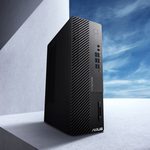
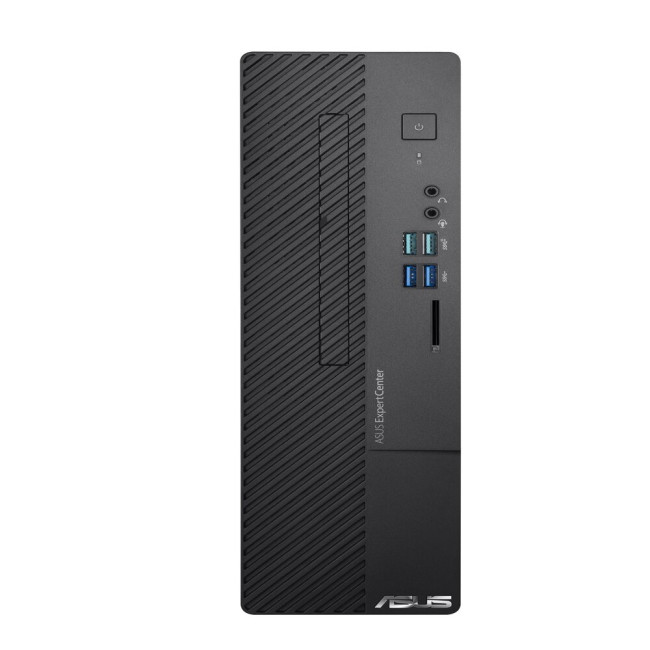
The ASUS ExpertCenter D5 is designed to sit on or under a desk in a permanent office setup. The Tower model stands approximately 38 centimeters tall and requires a stable surface that can support its weight of nearly 6 kilograms. The Small Form Factor model is much narrower and can be placed vertically using an included stand or horizontally under a monitor. The front panel of all models features a professional aesthetic with a vertical arrangement of ports for easy access.
Front-Panel Connectivity and Port Layout
The front of the D5 series is populated with ports, typically including multiple USB-A ports and separate jacks for headphones and microphones. This allows for the connection of thumb drives, external hard drives, and headsets without reaching behind the computer. Some configurations also include a built-in SD card reader on the front panel, which is used for media transfer. The power button is located at the top of the front panel and includes a small LED indicator to show the system status. The absence of a front-facing USB-C port on some entry-level D5 models is a detail to verify on the sales page.
Acoustic Profile and Thermal Behavior
In a standard office environment, the ExpertCenter D5 operates at a low noise level. During tasks like document editing or web browsing, the internal fans spin at a minimum speed that is difficult to hear from a distance of one meter. When the processor is under a heavy load, such as during a large file encryption or a video export, the fan speed increases. The sound is a consistent hum of moving air. Because the Tower model has more internal volume, it can move air more slowly and quietly than the SFF model, which relies on smaller, faster-spinning fans to manage heat in a tighter space.
Rear Connectivity and Legacy Support
The rear of the D5 series includes a wide array of ports, including DisplayPort, HDMI, and VGA outputs for connecting several monitors simultaneously. A specific feature of this series is the inclusion of legacy ports, such as a Serial port or PS/2 ports for older keyboards and mice. These connections are useful for businesses that still use specialized industrial or retail equipment. The rear also houses the RJ45 Ethernet port for a wired internet connection. If the computer is placed against a wall, the cables protruding from the rear will require approximately 5 to 10 centimeters of clearance to avoid being bent or damaged.
Internal Storage Expansion Options
The D5 series supports multiple storage drives. The motherboard typically features one M.2 slot for a fast NVMe SSD and several SATA ports for traditional mechanical hard drives or 2.5-inch SATA SSDs. In the Tower model, there are physical bays for 3.5-inch drives, which are useful for bulk data storage. The SFF model is more limited, usually supporting one M.2 drive and one 3.5-inch or 2.5-inch drive. If a user adds a second drive later, they may need to provide their own SATA data cable, as these are not always included if the computer was purchased with only one drive.
3. Performance by Use Case
The following ratings are based on a middle-tier configuration featuring an Intel Core i5 processor and 16GB of RAM.
| Use Case | Software | Rating | Reason |
| Office Productivity | Excel, Word, Outlook | Sufficient | Multi-core Intel CPUs handle large spreadsheets and many tabs. |
| Web Browsing | Chrome, Edge (20+ tabs) | Sufficient | 16GB of RAM allows for smooth switching between many open tabs. |
| Data Entry | Database, ERP Systems | Sufficient | Legacy port support and stable CPU performance suit office tools. |
| Photo Editing | Photoshop, Lightroom | Adequate | Sufficient for basic edits, but limited by integrated graphics. |
| Video Editing | 1080p Simple Cuts | Adequate | Can handle basic video tasks, but slow for 4K or complex effects. |
| AAA Gaming | Modern Heavy Titles | Not enough | Low-power PSU and integrated graphics cannot run heavy games. |
The performance of the ExpertCenter D5 is consistent due to its robust cooling and high-quality power delivery components. However, the Small Form Factor model may experience slightly higher temperatures during sustained high-load tasks compared to the larger Tower model.
4. Official Specs (with plain explanations)
| Category | Specification | Notes |
| CPU | Intel Core i3-12100 to i7-14700 | 12th, 13th, and 14th Gen Intel processors |
| Graphics | Intel UHD or NVIDIA RTX 3050 | Integrated or entry-level dedicated GPU options |
| Memory | Up to 64GB DDR4 (3200MHz) | Two physical slots, user-replaceable modules |
| Storage | Up to 2TB M.2 SSD + 2TB HDD | Dual storage slots, internal expansion possible |
| Dimensions | 16.0 x 38.0 x 35.5 cm (Tower) | Size varies by chassis (Tower vs. SFF) |
| Weight | Starting at 5.0 kg to 6.0 kg | Varies based on internal hardware and chassis |
| Power Supply | 180W / 300W / 500W (80+ Bronze/Platinum) | Internal proprietary unit, efficiency varies by model |
| Ports | USB-A, HDMI, DP, VGA, Serial, PS/2 | Extensive front and rear physical connections |
This series is sold with different CPUs, memory, and storage depending on the release year and generation. Please match the specifications on your current seller page with the official information above.
Source: ASUS Official Product Page
The specifications listed above represent the hardware foundation of the ExpertCenter D5 series, which includes the D500TC (Tower) and D500SC (Small Form Factor) models. These components determine the physical space the computer occupies, the speed of data processing, and the limits for future hardware changes.
5. Main Variations in This Series
- The chassis comes in two primary sizes: the 20-liter Tower (TC) for standard expansion and the 9-liter Small Form Factor (SC) for tight spaces.
- Processor generations span from the 12th Gen to the 14th Gen Intel Core series, affecting the number of performance cores and the type of onboard security features.
- Memory is limited to two slots in the D5 series, supporting a maximum of 64GB, which is half the capacity of the D7 and D9 series.
- Graphics configurations range from integrated Intel chips for office work to dedicated NVIDIA RTX 3050 cards for entry-level visual tasks.
- Power supply units are available in different wattages, with the 180W version being common for integrated graphics models and 500W for dedicated GPU models.
6. What to Check on the Sales Page
When reviewing a listing for the ExpertCenter D5, the specific chassis size and the internal components will determine the actual performance and expansion limits of the machine.
- Chassis Model: Confirm if the unit is the “D500TC” (Tower) or “D500SC” (Small Form Factor).
- CPU Generation: Check whether you are getting the 12th, 13th, or 14th Gen Intel Core processors.
- Memory Capacity: Verify the amount of RAM and if it is DDR4, as this affects data transfer speeds.
- Power Supply Wattage: Check if the PSU is 180W, 300W, or 500W, especially if you plan to add a GPU later.
- Included Ports: Confirm the presence of specific ports like Serial or VGA if your work requires them.
- Storage Type: Ensure the primary drive is an “SSD” or “NVMe” for fast boot times and application loading.
7. Disclaimer & Buying Advice
This buying guide for the ASUS ExpertCenter D5 is based on official manufacturer specifications and recurring real-world user experiences. It is completely independent, not sponsored, and does not guarantee specific performance for every unit. Hardware configurations such as the processor, memory, and storage can differ by generation and region, so please double-check the exact specifications listed on your seller’s page before purchasing.
8. Beginner Guide
If you are setting up a professional workstation for the first time and want to understand how to connect your monitor and secure your data, check out our [Start Here] page to read our basic hardware and setup guides.