
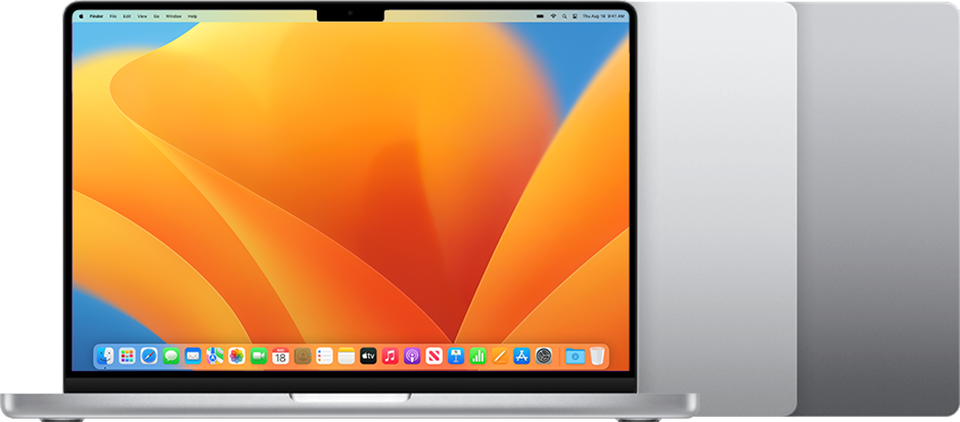
Image Source: Apple Official
Who Is It For?
The MacBook Pro 14 pairs an Apple silicon chip with fully soldered unified memory and storage that must be chosen at purchase. Video editors who cut 4K timelines on the Liquid Retina XDR display while traveling between client sites, or developers who compile large codebases and then join video calls from a café table, fit the daily pattern this series supports. Photographers who export batches of RAW files and need all-day battery without hunting for outlets also match the flow.
The 1.55 kg base weight and thin aluminum body make repeated bag carries practical, yet the memory and storage capacity cannot be increased later. The 72.4 Wh pack sustains long wireless web or video sessions, while sustained heavy creative loads still draw the battery down faster. Native Windows applications and .exe installers are unavailable. If this form factor or power doesn’t quite fit your daily work, exploring other lineup categories would be a better path.
1. Soldered Unified Memory and Fixed Storage
Unified memory locked at purchase
Memory is soldered as unified memory shared between CPU, GPU, and Neural Engine. Configurations start at 16 GB and rise to 24 GB or 32 GB on the base M5, with higher amounts available on Pro and Max variants. Once the machine leaves the factory the capacity cannot be changed. Choosing too little memory for large photo libraries or multi-app creative workflows leaves no later remedy. Confirm the exact unified memory amount on the sales page before ordering.
Storage also soldered
The SSD is soldered to the board. Base options begin at 512 GB or 1 TB and can be configured higher (up to 4 TB on current models) only at the time of purchase. Expanding capacity afterward requires external drives or cloud storage. Verify the installed storage size listed for the chosen configuration.
MagSafe 3 and port layout
Charging uses the MagSafe 3 connector with a 70 W USB-C adapter on base models (higher-watt adapters on Pro/Max). Three Thunderbolt ports (Thunderbolt 4 on base M5, Thunderbolt 5 on higher chips), HDMI, SDXC card slot, and a 3.5 mm headphone jack are fixed. The number and type of ports cannot be altered after purchase. Check whether the listed model includes Thunderbolt 4 or 5 and the exact adapter wattage supplied.
These constraints mean every capacity and interface decision is final at the point of sale.
2. Daily Carry Weight and Battery Routine
1.55 kg in a sleeve or messenger bag
The closed chassis measures 31.26 × 22.12 × 1.55 cm and weighs 1.55 kg on the base model (slightly more on Pro/Max). The size and weight fit most 14-inch sleeves and everyday bags without excess bulk. Opening the lid on a café table or airplane tray leaves enough surface for a mouse or notebook. The aluminum body remains cool to the touch during light work.
Fan behavior and meeting environments
The system uses fans that stay silent or near-silent under web browsing, document work, and video calls. Under sustained heavy rendering or export the fans spin up but remain quieter than most Windows workstations of similar power. In a quiet meeting the noise stays low enough for conversation.
Battery for a full workday
The 72.4 Wh battery supports long stretches of wireless web browsing or local video playback. Light creative work and calls typically last through a full day away from an outlet. Heavy continuous GPU or multi-core loads reduce that window, so the MagSafe cable and adapter still travel with the machine for intensive sessions.
3. Performance by Use Case
Configurations range from the base M5 chip through M5 Pro and M5 Max. All heavy creative work benefits from remaining plugged in for maximum sustained output; battery mode still delivers usable performance for many tasks but drains faster under peak load.
| Use Case | Software | Rating | Reason |
|---|---|---|---|
| 4K video editing | Final Cut Pro, Premiere (via compatible versions) | Sufficient | Unified memory and media engines keep timelines responsive while plugged in |
| Photo editing and export | Lightroom, Photoshop | Sufficient | Fast SSD and GPU acceleration handle large libraries |
| Software development | Xcode, terminal, browsers | Sufficient | Multi-core CPU and unified memory sustain concurrent builds and tabs |
| Multi-monitor productivity | macOS apps + external displays | Sufficient | Thunderbolt and HDMI drive multiple high-resolution screens |
| Native Windows-only software | .exe applications without virtualization | Not enough | macOS only; no native Windows installation possible |
Lower memory or storage configurations reduce headroom on the first three rows. Virtualization or cloud solutions are required for Windows-only tools.
4. Official Specs (with plain explanations)
| Category | Specification | Notes |
|---|---|---|
| Display | 14.2-inch Liquid Retina XDR, 3024×1964, 120 Hz ProMotion | Fixed; nano-texture option available |
| Chip | Apple M5 / M5 Pro / M5 Max | Soldered; generation varies by model |
| Memory | 16 GB to 32 GB+ unified memory | Soldered; chosen at purchase |
| Storage | 512 GB to 4 TB SSD | Soldered; chosen at purchase |
| Battery | 72.4 Wh | Built-in |
| Adapter | 70 W USB-C (base); higher on Pro/Max | MagSafe 3 cable included |
| Weight | 1.55–1.62 kg | With battery |
| Ports | 3× Thunderbolt 4/5, HDMI, SDXC, MagSafe 3, headphone | Fixed layout |
This series is sold with different chips, memory, and storage depending on the release year and configuration. Please match the specifications on your current seller page with the official information above.
Source: Apple Official Product Page
The soldered unified memory and MagSafe charging listed above directly determine long-term capacity limits and daily cable use.
5. Main Variations in This Series
Chip choice among M5, M5 Pro, and M5 Max changes multi-core rendering speed, GPU acceleration, and external display bandwidth. Unified memory starting at 16 GB versus 24 GB or 32 GB (or higher on Pro/Max) affects how many large files or browser tabs remain open before the system slows. Storage starting at 512 GB versus 1 TB or more determines how much media stays local. Display options include the standard Liquid Retina XDR or a nano-texture glass finish that reduces glare. Each of these choices is permanent after purchase.
6. What to Check on the Sales Page
Confirm the exact hardware listed for the SKU you are considering, because the same series name covers multiple chips and configurations.
- Chip generation: Check whether you are getting the M5, M5 Pro, or M5 Max.
- Exact unified memory amount (16 GB, 24 GB, 32 GB, or higher).
- Installed SSD capacity and maximum configurable size.
- Whether the display includes the nano-texture option.
- Included adapter wattage and whether Thunderbolt 4 or 5 ports are present.
Matching these five items against the official sheet prevents receiving a lower-capacity configuration under the same series name.
7. Disclaimer & Buying Advice
This buying guide for the MacBook Pro 14 is based on official manufacturer specifications and recurring real-world user experiences. It is completely independent, not sponsored, and does not guarantee specific performance for every unit. Hardware configurations such as the chip, memory, and storage can differ by generation and region, so please double-check the exact specifications listed on your seller’s page before purchasing.
8. Beginner Guide
The soldered unified memory and storage that must be chosen at purchase define the daily limits of this series more than any other factor. [Start Here] walks through how those constraints interact with common creative and mobile work patterns before any purchase decision.


[…] Apple MacBook Pro 14 — Premium high-performance workstation […]