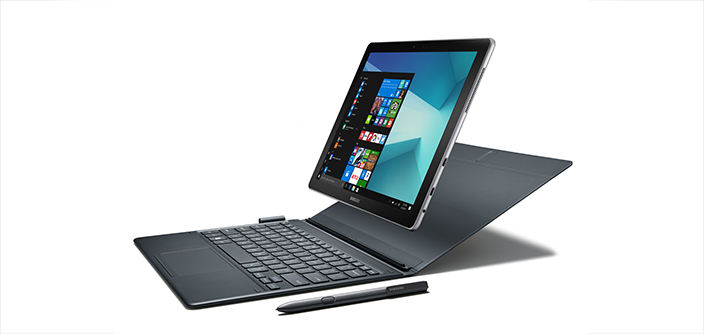
Image Source: Samsung Official
A full day of lectures or office work that still leaves battery at the end is the practical reality most people notice first with the current Galaxy Book series. These machines belong to Samsung’s mainstream range. They rely on efficient Intel processors, mostly IPS screens, and aluminum or mixed bodies aimed at students and everyday office users who want reliable Windows performance without flagship prices.
A matching day includes moving between classes with many browser tabs and shared documents open, joining afternoon video calls, then finishing light photo sorting or streaming later. Another fitting pattern is someone working from different rooms at home who needs steady multitasking without constant charging. The series does not fit long 4K video exports, sustained 3D work, or regular high-setting gaming. Cooling and integrated graphics reach their limit under those continuous loads.
Does the battery really last through a normal study or work day?
Yes, in mixed real use most current models clear a full day. Browser research, documents, messaging, and intermittent video calls are handled without hunting for outlets. Continuous high-brightness calls and heavy multitasking shorten the window, as expected. Video playback stretches further.
The included USB-C chargers are compact. A short plug-in during a break restores useful charge. Larger battery configurations simply give more margin before the warning appears.
How does the screen behave in bright classrooms and shared spaces?
Most mainstream Galaxy Book models use IPS panels. Text stays clear for documents and spreadsheets. Colors are usable for everyday photos and web content, yet they lack the deep blacks and saturation of AMOLED screens found on higher lines.
Anti-glare coating on many versions reduces reflections under classroom lights or near windows. Brightness is adequate indoors but can feel limited outdoors or under strong overhead lighting. People who read text for long hours generally find the panels comfortable. Those who prioritise vivid media notice the difference immediately.
What happens to heat and fan noise during ordinary multitasking?
Under normal document work, browsing, and video calls the fans stay quiet or silent. The body remains cool enough for lap use in most cases. When the processor faces longer tasks—compressing large folders, running several meetings at once, or light photo batch work—temperatures rise and the fans become clearly audible.
Because these machines prioritise thinness and cost, the cooling system is modest. Sustained heavy loads cause the processor to slow itself to stay safe. Soft surfaces block vents and make the slowdown arrive sooner.
How noticeable is the weight difference between sizes in daily carry?
14-inch models often land around 1.3–1.4 kg and feel manageable in a backpack for full-day campus or commute use. 15.6-inch and 16-inch versions add clear weight and bulk. The extra screen space helps when many windows are open, yet the bag feels heavier on long walks or crowded transport.
Aluminum or reinforced construction resists everyday flex. Lifting by one corner produces little twisting on most units. The design prioritises practical daily carrying over ultra-light flagship numbers.
Can memory or storage be upgraded later?
Memory is soldered on the large majority of current models. The amount chosen at purchase is permanent. 8 GB handles basic work but becomes limiting once many tabs, documents, and a video call run together. 16 GB gives clearer headroom for typical student and office multitasking.
Storage is more flexible on many units. A second M.2 slot or accessible primary drive often allows capacity upgrades later. Choosing higher storage at purchase still reduces the need for external drives in the first years.
Which ports actually matter on a library table or home desk?
Most models include USB-C, USB-A, HDMI, and a headphone jack. Some add a microSD reader. One USB-C port can charge the laptop while another handles a peripheral, or a single cable can connect to a monitor and power through a basic hub.
The selection covers everyday needs without requiring a dock for simple setups. People who connect many older USB-A devices or need wired Ethernet daily will still reach for a hub. Full-size HDMI remains convenient for quick classroom or meeting-room projection.
How do the common sizes feel different in real use?
The 14-inch version prioritises easy all-day carrying. It disappears more easily into a bag and suits frequent movement between buildings or transport. The 15.6-inch and 16-inch versions prioritise workspace. Multiple documents and browser windows feel less cramped, yet the extra weight becomes noticeable on longer walking days.
Both share the same core limits around sustained heavy loads and fixed memory. The choice is mainly between portability and screen real estate.
What Galaxy phone features actually appear in daily use?
Owners who already use a Galaxy phone gain simple wireless file transfer and continuity tools. These reduce cable use for quick photo or document moves. They are convenient extras rather than core reasons to choose the series. People outside the Galaxy ecosystem simply do not use them.
What to check before you buy
- Exact model name and screen size (14-inch vs 15.6/16-inch)
- Memory capacity and whether it is soldered
- Storage capacity and whether a second slot exists
- Battery capacity (Wh) listed on the seller page
- Screen type (IPS) and brightness rating
- Port selection matches your daily devices (HDMI, USB-A, microSD)
- Weight if you carry the machine all day
- Whether the charger included is USB-C and what wattage it is
- Keyboard backlighting presence if you work in dim spaces
This guide is based only on official specifications and recurring patterns from professional reviews and real-world use of the mainstream Galaxy Book series. It is independent and not sponsored. Exact battery size, memory, and ports vary by region and configuration, so always match the full specifications on the seller’s page before purchasing. If terms such as soldered memory or thermal throttling remain unclear, the explanations on the Start Here page will help before checking individual listings.