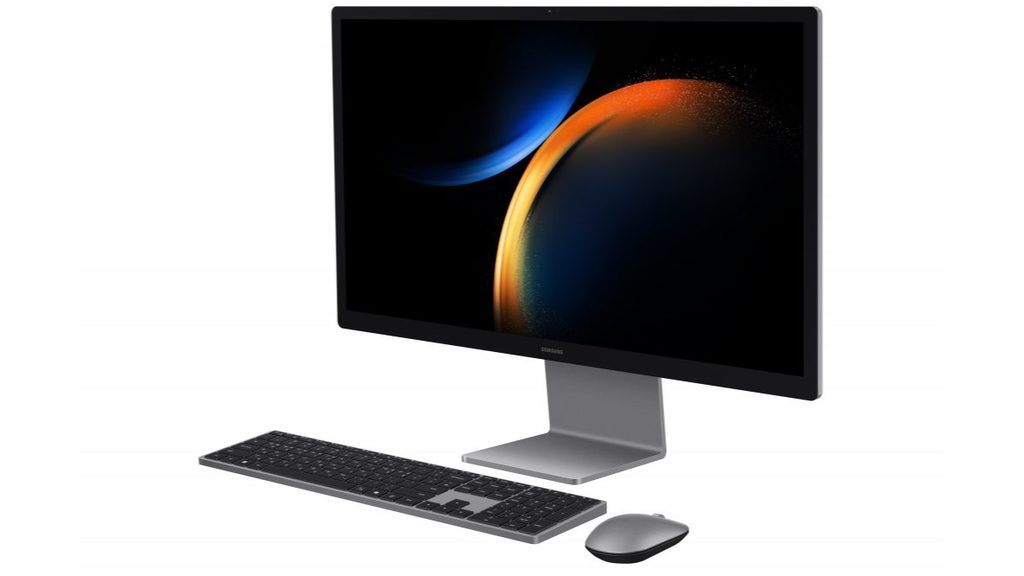
Image Source: Samsung Official
Who Is It For?
The Samsung All-in-One PC Pro is used by individuals who require a large 4K display for office work and media consumption but want to minimize the number of cables and components on their desk. It fits the needs of Galaxy smartphone and tablet users who want to utilize the ecosystem features for cross-device multitasking. It also serves as a centralized computer for home environments where the PC is used for both work and as a monitor for external devices via the HDMI-in port. The aluminum build and integrated design make it a choice for those who prioritize a clean workspace aesthetic.
If this form factor or power doesn’t quite fit your daily work, exploring other lineup categories would be a better path.
1. Check Before You Buy
Display Resolution and Integrated Graphics
The Samsung All-in-One PC Pro features a 27-inch 4K display with a resolution of 3840 x 2160. This high pixel density results in sharp text and detailed images, which is a factor for document editing and media consumption. The graphics processing is handled by the integrated Intel Arc chip. Unlike a dedicated graphics card, this chip shares the system memory (RAM) to process visuals. While it handles 4K video playback and standard photo editing, the performance in 3D applications is limited by the shared memory architecture. The anti-glare coating on the screen reduces reflections from windows or overhead lights, but it does not eliminate them entirely in direct sunlight.
Soldered Memory and Hardware Limitations
The LPDDR5X memory in the Samsung All-in-One PC Pro is soldered directly to the motherboard. Soldered means the memory chips are permanently attached and cannot be removed or replaced. There are no empty slots for adding more RAM later. If a unit is purchased with 16GB, it will remain at 16GB for the life of the device. For those who run multiple professional applications or keep dozens of browser tabs open, the 32GB version is a fixed hardware choice that must be made at the time of purchase. The storage, however, is accessible through a panel on the rear, allowing for the replacement or addition of an SSD if more file space is required.
HDMI-in Functionality and Monitor Mode
A specific feature of the Samsung All-in-One PC Pro is the HDMI-in port located on the rear of the chassis. This allows the 27-inch 4K screen to function as a standalone monitor for external devices. When a laptop, gaming console, or tablet is connected to this port, the All-in-One display shows the output from that device. This is a physical connection that works even when the internal PC components are not being used for processing. This functionality extends the utility of the screen beyond the lifespan of the internal processor, as the display can continue to serve as a monitor for future computers.
Thermal Management and Integrated Design
The cooling system is contained within the slim housing behind the display. It uses internal fans to move air across the processor and exhaust it through vents. During basic tasks like web browsing or word processing, the fans operate at a low speed that is difficult to hear. When the system is under a heavy load, such as during high-resolution video exports or system updates, the fan speed increases. This results in a steady air-rushing sound from the rear of the unit. Because the components are packed closely together, the rear of the chassis will feel warm to the touch during these periods.
Galaxy Ecosystem Integration
The Samsung All-in-One PC Pro includes software features designed to work with other Samsung Galaxy devices. “Multi Control” allows the included keyboard and mouse to control a nearby Galaxy smartphone or tablet. “Second Screen” allows a Galaxy tablet to be used as an additional wireless monitor for the All-in-One PC. These features require a Samsung account and for all devices to be on the same Wi-Fi network. This integration is a functional characteristic of the software suite provided with the device, allowing for the transfer of files and the synchronization of clipboards across different hardware.
2. How It Fits a Real Desk Setup
Physical Footprint and Stand Design
The Samsung All-in-One PC Pro occupies a desk space determined by its 27-inch screen width and the depth of its integrated stand. The stand is constructed from aluminum and provides a stable base that prevents the screen from wobbling during use. The footprint of the stand is smaller than that of a traditional desktop tower, leaving more open space on the desk surface. The height of the display is fixed, meaning it cannot be raised or lowered, but the tilt angle can be adjusted to match the user’s eye level. This fixed height is a factor when considering the ergonomics of a specific chair and desk combination.
Wireless Peripherals and Cable Management
The device is supplied with a wireless keyboard and a wireless mouse that are pre-paired to the system. This reduces the number of cables on the desk to a single power cord. The keyboard features a dedicated “Galaxy AI” key in certain regions, which launches specific software functions. Both peripherals are powered by batteries and connect via a wireless signal. The power cable connects to the rear of the stand, keeping the wire out of the user’s direct line of sight. This single-cable setup is a primary characteristic of the All-in-One form factor, intended for a minimalist workspace.
Port Accessibility and Rear Connectivity
The physical ports are located on the back of the display housing. This includes the Thunderbolt 4 port, USB-A ports, the HDMI-in port, and the Ethernet jack. Because the ports face the rear, connecting and disconnecting peripherals like thumb drives or wired headsets requires reaching behind the screen or turning the entire unit. This placement keeps cables hidden from the front but makes frequent port access less convenient than a system with front-facing ports. The Thunderbolt 4 port supports high-speed data transfer and can drive an additional external 4K monitor if more screen space is required.
Audio Performance and Speaker Placement
The audio system consists of four speakers tuned by AKG, located within the base and the lower portion of the display. There are two woofers for lower frequencies and two tweeters for higher frequencies. This quad-speaker setup provides a 3D sound experience without the need for external speakers. The sound quality is influenced by the desk surface, as the speakers fire downwards and outwards. A hard desk surface reflects the sound toward the user, while a soft surface may dampen the audio. The volume is sufficient for video calls and media playback in a standard room environment.
Webcam and Microphone for Communication
The webcam is integrated into the top bezel of the display. It provides a 5MP resolution, which is higher than the standard 720p or 1080p cameras found in many laptops. This results in a clearer image for video conferencing. The dual microphones are designed to capture voice while filtering out background noise. There is no physical privacy shutter for the camera, so the device relies on software indicators to show when the camera is active. The camera also supports Windows Hello facial recognition, allowing the user to sign in to the operating system by looking at the lens.
3. Performance by Use Case
The performance of the Samsung All-in-One PC Pro is determined by the Intel Core Ultra processor and the integrated Intel Arc graphics. The following ratings assume a configuration with 16GB of RAM.
| Use Case | Software | Rating | Reason |
| Office Productivity | Excel, Word, Outlook | Sufficient | 4K screen provides ample space for large spreadsheets |
| Web Browsing | Chrome, Edge (20+ tabs) | Sufficient | 16GB+ RAM handles many active tabs without lag |
| Video Conferencing | Zoom, Microsoft Teams | Sufficient | 5MP webcam and dual microphones provide clear input |
| Photo Editing | Photoshop, Lightroom | Adequate | 4K resolution is beneficial, but integrated GPU has limits |
| 3D Gaming | AAA Games (Modern) | Not enough | Integrated graphics are not intended for heavy 3D games |
The ratings above reflect the capabilities of the hardware when connected to a power outlet. Performance in specific applications will depend on the complexity of the project files and the multitasking load.
4. Official Specs (with plain explanations)
| Category | Specification | Notes |
| CPU | Intel Core Ultra 5 / 7 (Series 1) | Processors with integrated AI processing units |
| Graphics | Intel Arc Graphics | Integrated graphics sharing system memory |
| Memory | 16GB / 32GB LPDDR5X | Soldered to motherboard, non-upgradable |
| Storage | 256GB / 512GB / 1TB NVMe SSD | Internal M.2 slot, expansion possible |
| Display | 27-inch 4K (3840 x 2160) LED | Anti-glare coating, 16:9 aspect ratio |
| Weight | Approx. 6.5 kg – 7.0 kg | Total weight including the integrated stand |
| Audio | Quad Speakers (Woofer x2, Tweeter x2) | Integrated 3D sound system with AKG tuning |
| Ports | HDMI-in, USB-A, Thunderbolt 4, LAN | Physical connections located on the rear |
This series is sold with different CPUs, memory, and storage depending on the release year and generation. Please match the specifications on your current seller page with the official information above.
Source: Samsung Official Product Page
The technical specifications of the Samsung All-in-One PC Pro define its role as a centralized home or office computing station. These components are integrated into the display housing, eliminating the need for a separate tower. Understanding these individual parts is necessary to identify the capabilities of a specific unit found on a retail website.
5. Main Variations in This Series
The Samsung All-in-One PC Pro series features several hardware combinations that change the processing speed and multitasking capacity. These variations are determined by the specific model chosen at the time of purchase.
- Processor options include the Intel Core Ultra 5 and the Intel Core Ultra 7, which feature different core counts and clock speeds for data processing.
- Memory is available in 16GB or 32GB capacities, but because it is permanently attached to the internal board, the choice made at purchase is final.
- Storage sizes range from 256GB to 1TB, utilizing the NVMe standard for high-speed file access and system boot times.
- The display remains a 27-inch 4K panel across the current series, but the included wireless accessories may vary in color or layout by region.
- Connectivity features include Wi-Fi 6E and Bluetooth 5.3, providing modern wireless standards for internet and peripheral devices.
6. What to Check on the Sales Page
When viewing a Samsung All-in-One PC Pro listing, the specific memory capacity and the processor generation are the most important details to verify. Sellers often list different hardware configurations under the same series name.
- CPU Generation: Check whether you are getting the Intel Core Ultra processors (Series 1).
- Memory Capacity: Confirm if the unit has 16GB or 32GB, as this cannot be changed later.
- Storage Size: Check if the 256GB, 512GB, or 1TB SSD meets your file storage requirements.
- Included Accessories: Verify that the wireless keyboard and mouse are included in the package.
- HDMI-in Support: Confirm the presence of the HDMI-in port if you intend to use the screen as a monitor.
The specifications on a retail page can sometimes be generalized. Matching the manufacturer’s part number with the official datasheet is the most accurate way to confirm the internal hardware.
7. Disclaimer & Buying Advice
This buying guide for the Samsung All-in-One PC Pro is based on official manufacturer specifications and recurring real-world user experiences. It is completely independent, not sponsored, and does not guarantee specific performance for every unit. Hardware configurations such as the processor, memory, and storage can differ by generation and region, so please double-check the exact specifications listed on your seller’s page before purchasing.
8. Beginner Guide
If you are new to choosing computer hardware and want to understand the basics of these components, you can [Start Here] to learn more about how to read specifications.