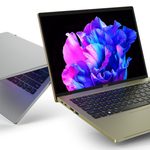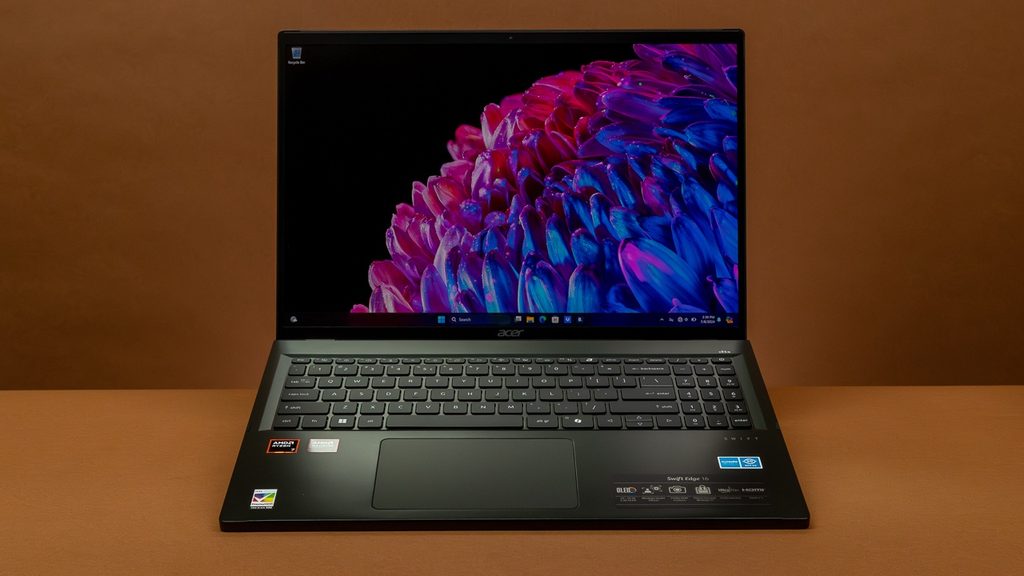
Image Source: Tech Reviewer / Hands-on Photo
Who Is It For?
The Acer Swift Edge is used by office professionals and students who require a large screen for multitasking but need to carry their laptop between locations every day. It fits the needs of data analysts who work with large spreadsheets and benefit from the 16:10 aspect ratio and the numeric keypad. It also serves as a primary computer for travelers who want a desktop-like viewing experience in a hotel room or a cafe without the weight of a traditional 16-inch machine. The lightweight design makes it a choice for those who prioritize physical comfort during a commute over the rigid feel of a heavier aluminum laptop.
If this form factor or power doesn’t quite fit your daily work, exploring other lineup categories would be a better path.
1. Check Before You Buy
Magnesium-Aluminum Alloy and Structural Rigidity
The Acer Swift Edge uses a magnesium-aluminum alloy chassis to achieve its weight of approximately 1.17kg. This material is different from the heavy aluminum used in many other premium laptops. When the device is lifted with one hand, it feels lighter than its 16-inch size suggests. However, this material has more physical flexibility. Pressing on the center of the keyboard or the lid results in a visible dip in the surface. Tapping on the chassis produces a different sound than denser metals, which some describe as a hollow sensation. This flexibility is a characteristic of the lightweight alloy and does not indicate a mechanical failure. The surface has a matte coating that resists fingerprints, but the light weight means the base can lift slightly when the lid is opened with one hand.
Soldered Memory and Internal Expansion
The LPDDR5 memory in the Acer Swift Edge is soldered directly to the motherboard. Soldered means the memory chips are permanently attached and cannot be removed or replaced. There are no empty slots for adding more RAM later. If a unit is purchased with 16GB, it will remain at 16GB for the life of the device. For those who run multiple professional applications or keep dozens of browser tabs open, the 32GB version is a fixed hardware choice that must be made at the time of purchase. The storage, however, remains upgradable as there are two physical M.2 slots inside. Adding a second SSD requires removing the bottom panel, which exposes the internal layout. This dual-slot configuration is rare for a laptop of this weight.
OLED Display Characteristics and Reflections
The 16-inch screen uses a 16:10 aspect ratio, which makes the display taller than a traditional 16:9 widescreen. This extra vertical space allows for more rows to be visible in a spreadsheet or more text to appear in a word processor without scrolling. The resolution of 3200 x 2000 ensures that text remains sharp even when the font size is reduced. The screen features a glossy finish, which can result in reflections from overhead lights or windows. In brightly lit environments, these reflections interfere with visibility. The OLED panel provides deep black levels because each pixel can turn off completely, but it also requires specific software management to maintain the state of the pixels over time.
Thermal Management and Fan Activity
The cooling system in the Acer Swift Edge is designed for a very thin chassis. During basic tasks like document editing or web browsing, the fan often remains at a low speed. When the system is under a heavy load, such as during video rendering or large file transfers, the fan increases its speed. This results in a steady air-rushing sound that can be higher in pitch than the fans in thicker laptops. Because the chassis is very thin, the fan must move heat away from the components quickly. The heat is primarily exhausted through the rear vents near the hinge, and the area above the keyboard will feel warm to the touch during these periods. The magnesium alloy does not dissipate heat as quickly as aluminum, so the internal temperatures are managed by the system software.
Battery Capacity and Energy Consumption
The battery capacity of 54Wh or 65Wh is relatively small for a 16-inch laptop. This capacity provides the energy required for the processor and the high-resolution OLED screen. When the laptop is not connected to a wall outlet, the system may reduce the screen brightness and the refresh rate to extend the runtime. Using the laptop for basic office tasks results in different durations than using it for video playback or data-intensive processing. The 3.2K OLED panel and the 120Hz refresh rate are significant consumers of energy. Setting the screen to 60Hz instead of 120Hz while on battery is a common way to extend the duration of use.
2. How It Fits a Real Desk Setup
Screen Real Estate and Multitasking
On a desk, the 16-inch screen provides enough space to have two windows open side-by-side without the content feeling cramped. The 16:10 ratio is particularly useful for vertical tasks like coding or reading long PDF documents. The high resolution allows for more information to be displayed on the screen at once compared to a standard Full HD monitor. When connected to an external monitor via the HDMI 2.1 or USB4 ports, the laptop can function as a secondary display that is large enough to be used for primary tasks. The OLED technology ensures that colors remain consistent even when the screen is viewed from the side.
Keyboard Layout and Typing Feel
The keyboard includes a full numeric keypad on the right side, which is a standard feature for the 16-inch model. This shifts the main typing area slightly to the left of the center of the chassis. For those who perform heavy data entry or financial calculations, the numeric keypad is a physical tool built into the device. The keys have a travel distance of approximately 1.3mm, which is shallower than many traditional laptops. This results in a typing experience that requires less force but provides less physical feedback. The touchpad is centered under the spacebar rather than the chassis, which aligns with the typing position. Because the chassis is thin, the front edge of the laptop is low, which reduces the angle of the wrists during typing.
Port Accessibility and Cable Management
The Acer Swift Edge includes a variety of ports that are distributed across both sides of the chassis. It features two USB4 ports on the left side, which support high-speed data, video output, and charging. It also includes two standard USB-A ports, one on each side, for older peripherals like mice or thumb drives. The HDMI 2.1 port allows for connection to an external monitor or projector. All ports are located on the sides of the chassis. When multiple cables are connected, they will protrude from the sides, which is a factor in cable management on a desk. The MicroSD card slot allows for quick file transfers from cameras or mobile devices.
Audio and Video for Meetings
The speakers are located on the bottom of the chassis and fire downwards. The sound quality is influenced by the surface the laptop is sitting on; a hard desk reflects the sound toward the user, while a soft surface like a lap will dampen the audio. The webcam is located at the top of the screen and often features a 1440p resolution, which is higher than the standard 1080p cameras found in many laptops. This results in a clearer image for video conferencing. The dual microphones use AI noise-reduction technology to filter out background sounds. The camera does not have a physical privacy shutter on all models, but it can be disabled through the system software.
Daily Carry and Portability
The primary characteristic of the Swift Edge is its weight. At approximately 1.17kg, it is lighter than many 13-inch laptops despite having a 16-inch screen. This allows the device to be carried in a backpack or a shoulder bag without causing significant physical strain. However, the 16-inch screen size means the laptop has a large physical footprint. It requires a bag specifically designed for 16-inch devices. Many standard backpacks intended for 15-inch laptops will not accommodate the width and depth of this chassis. The power adapter is also designed to be compact, which contributes to the total travel weight.
3. Performance by Use Case
The performance of the Acer Swift Edge is determined by the AMD Ryzen processor and the amount of RAM installed. The following ratings assume a configuration with 16GB of RAM.
| Use Case | Software | Rating | Reason |
| Office Productivity | Excel, Word, Outlook | Sufficient | Fast response times and large screen for multitasking |
| Web Browsing | Chrome, Edge (20+ tabs) | Sufficient | 16GB+ RAM handles many active tabs without lag |
| Photo Editing | Photoshop, Lightroom | Sufficient | High-resolution, color-accurate OLED screen is beneficial |
| Video Editing | Premiere Pro (1080p) | Adequate | Possible for light edits, but thin chassis limits heat dissipation |
| 3D Gaming | AAA Games (Modern) | Not enough | Integrated graphics are not intended for heavy 3D games |
The ratings above reflect the capabilities of the hardware when connected to a power outlet. Performance in specific applications will depend on the complexity of the project files and the thermal mode selected in the Acer QuickAccess software.
4. Official Specs (with plain explanations)
| Category | Specification | Notes |
| CPU | AMD Ryzen 7 7000 / 8000 Series | Efficiency-focused processors with integrated graphics |
| Graphics | AMD Radeon 780M | Integrated graphics sharing system memory |
| Memory | 16GB / 32GB LPDDR5 | Soldered to the board, non-upgradable |
| Storage | 512GB / 1TB / 2TB NVMe SSD | Two internal M.2 slots for storage expansion |
| Display | 16-inch 3.2K (3200 x 2000) OLED | 120Hz refresh rate, glossy finish, 16:10 ratio |
| Weight | Approx. 1.17 kg to 1.23 kg | Magnesium-aluminum alloy chassis, very low weight |
| Battery | 54Wh or 65Wh Lithium-ion | Mid-range capacity for a 16-inch screen |
| Ports | 2x USB4, 2x USB-A, HDMI 2.1, MicroSD | Mixed modern and legacy physical connections |
This series is sold with different CPUs, memory, and storage depending on the release year and generation. Please match the specifications on your current seller page with the official information above.
Source: Acer Official Product Page
The technical specifications of the Acer Swift Edge define its role as an ultra-portable, large-screen laptop. These components determine how the device handles software and how it physically behaves during daily transport. Understanding these individual parts is necessary to identify the capabilities of a specific unit found on a retail website.
5. Main Variations in This Series
The Acer Swift Edge series features several hardware combinations that change the processing speed and visual experience. These variations are determined by the specific model year and the configuration chosen at the time of purchase.
- Processor options include different tiers of the AMD Ryzen 7 family, such as the 7840U or 8840U, which affect the speed of data processing and AI-related tasks.
- Memory is available in 16GB or 32GB capacities, but because it is permanently attached to the board, the choice made at purchase is final.
- Storage configurations vary, but the presence of two internal M.2 slots allows for the addition of a second drive after purchase.
- Display panels are consistent in resolution (3.2K) and technology (OLED), but refresh rates can vary between 60Hz and 120Hz depending on the generation.
- Battery sizes are offered in 54Wh or 65Wh versions, which changes the total runtime and the weight of the device by a small margin.
6. What to Check on the Sales Page
When viewing an Acer Swift Edge listing, the specific memory capacity and the processor generation are the most important details to verify. Sellers often list different hardware configurations under the same series name.
- CPU Generation: Check whether you are getting the AMD Ryzen 7000 or 8000 series processors.
- Memory Capacity: Confirm if the unit has 16GB or 32GB, as this cannot be changed later.
- Storage Size: Check if the 512GB, 1TB, or 2TB SSD meets your file storage requirements.
- Battery Size: Confirm if the unit includes the 54Wh or 65Wh battery to ensure it meets your runtime needs.
- Screen Refresh Rate: Verify if the display is 60Hz or 120Hz for your motion clarity needs.
The specifications on a retail page can sometimes be generalized. Matching the manufacturer’s part number with the official datasheet is the most accurate way to confirm the internal hardware.
7. Disclaimer & Buying Advice
This buying guide for the Acer Swift Edge is based on official manufacturer specifications and recurring real-world user experiences. It is completely independent, not sponsored, and does not guarantee specific performance for every unit. Hardware configurations such as the processor, memory, and storage can differ by generation and region, so please double-check the exact specifications listed on your seller’s page before purchasing.
8. Beginner Guide
If you are new to choosing computer hardware and want to understand the basics of these components, you can [Start Here] to learn more about how to read specifications.