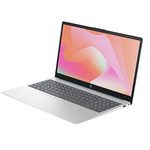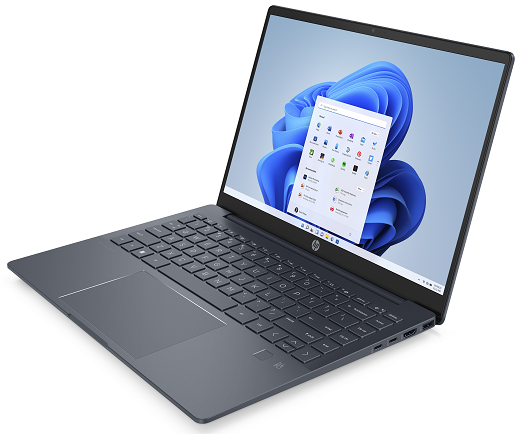
Image Source: HP Official
Who Is It For?
The HP Pavilion Plus is for individuals who need a laptop that balances a premium metal build with a lightweight design for daily travel. It fits the needs of students who move between classrooms and office workers who require a machine for documents, emails, and web-based research. The high-resolution screen options make it a tool for those who consume high-definition media or perform light photo editing. It is not for those who plan to perform internal hardware upgrades to the RAM, nor is it for professional gamers who require high-wattage graphics cards and advanced cooling systems for long gaming sessions.
“If this form factor or power doesn’t quite fit your daily work, exploring other lineup categories would be a better path.”
1. Check Before You Buy
The HP Pavilion Plus is a slim laptop series that uses an all-metal aluminum chassis, distinguishing it from the standard Pavilion models that often incorporate plastic. This material choice results in a more rigid frame that does not flex easily when the laptop is picked up by one corner. However, the internal architecture of this series follows a modern trend where the memory (RAM) is soldered directly to the motherboard. This means there are no physical slots to add more memory later. The 16GB or 32GB capacity chosen at the time of purchase remains for the life of the device.
Display Technology and Battery Consumption
The choice of display panel significantly affects the daily operation of the laptop. The OLED panel option provides a 120Hz refresh rate, which makes the movement of the mouse cursor and the scrolling of text appear smoother. However, OLED technology consumes more electricity than the standard IPS panels, especially when displaying bright white backgrounds. This results in a shorter operating time when the laptop is not connected to a wall outlet. The OLED screen also features a glossy glass cover, which reflects light from windows or overhead lamps more clearly than the matte IPS version.
Thermal Management and Fan Behavior
The Pavilion Plus series utilizes a dual-fan cooling system to manage the heat generated by the processor. Because the chassis is thin, the fans must spin at higher speeds to move air through the internal components during heavy tasks. This results in an audible whirring sound that becomes prominent during system updates, video calls, or when many browser tabs are open simultaneously. The air is exhausted through vents located near the hinge, which causes the area above the keyboard to become warm to the touch during sustained use. The aluminum body also conducts heat, meaning the bottom of the laptop will feel warm if used on a lap for long periods.
Processor and Graphics Power Limits
While the Pavilion Plus can be configured with high-performance processors like the Intel Core i7 or AMD Ryzen 7, the slim design limits the amount of power these chips can draw. To prevent the metal chassis from becoming too hot, the system software reduces the clock speeds of the CPU and GPU during long periods of high-intensity work. This means that while the hardware names are the same as those found in larger gaming laptops, the actual processing speed in the Pavilion Plus is lower to maintain a safe operating temperature. The dedicated NVIDIA RTX 3050 option in the 16-inch model also operates at a lower wattage than it would in a thicker machine.
Portability and Build Characteristics
The 14-inch model weighs approximately 1.4 kilograms, which fits into the category of laptops that can be carried in a standard backpack for a full day. The 16-inch model is heavier at nearly 1.9 kilograms and requires a larger bag. The all-metal construction provides a premium feel, but the edges of the aluminum can feel sharp against the wrists depending on the typing angle. The hinge is designed to lift the back of the laptop slightly when opened, which creates a small gap for airflow but also changes the angle of the keyboard relative to the desk surface.
2. How It Fits a Real Desk Setup
The HP Pavilion Plus occupies a footprint that varies by screen size, but both models maintain a slim profile that leaves room for other desk items. The 14-inch model is roughly the size of a standard paper notebook, while the 16-inch model is wider to accommodate the extra screen space and the numeric keypad. On a desk, the laptop sits on rubber feet that prevent it from sliding. The power button is integrated into the keyboard row, located next to the Delete key, which requires a specific press to activate and avoid accidental shutdowns.
Keyboard and Touchpad Interaction
The keyboard features a 1.3mm key travel, providing a tactile response that is standard for slim laptops. The 16-inch model includes a full numeric keypad on the right side, which shifts the main typing area and the touchpad slightly to the left of the center. This asymmetrical layout requires the user to adjust their hand position. The touchpad is large and uses a mechanical diving-board mechanism, meaning the click is easier to register at the bottom than at the top. The surface of the touchpad is smooth, allowing for multi-finger gestures like zooming and switching between windows.
Connectivity and Cable Management
The port layout is distributed on both sides of the chassis. The USB-C ports support Power Delivery, which means the laptop can be charged using a standard USB-C adapter. This eliminates the need for a proprietary barrel-style charger and allows for a single-cable setup if a USB-C monitor is used. The HDMI 2.1 port allows for connection to modern external displays or televisions. Because the ports are located on the sides, cables will protrude from the left and right, which may interfere with mouse movement if the desk space is narrow. The inclusion of a USB-A port ensures that older thumb drives and peripherals can still be connected without an adapter.
Audio and Visual Communication
The webcam is a 5MP sensor, which provides a higher resolution than the 720p cameras found on many entry-level laptops. This results in a clearer image during video conferences. A physical privacy shutter is built into the top bezel, allowing the user to slide a plastic cover over the lens when the camera is not in use. The speakers are tuned by B&O and are located on the bottom of the chassis, firing downward. This design relies on the hard surface of a desk to reflect the sound toward the user. If the laptop is used on a soft surface like a bed, the audio becomes muffled and the volume decreases.
Daily Ergonomics and Screen Hinge
The screen hinge allows the display to open to approximately 140 degrees. It is stiff enough to prevent the screen from wobbling when typing on an uneven surface, but it requires two hands to open the lid from a closed position. The 16:10 aspect ratio of the screen provides more vertical space than a traditional 16:9 widescreen, which is useful for reading long documents or viewing spreadsheets. The 5MP webcam also supports Windows Hello facial recognition on specific models, allowing for a hands-free login process by simply looking at the screen.
3. Performance by Use Case
The following ratings are based on a middle-tier configuration featuring an Intel Core i5 or Ryzen 5 processor and 16GB of RAM.
| Use Case | Software | Rating | Reason |
| Office Work | Excel, Word, Outlook | Sufficient | 16GB RAM and modern CPUs handle multitasking and large files. |
| Web Browsing | Chrome, Edge (30+ tabs) | Sufficient | High-speed memory allows for smooth switching between many tabs. |
| Video Calls | Zoom, Microsoft Teams | Sufficient | 5MP webcam provides a clear image; dual fans manage the load. |
| Photo Editing | Photoshop, Lightroom | Sufficient | OLED and 2.2K IPS panels offer high color accuracy for editing. |
| Video Editing | 1080p Simple Cuts | Adequate | Can handle basic video tasks, but slow for 4K or complex effects. |
| AAA Gaming | Modern Heavy Titles | Not enough | Slim chassis and low-wattage GPUs cannot run heavy games well. |
The performance of the Pavilion Plus is consistent for productivity tasks. However, because it is a slim laptop, it is not intended for sustained high-load tasks like 24/7 video rendering, which may lead to the fans running at maximum speed and the processor slowing down to manage heat.
4. Official Specs (with plain explanations)
| Category | Specification | Notes |
| CPU | Intel Core i5/i7 (13th Gen) or Core Ultra / AMD Ryzen 5/7 | Processor options vary by generation and architecture |
| Graphics | Integrated (Intel Iris Xe/Arc, AMD Radeon) or RTX 3050 | Dedicated GPU available on specific 14″ and 16″ models |
| Memory | 16GB or 32GB LPDDR5x | Soldered to the motherboard, no expansion slots |
| Storage | 512GB to 1TB PCIe NVMe SSD | Single internal slot for the storage drive |
| Display | 14″ or 16″ (2.2K IPS to 2.8K/120Hz OLED) | High-resolution options with varying panel technologies |
| Weight | ~1.40 kg (14″) to ~1.90 kg (16″) | All-metal chassis influences the total physical weight |
| Battery | 51Wh to 68Wh | Capacity depends on the screen size and GPU |
| Ports | USB-C (Thunderbolt 4 on Intel), USB-A, HDMI 2.1 | Physical connections for data, video, and power |
This series is sold with different CPUs, memory, and storage depending on the release year and generation. Please match the specifications on your current seller page with the official information above.
Source: HP Official Product Page
The specifications listed above represent the hardware components that define the physical size and technical limits of the Pavilion Plus series. These parts determine how much information the screen can show at once, how heavy the device feels in a bag, and how the system handles multiple open applications.
5. Main Variations in This Series
- The display comes in two primary sizes: a 14-inch model for portability and a 16-inch model that includes a dedicated numeric keypad.
- Panel technology is divided between IPS displays, which have a matte finish, and OLED displays, which offer higher contrast but a glossy surface.
- Processor architecture is split between Intel and AMD, which changes the specific type of USB-C connectivity (Thunderbolt 4 vs. USB4).
- Graphics configurations range from integrated chips that share system memory to dedicated NVIDIA RTX cards with their own video memory.
- Memory is fixed at the time of manufacture, with 16GB being the standard and 32GB available on higher-tier configurations.
6. What to Check on the Sales Page
When reviewing a listing for the HP Pavilion Plus, the specific model generation and the internal components will determine the actual performance and longevity of the machine.
- CPU Generation: Check whether you are getting the 13th Gen Intel, Core Ultra, or Ryzen 7000/8000 series.
- Memory Capacity: Confirm if the RAM is 16GB or 32GB, as this is soldered and non-upgradable.
- Display Panel Type: Verify if the screen is “IPS” (matte) or “OLED” (glossy/high contrast).
- Screen Refresh Rate: Check if the panel supports 60Hz, 90Hz, or 120Hz for smoother motion.
- Graphics Card: Confirm if the laptop uses “Integrated Graphics” or a dedicated “NVIDIA RTX” card.
- Port Specifications: Check if the USB-C port supports “Thunderbolt 4” (Intel) or “USB4” (AMD).
7. Disclaimer & Buying Advice
This buying guide for the HP Pavilion Plus is based on official manufacturer specifications and recurring real-world user experiences. It is completely independent, not sponsored, and does not guarantee specific performance for every unit. Hardware configurations such as the processor, memory, and storage can differ by generation and region, so please double-check the exact specifications listed on your seller’s page before purchasing.
8. Beginner Guide
If you are setting up a new laptop for the first time and want to understand how to manage your battery and screen settings, check out our [Start Here] page to read our basic hardware and setup guides.