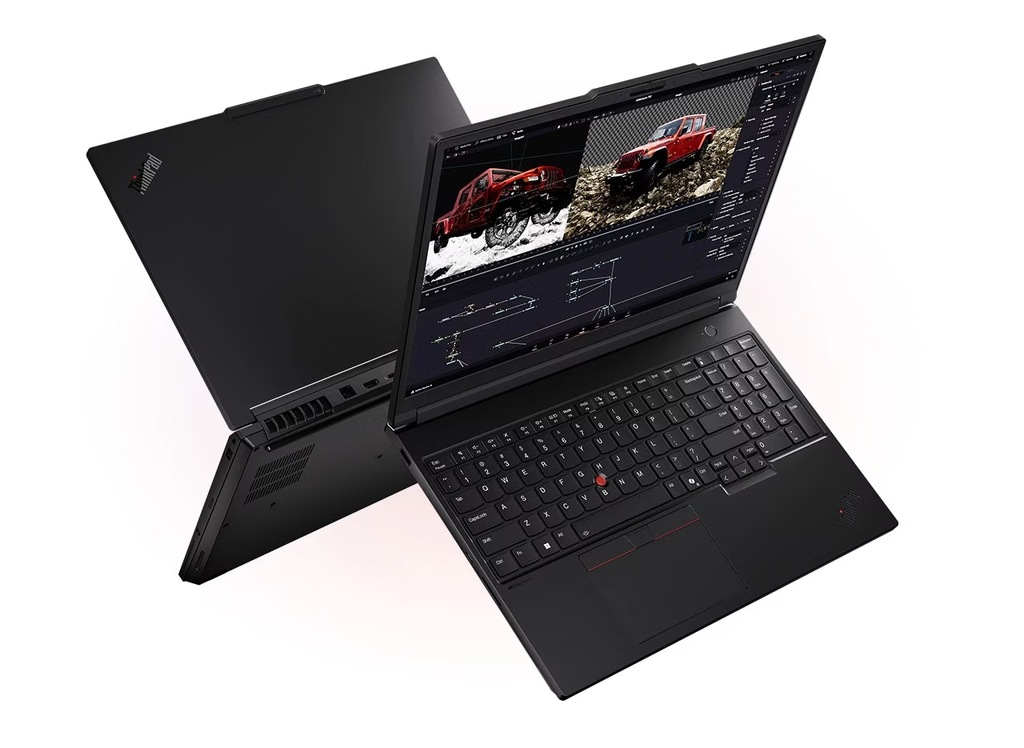
Image Source: Lenovo Official
Who Is It For?
The ThinkPad P16 anchors a 16-inch mobile workstation to a desk or docking station for multi-monitor CAD sessions, complex simulations, or color-critical compositing while the high-watt adapter or Thunderbolt dock supplies power. Engineers who move between office desks and client sites with calibrated displays, or researchers who keep large datasets local and expand memory later, fit the pattern this series supports. Architects or media professionals who rely on ISV-certified professional graphics and ECC options for error-resistant long renders also match the daily flow.
The 2.54–2.95 kg body and thick chassis make frequent bag carries less practical than desk-to-desk or docked use. Four SO-DIMM slots allow memory capacity to change later, and multiple M.2 bays support storage growth. The 94–99.9 Wh pack keeps lighter productivity work going for several hours away from the wall, but sustained professional GPU loads drain it quickly. If this form factor or power doesn’t quite fit your daily work, exploring other lineup categories would be a better path.
1. Four SO-DIMM Slots and Professional GPU Constraints
ECC or non-ECC memory and four slots
The series provides four DDR5 SO-DIMM slots that accept either ECC modules up to a combined 128 GB or non-ECC modules up to 192 GB. ECC protects against memory errors during long scientific or financial calculations; non-ECC reaches higher capacity for large 3D scenes. After purchase the owner can add or replace sticks to match project needs, but the choice of ECC versus non-ECC is fixed by the initial configuration. Confirm on the product page whether the listed SKU ships with ECC support and how many slots are already filled.
Workstation GPU versus consumer graphics
Graphics options use NVIDIA RTX professional series (Ada or Blackwell PRO) with ECC VRAM on higher models and TGP typically in the 90–115 W range. These drivers are certified for CAD, simulation, and content-creation applications; they do not target the same frame-rate priorities as consumer gaming GPUs. On a desk the discrete GPU sustains multi-hour renders or viewport navigation when powered; battery mode throttles it sharply. Check the sales listing for the exact professional GPU model and VRAM capacity.
Thunderbolt docking and multi-monitor output
Multiple Thunderbolt 4 or 5 ports plus HDMI 2.1 support docking stations that deliver power, Ethernet, and several external displays at once. A single dock can turn the machine into a full multi-monitor workstation at a fixed desk and then release it for brief movement. The ports remain fixed after purchase, so verify the generation of Thunderbolt and the included adapter wattage on the seller page.
These physical limits keep the machine oriented toward docked professional workloads and allow memory and storage expansion through the available slots.
2. Desk-to-Desk Movement, Meeting Noise, and Carry Weight
30 mm peak thickness on a shared table
The chassis measures approximately 362–364 × 252–266 × 15.8–30 mm. On a conference table or temporary desk the rear vents and large adapter leave limited free surface for a mouse or secondary documents. The 16-inch 16:10 lid requires clear depth so the screen can open fully without colliding with a wall or second monitor. Daily placement therefore favors a dedicated desk or docking station rather than shared surfaces.
Fan noise during meetings and sustained loads
Air enters through the underside and exits at the rear. Under light productivity the fans remain quiet enough for conference calls; under professional GPU or multi-core CPU loads they ramp and become audible in a quiet meeting room. Soft surfaces or closed bags block the intake and raise temperatures within minutes of heavy work. On a hard desk the cooling system maintains sustained output, yet the aluminum or hybrid chassis transfers heat to the surface beneath it.
2.54–2.95 kg for occasional moves
The notebook alone starts at 2.54 kg and can reach 2.95 kg depending on configuration. Adding the 170–230 W adapter pushes the total well past 3.5 kg. A short walk between offices or to a client site is manageable in a large bag; repeated daily transit across a campus adds noticeable mass. The 94–99.9 Wh battery covers several hours of document work or video calls but empties far sooner once the professional GPU engages, so any mobile heavy session still needs the adapter or a compatible dock nearby.
3. Performance by Use Case
Higher configurations pair Intel Core Ultra HX or previous HX processors with NVIDIA RTX professional GPUs. All heavy GPU work assumes the high-watt adapter or dock is connected; battery mode restricts the discrete graphics sharply. Results change with the graphics option.
| Use Case | Software | Rating | Reason |
|---|---|---|---|
| CAD and 3D modeling | SolidWorks, AutoCAD, Revit | Sufficient | Professional GPU and ECC options sustain complex models when powered |
| Scientific simulation / rendering | MATLAB, Ansys, Blender | Sufficient | Multi-core CPU and high VRAM keep long jobs in motion on AC power |
| Multi-stream 4K editing | Premiere, DaVinci Resolve | Adequate | Timeline playback holds when plugged in; battery drains rapidly |
| Office and multi-monitor productivity | Office, browsers, dual/triple displays | Sufficient | Thunderbolt docking and large memory handle concurrent loads |
| Battery-only heavy CAD or export | Any professional GPU-intensive task | Not enough | Discrete GPU power collapses and runtime shrinks to a short window |
Lower GPU or memory configurations reduce the margin on the first three rows. Gaming is not the design target of the professional graphics drivers.
4. Official Specs (with plain explanations)
| Category | Specification | Notes |
|---|---|---|
| Display | 16″ 16:10 WUXGA to 4K+ IPS or OLED | X-Rite factory color calibration on select panels |
| Processor | Up to Intel Core Ultra 9 HX or previous HX | Soldered |
| Graphics | NVIDIA RTX professional (PRO/Ada series) | Workstation drivers; up to 24 GB ECC VRAM |
| Memory | 4× SO-DIMM DDR5, up to 128 GB ECC / 192 GB non-ECC | Removable sticks |
| Storage | 2–3× M.2 NVMe (Gen4/Gen5) | Up to 8–12 TB total |
| Battery | 94–99.9 Wh | User-replaceable on some generations |
| Adapter | 170–230 W or USB-C GaN | Separate brick; PD support on newer models |
| Weight | Starting at 2.54–2.95 kg | With battery |
| Ports | Multiple Thunderbolt 4/5, HDMI 2.1, 2.5GbE, SD Express | Side and rear |
This series is sold with different CPUs, memory, and storage depending on the release year and generation. Please match the specifications on your current seller page with the official information above.
Source: Lenovo Official Product Page
The four SO-DIMM slots and Thunderbolt docking listed above directly determine later upgrade paths and multi-monitor desk setups.
5. Main Variations in This Series
GPU choice among RTX professional models changes sustained viewport and render performance once the machine is plugged in. Screen selection between WUXGA, QHD+, or 4K+ (IPS or OLED) with factory calibration alters color accuracy and brightness for the life of the unit. Starting memory of 32 GB versus 64 GB or higher, and the ECC versus non-ECC choice, affects how large datasets or scenes remain stable. Storage configuration of one versus two or three M.2 drives changes how much local project data can reside onboard. Battery capacity of 94 Wh versus 99.9 Wh alters the length of light unplugged sessions. Each of these choices is fixed after purchase except for the SO-DIMM modules and free M.2 bays that can still be filled.
6. What to Check on the Sales Page
Confirm the exact hardware listed for the SKU you are considering, because the same series name covers multiple generations and graphics levels.
- CPU Generation: Check whether you are getting the Core Ultra HX or previous HX processors.
- GPU model (professional RTX series) and VRAM capacity so the workstation certification is clear.
- Whether memory is ECC or non-ECC and how many of the four SO-DIMM slots are filled.
- Exact display resolution, refresh rate, and whether X-Rite factory calibration is included.
- Number of M.2 slots, battery capacity (94 Wh or 99.9 Wh), and included adapter wattage.
Matching these five items against the official sheet prevents receiving a lower-power or older configuration under the same series name.
7. Disclaimer & Buying Advice
This buying guide for the ThinkPad P16 is based on official manufacturer specifications and recurring real-world user experiences. It is completely independent, not sponsored, and does not guarantee specific performance for every unit. Hardware configurations such as the processor, memory, and storage can differ by generation and region, so please double-check the exact specifications listed on your seller’s page before purchasing.
8. Beginner Guide
The four SO-DIMM slots and professional GPU options define the daily limits of this series more than any other factor. [Start Here] walks through how those constraints interact with common workstation and mobile-office patterns before any purchase decision.