
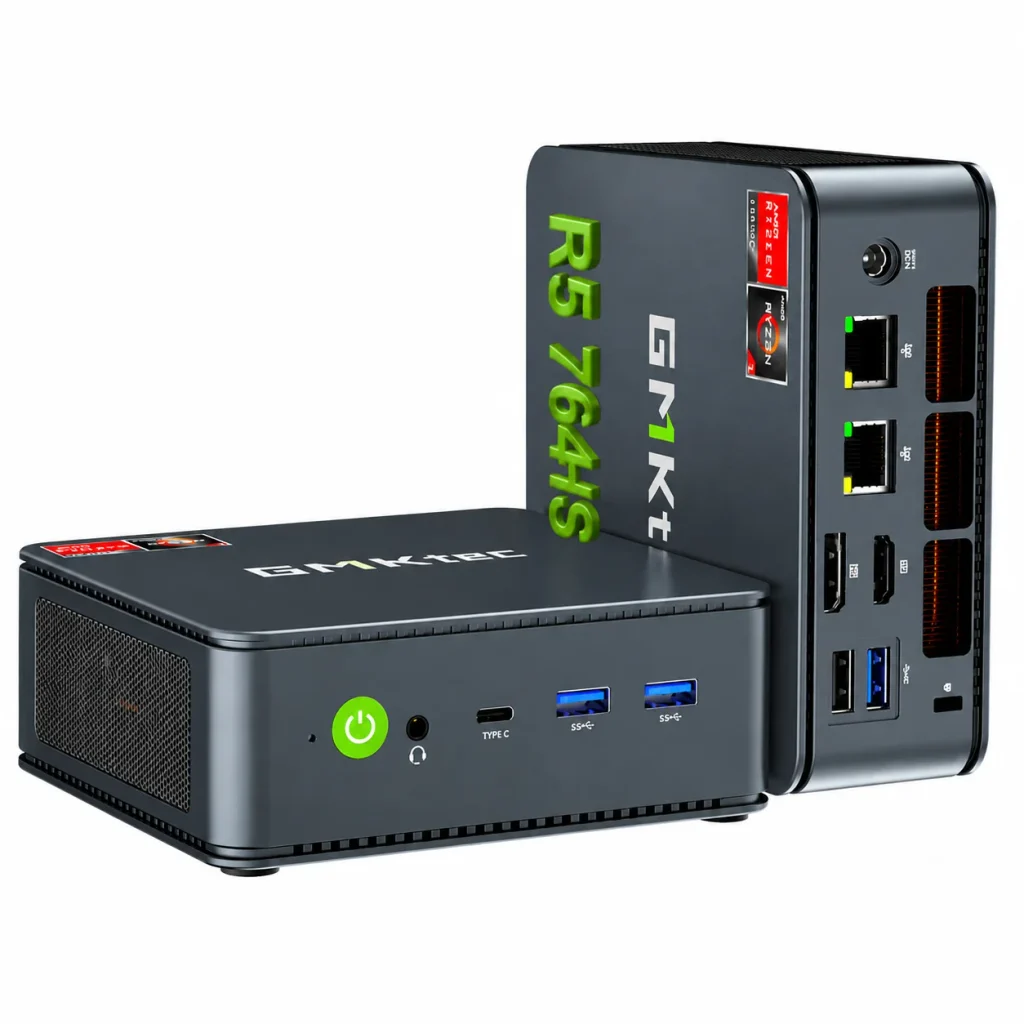
Image Source: GMKtec Official
Who Is It For?
GMKtec Mini PC models occupy a compact metal or plastic chassis that sits on a desk, mounts behind a monitor with the included VESA plate, or tucks into a media cabinet for office work, light content creation, or multi-monitor setups. Users who run browsers, office suites, local media libraries, or dual 4K displays from a small permanent footprint fit the daily pattern. An external power brick (commonly 120 W on higher models) and active fan cooling replace any portable battery. Many units provide SO-DIMM and dual M.2 slots for later expansion, while some AI-focused models solder the memory. Idle power stays modest while sustained loads raise fan noise. If this form factor or power doesn’t quite fit your daily work, exploring other lineup categories would be a better path.
1. Fixed Chassis Size and Expansion Limits
Compact dimensions that stay fixed
Most GMKtec NucBox and EVO units measure roughly 11–13 cm on each side and 5–6 cm tall (a few larger models stretch to 15–18 cm footprints). The exterior volume never changes after purchase. On a desk the box claims a permanent small rectangle; behind a monitor via VESA it vanishes from view. Confirm the exact exterior measurements listed for the chosen model so the intended placement remains clear.
External power brick requirement
Power arrives through an external adapter, frequently rated 120 W on Ryzen HS and Core H models. The brick occupies a wall outlet or power strip slot and must remain connected at all times. There is no internal battery. Verify the exact wattage and connector type on the sales page.
RAM and storage slots
Many models offer two SO-DIMM slots for DDR5 memory (up to 64–96 GB) and two M.2 NVMe slots (often both 2280). Some higher AI-oriented units solder LPDDR5X memory and leave only the storage bays free. Opening the bottom panel usually grants access, yet maximum supported capacity is fixed by the board. Check the number of free slots and the supported maximums before ordering.
These physical limits keep the machine oriented toward permanent desk or mounted placement and allow limited internal upgrades on most configurations.
2. Desk Footprint, Fan Noise, and Multi-Monitor Use
Surface and mounting space
The small footprint fits beside a keyboard or mounts behind a monitor. Rear ports (HDMI, DisplayPort, dual Ethernet, OCuLink on many recent models) need clearance for cables. Soft surfaces or enclosed cabinets can restrict underside or side intake vents and raise temperatures.
Fan behavior under load
Active cooling with one or more fans keeps the system near silent at idle. Under multi-core office loads or light media encoding the fan speed rises and becomes audible in a quiet room. Higher TDP configurations produce a steadier hum during sustained work. Confirm whether the chosen model emphasizes quiet modes or higher performance power limits.
Multi-monitor and peripheral capacity
Dual HDMI or HDMI plus DisplayPort (and USB4/USB-C with DisplayPort Alt Mode) support two or three external displays at 4K60 or higher on most units. USB-A, USB-C/USB4, and often an OCuLink port handle peripherals, external GPUs, or docks. Dual 2.5 GbE Ethernet appears on many models for separate networks. These interfaces are fixed after purchase.
3. Performance by Use Case
Configurations range from entry Ryzen or Intel chips to higher Ryzen HS / Core Ultra processors with integrated Radeon or Arc graphics. All ratings assume the unit remains plugged in; there is no battery mode.
| Use Case | Software | Rating | Reason |
|---|---|---|---|
| Office and multi-browser productivity | Word, Excel, Chrome with many tabs | Sufficient | Multi-core CPUs and dual-channel RAM keep concurrent work smooth |
| Dual or triple 4K media playback | Streaming apps, local video | Sufficient | Multiple video outputs sustain high-resolution screens |
| Light photo/video editing and file serving | Lightroom, short-form export, local NAS roles | Adequate | Integrated graphics and dual M.2 slots handle moderate media libraries |
| Sustained heavy 4K export or modern gaming | Premiere, recent AAA titles | Not enough | Most models lack discrete GPUs and the cooling for prolonged high loads |
| Always-on low-power home server | Media server, light Docker | Sufficient | Idle power remains modest with quiet fans on lower modes |
Lower-power configurations reduce the margin on the first three rows. Discrete graphics require an external OCuLink enclosure on supported models.
4. Official Specs (with plain explanations)
| Category | Specification | Notes |
|---|---|---|
| Chassis | Approx. 11–13 cm square × 5–6 cm tall | Varies by model; some larger footprints |
| Processor | AMD Ryzen / Intel Core / Core Ultra | Soldered |
| Graphics | Integrated Radeon / Arc / UHD | OCuLink for external GPU on many models |
| Memory | 2× SO-DIMM DDR5 (some LPDDR soldered) | Upgradable on most non-AI models |
| Storage | 2× M.2 NVMe (some additional) | Upgradable |
| Power | External 120 W brick (common) | Always required |
| Weight | Typically 0.5–1 kg (device only) | Without adapter |
| Ports | HDMI + DP / dual HDMI, USB4, dual 2.5GbE, OCuLink (select) | Fixed layout |
This series is sold with different processors, memory, and storage depending on the model and generation. Please match the specifications on your current seller page with the official information above.
Source: GMKtec Official Product Page
The compact fixed size and available SO-DIMM / M.2 slots listed above directly determine desk placement and later expansion.
5. Main Variations in This Series
Processor choice among Ryzen 5/7 HS, Core H, or Core Ultra chips changes multi-core headroom and integrated graphics strength. Memory starting capacity and the presence of SO-DIMM slots determine whether capacity can grow later (some AI models lock it at purchase). Storage of one versus two M.2 bays alters how much local data stays internal. Dual 2.5 GbE Ethernet and the presence of an OCuLink port change network and external GPU flexibility. Power adapter wattage and cooling design affect sustained performance and noise. Each of these choices is fixed after purchase except for the modules that fit the available slots.
6. What to Check on the Sales Page
Confirm the exact hardware listed for the SKU you are considering, because the same series name covers many different chassis and performance levels.
- Exact processor model and configurable TDP so sustained performance is clear.
- Number of SO-DIMM slots and maximum supported RAM (or whether memory is soldered).
- Number of M.2 slots plus pre-installed drive size.
- Whether an OCuLink port is present and the exact video outputs (HDMI, DP, USB4).
- Power adapter wattage and whether dual 2.5 GbE Ethernet is included.
Matching these five items against the official sheet prevents receiving a lower-expansion or lower-power configuration under the same series name.
7. Disclaimer & Buying Advice
This buying guide for the GMKtec Mini PC series is based on official manufacturer specifications and recurring real-world user experiences. It is completely independent, not sponsored, and does not guarantee specific performance for every unit. Hardware configurations such as the processor, memory, and storage can differ by model and region, so please double-check the exact specifications listed on your seller’s page before purchasing.
8. Beginner Guide
The fixed compact chassis and the presence or absence of free SO-DIMM and M.2 slots define the daily limits of this series more than any other factor. [Start Here] walks through how those constraints interact with common desk, mounted, and always-on patterns before any purchase decision.

[…] GMKtec Mini PC Series — Compact and value-oriented mini desktop […]