Image Source: Tech Reviewer / Hands-on Photo
Who Is It For?
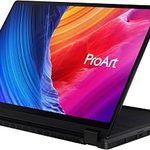
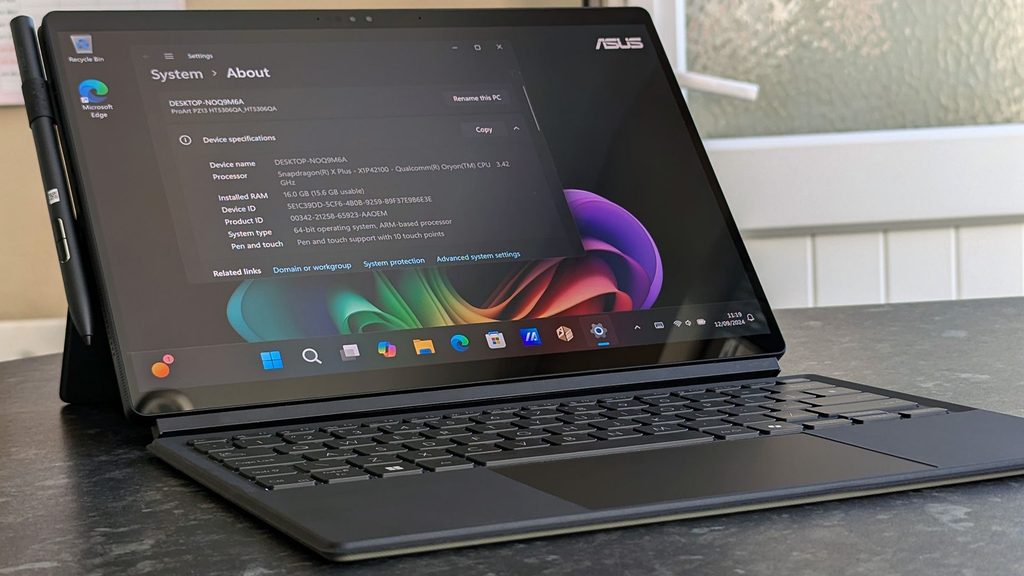
The ProArt PZ13 is a 13.3-inch tablet-first 2-in-1 with a 3K OLED touchscreen, detachable keyboard, and Snapdragon X Plus processor for creators who move frequently and work in laptop, tablet, or stand modes. Photographers and designers who sketch or annotate on location, students who take handwritten notes, and travelers who need an ultralight device that still supports external displays fit the daily pattern.
Memory is fixed at 16 GB LPDDR5X with no upgrade path, and the thin tablet design limits sustained high loads. The 70 Wh battery supports mixed creative and note-taking work, yet continuous high-brightness touch use shortens runtime. If this form factor or power doesn’t quite fit your daily work, exploring other lineup categories would be a better path.
1. Fixed Memory and Tablet-First Limits
LPDDR5X memory locked at purchase
Memory is soldered LPDDR5X at 16 GB. No SO-DIMM slots exist, so capacity is permanent after purchase. Once large photo libraries, multiple creative apps, and browser sessions fill the available memory, there is no later remedy. Confirm the exact installed amount on the sales page.
Storage and expansion
Storage uses a single M.2 NVMe SSD (commonly 1 TB). Expansion is limited or unavailable without replacing the original drive. Verify the installed capacity on the specific SKU.
Port layout and detachable design
Two USB4 Type-C ports support data, display output, and power delivery. An SD Express card reader handles direct media import. The detachable keyboard and folio cover turn the device into a tablet or laptop. The ultra-thin 9 mm chassis restricts internal cooling volume, so sustained multi-core loads raise temperatures more quickly than thicker machines. These interfaces and the physical envelope cannot be altered after purchase.
These constraints keep the machine oriented toward ultralight creative mobility while locking memory capacity at the point of sale.
2. Daily Carry Weight and Flexible Use
0.85 kg tablet in any bag
The tablet alone measures 29.75 × 20.29 × 0.90 cm and weighs 0.85 kg. With the keyboard and folio the total rises but remains under 1.5 kg. It disappears into a small bag or even a large coat pocket. In tablet mode the weight is light enough for extended handheld sketching or note-taking.
Fan noise and thermal behavior
The system is designed for quiet operation. Under light productivity, note-taking, and photo review the device stays silent. Under sustained multi-core loads or continuous high-brightness OLED use the fan (if active) becomes audible but remains quieter than most thicker convertibles. Soft surfaces can restrict airflow and raise surface temperatures during longer sessions.
Battery for mixed creative and note days
The 70 Wh battery supports several hours of document work, handwriting with a stylus, photo review, and video calls. Real-world mixed use commonly covers a full workday. The compact 65 W USB-C charger travels easily for overnight top-ups or continuous high-brightness sessions.
3. Performance by Use Case
The configuration uses a Qualcomm Snapdragon X Plus processor with Adreno graphics and a high-TOPS NPU. All ratings assume typical creative, note-taking, and light productivity workloads on ARM Windows.
| Use Case | Software | Rating | Reason |
|---|---|---|---|
| Photo review, annotation, and light editing | Photos, Lightroom (compatible), stylus apps | Sufficient | OLED touch + stylus and NPU keep work responsive |
| Note-taking and document work | OneNote, Samsung Notes-style apps, Office | Sufficient | Touch + keyboard modes and high memory handle concurrent tasks |
| Multi-tab browsing and light multitasking | Edge, Chrome, multiple apps | Sufficient | Dual-channel LPDDR5X sustains browser loads |
| Sustained 4K video export or heavy rendering | Premiere, DaVinci Resolve (demanding) | Not enough | Thin cooling and integrated graphics limit prolonged high loads |
| Native x86-only software without translation | Legacy Windows apps requiring full x86 | Adequate to Not enough | ARM translation works for many apps but not all; check compatibility |
Lower memory is not an option; the fixed 16 GB is the only configuration. Heavy x86 workloads may require cloud or external solutions.
4. Official Specs (with plain explanations)
| Category | Specification | Notes |
|---|---|---|
| Display | 13.3″ 3K (2880×1800) OLED, 60 Hz, touch | Stylus support; 100% DCI-P3 |
| Processor | Qualcomm Snapdragon X Plus | Soldered |
| Graphics | Qualcomm Adreno | Integrated |
| Memory | 16 GB LPDDR5X | Soldered; fixed |
| Storage | 1 TB M.2 NVMe | Limited expansion |
| Battery | 70 Wh | Built-in |
| Adapter | 65 W USB-C | Compact |
| Weight | 0.85 kg (tablet only) | With keyboard higher |
| Ports | 2× USB4, SD Express | Fixed layout |
This series is sold with limited configuration options. Please match the specifications on your current seller page with the official information above.
Source: ASUS Official Product Page
The fixed 16 GB memory and tablet-first thin design listed above directly determine long-term capacity limits and daily flexible use.
5. Main Variations in This Series
The ProArt PZ13 is offered in a narrow set of configurations centered on the Snapdragon X Plus processor and 16 GB memory. Storage is typically 1 TB. Color is Nano Black. The detachable keyboard and folio are included or optional depending on the bundle. Display remains the 13.3-inch 3K OLED touch panel with stylus support. Each of these choices is permanent after purchase except for the replaceable M.2 drive where available.
6. What to Check on the Sales Page
Confirm the exact hardware listed for the SKU you are considering, because options are limited but still vary by region and bundle.
- Exact processor model (Snapdragon X Plus variant).
- Confirmation of 16 GB LPDDR5X memory (the only option).
- Primary SSD capacity (commonly 1 TB).
- Whether the detachable keyboard and folio are included.
- Display confirmation (13.3″ 3K OLED touch) and stylus support.
Matching these five items against the official sheet prevents receiving an incomplete bundle under the same series name.
7. Disclaimer & Buying Advice
This buying guide for the ProArt PZ13 is based on official manufacturer specifications and recurring real-world user experiences. It is completely independent, not sponsored, and does not guarantee specific performance for every unit. Hardware configurations such as the processor, memory, and storage can differ by region, so please double-check the exact specifications listed on your seller’s page before purchasing.
8. Beginner Guide
The fixed 16 GB memory and the ultra-thin tablet-first chassis that limit sustained cooling define the daily limits of this series more than any other factor. Start Here walks through how those constraints interact with common mobile creative, note-taking, and travel patterns before any purchase decision.