[Buyer’s Guide #2]Intel vs AMD: The Complete Beginner-Friendly Guide to Choosing the Right PC CPU

When you’re buying or building a computer—whether it’s a desktop, a laptop, or a compact mini PC—one of the first big questions you face is: “Should I go with Intel or AMD?”
In the past, many people thought “Intel is the expensive but reliable brand, while AMD is the budget option.” That idea is completely outdated now.
AMD has become a major player with its latest Ryzen series, offering excellent power efficiency and strong gaming performance. Intel, meanwhile, continues to hold a solid position with its next-generation processors, especially when it comes to software stability for business use and built-in video processing features.
Instead of asking “Which company is better?”, it’s much smarter to ask: “What’s the difference between them, and which one fits my actual usage better?”
1. How Are Intel and AMD Different?
The two brands take different approaches to designing the “brain” of your computer (the CPU). Understanding this difference alone makes choosing much easier.
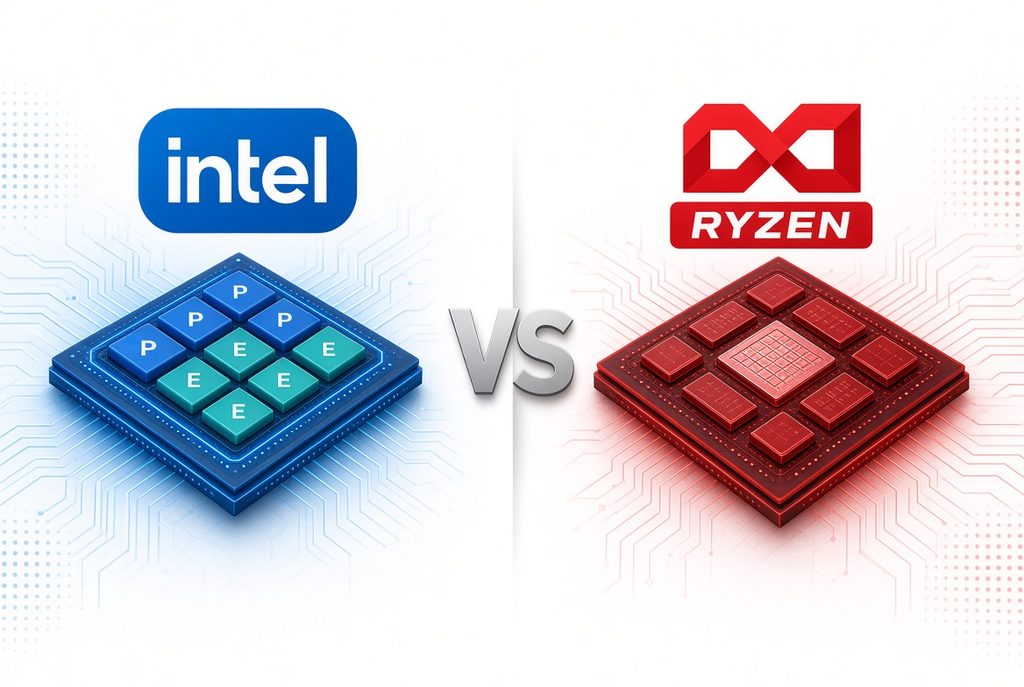
① Architectural Difference: Hybrid Cores vs Chiplet Design
- Intel: Think of it like a hybrid car engine—it uses two types of cores.
- Performance cores (P-cores): Deliver high speed for demanding tasks like high-end gaming or heavy workloads.
- Efficiency cores (E-cores): Handle background tasks and light activities (like web browsing) while saving power.
- AMD (Ryzen): Uses a “chiplet” design that efficiently combines multiple smaller semiconductor pieces. All cores are similarly powerful, which makes it especially good when you’re running many programs at the same time.
② Real-World Strengths: Software Compatibility vs Power Efficiency & Gaming
- Intel: Because it has long been the industry standard, it often works more reliably with certain government websites, company security software, Excel, Photoshop, and similar tools. It also has a built-in video processing engine that helps reduce stuttering during video editing.
- AMD (Ryzen): Offers strong power efficiency and lower heat output. In laptops, this often translates to longer battery life, and in desktops or mini PCs, it usually means quieter operation. (Note: Laptop battery life can vary by specific model and generation, so it’s worth checking recent reviews.) It also has generous game-oriented cache memory that helps maintain high frame rates in 3D games.
2. Best Uses by CPU Model Name (What You’ll See on Spec Sheets)
Here’s a simple guide to the specific Intel Core / Ultra and AMD Ryzen model names you’ll find on shopping pages. Check which performance tier matches your needs.
【 Best Uses by Intel CPU Lineup 】
- Intel Core Ultra 9 / Core i9
- Best for: 4K/8K video editing, professional 3D rendering, large-scale programming
- Simple explanation: Intel’s most powerful flagship models, built for pro creators and specialists.
- Intel Core Ultra 7 / Core i7
- Best for: High-end 3D gaming, FHD/2K video editing, Photoshop & Illustrator work, live streaming
- Simple explanation: The sweet spot between performance and price—most popular choice for people who want smooth high performance.
- Intel Core Ultra 5 / Core i5
- Best for: Everyday office/business work, government or company security tools, large Excel files, popular online games
- Simple explanation: The standard model most people buy. Handles the majority of daily tasks comfortably.
- Intel Core i3 / Intel N Series
- Best for: Document writing, web browsing, watching YouTube or Netflix
- Simple explanation: Entry-level, budget-friendly option optimized for basic tasks.
【 Best Uses by AMD CPU Lineup 】
- AMD Ryzen 9 (including X3D series)
- Best for: Ultra-high-end 3D gaming, heavy multitasking, gaming + streaming at the same time
- Simple explanation: AMD’s top-tier models that combine maximum gaming power with strong multi-tasking ability.
- AMD Ryzen 7 (including X3D series)
- Best for: [Strongly recommended for gaming] PUBG, FPS games, high-end Steam 3D titles, general video editing
- Note: The lineup most loved by gamers. Helps keep gameplay smooth and stutter-free.
- AMD Ryzen 5
- Best for: Laptops used outdoors for long periods, popular games like Valorant or League of Legends, quiet mini PCs
- Simple explanation: Excellent at managing power and heat, which is why students and people who move around a lot often prefer it.
- AMD Ryzen 3
- Best for: Budget office PCs, online classes, watching videos
- Simple explanation: An affordable option that covers basic computer needs without breaking the bank.
3. Quick Comparison Table
| Comparison Point | Intel | AMD (Ryzen) |
|---|---|---|
| One-sentence summary | “The name for software compatibility and work stability” | “The name for power efficiency and gaming performance” |
| Representative models | Core Ultra 5 / 7 / 9 (or i5 / i7 / i9) | Ryzen 5 / 7 / 9 (X3D) |
| Best suited for | Business work, security tools, video/design editing | Portable use, high-end 3D gaming, mini PCs |
| Key strength | Long-proven software compatibility | Lower power use and strong game frame rates |
The Golden Rule Before You Buy
Once you’ve understood the differences between the two brands, there’s one final check you should always make before hitting the purchase button: the CPU generation.
Even if you like the Intel or AMD brand name, a newer-generation CPU will almost always be significantly faster and more power-efficient than an older one.
When you look at the product specs, don’t just look at the logo. Check whether it’s an Intel Core Ultra series or an AMD Ryzen 7000 / 8000 / 9000 series. Confirming the latest generation number is the single best way to make a smart purchase.