
The earlier guides [Beginner’s Guide #8] How to Check Your Current Computer Specs: Windows and Mac taught you how to read each part on its own — CPU, RAM, storage, graphics, power, and motherboard.
This guide puts those parts on one list. The goal is not to name a “best PC.” It is to show, for each kind of work, the minimum that actually works and the optimal that stays comfortable for a few years.
Two rules matter more than any brand name:
- Match the whole build to one use case.
- Do not pair a strong part with a weak one. A fast graphics card with 8GB of RAM is still a slow PC.
1. Minimum vs Optimal — What These Words Mean
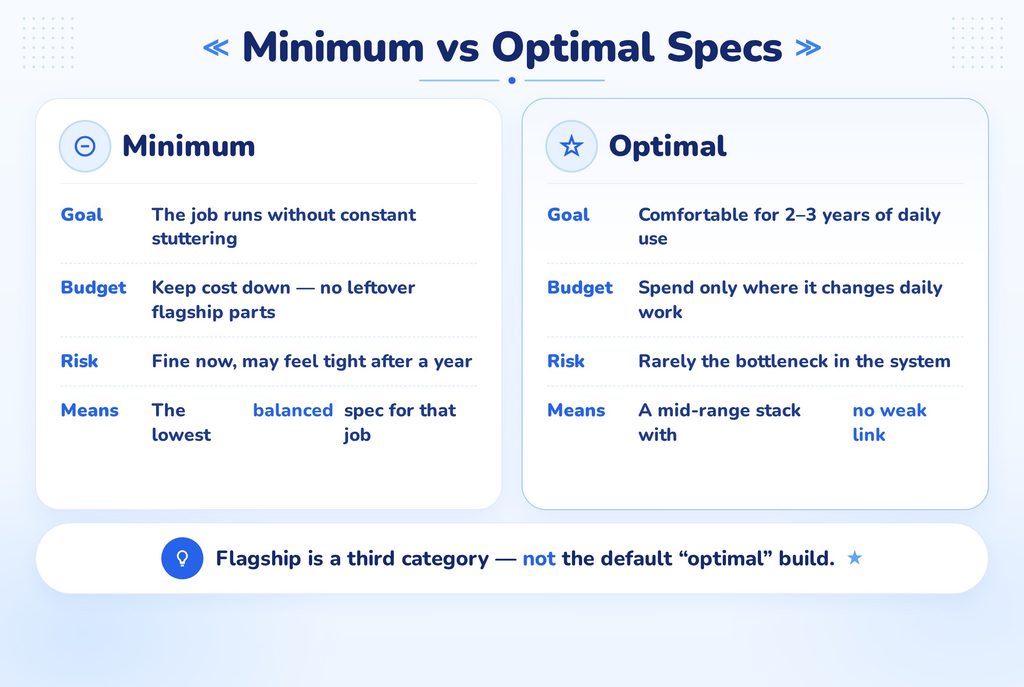
| Minimum | Optimal | |
| Goal | The job runs without constant stuttering | Comfortable for 2–3 years, with room for extra programs |
| Budget | Keep cost down | Spend where it actually changes daily use |
| Risk | Fine now, may feel tight after a year | Rarely the bottleneck |
Minimum is not “the cheapest listing.” It is the lowest balanced spec for that job. Optimal is not a flagship. For most people, optimal is a mid-range stack with no weak link.
Note:
If you only game at 1080p, a flagship CPU and 4K graphics card are not “optimal.” They are leftover budget you did not need.
2. Manufacturer Combinations (Keep This Simple)
You only choose two brands for the core of a Windows desktop.
CPU — pick one platform
| Platform | Typical pairing | Beginner note |
| Intel (Core i / Core Ultra 5 or 7) | Intel CPU + B-series motherboard | Easy to find in prebuilts. Socket changes more often. |
| AMD (Ryzen 5 or 7) | AMD CPU + B-series motherboard | Often better upgrade path on the same socket. |
Intel and AMD both have 3 / 5 / 7 / 9 tiers. For almost every use case below, 5 is the default and 7 is the optimal step up. You rarely need 9.
GPU — pick one graphics brand (or none)
| Graphics | Typical pairing | Beginner note |
| Integrated (no extra card) | Any modern CPU with built-in graphics | Enough for documents, web, video. |
| NVIDIA (RTX 40 / 50-series) | Works with Intel or AMD CPUs | Widest game and creator software support. |
| AMD Radeon (RX 7000-class) | Works with Intel or AMD CPUs | Often stronger price for raw gaming. |
Safe combinations:
- Intel CPU + NVIDIA GPU
- AMD CPU + NVIDIA GPU
- AMD CPU + AMD GPU
- Intel CPU + AMD GPU
All four are normal. The motherboard must match the CPU socket, not the GPU brand.
Warning:
Intel CPUs with an F in the name (example: 14400F) have no screen output. They need a dedicated graphics card, or the monitor stays black.
3. The Balanced Stack (Every Build Uses This Template)
Whatever the use case, fill in the same six lines:
- CPU — tier 3 / 5 / 7 / 9
- GPU — integrated, entry, mid, high
- RAM — 16 / 32 GB (DDR5 if the board requires it)
- Storage — NVMe SSD size
- Motherboard — B-series unless you overclock
- PSU + cooler — wattage with headroom
If one line is a generation behind the others, that line becomes the bottleneck.
4. Recommended Builds by Use Case
Tiers below match the earlier guides (CPU #1, RAM #2, storage #3, GPU #4, PSU #5, motherboard #6).
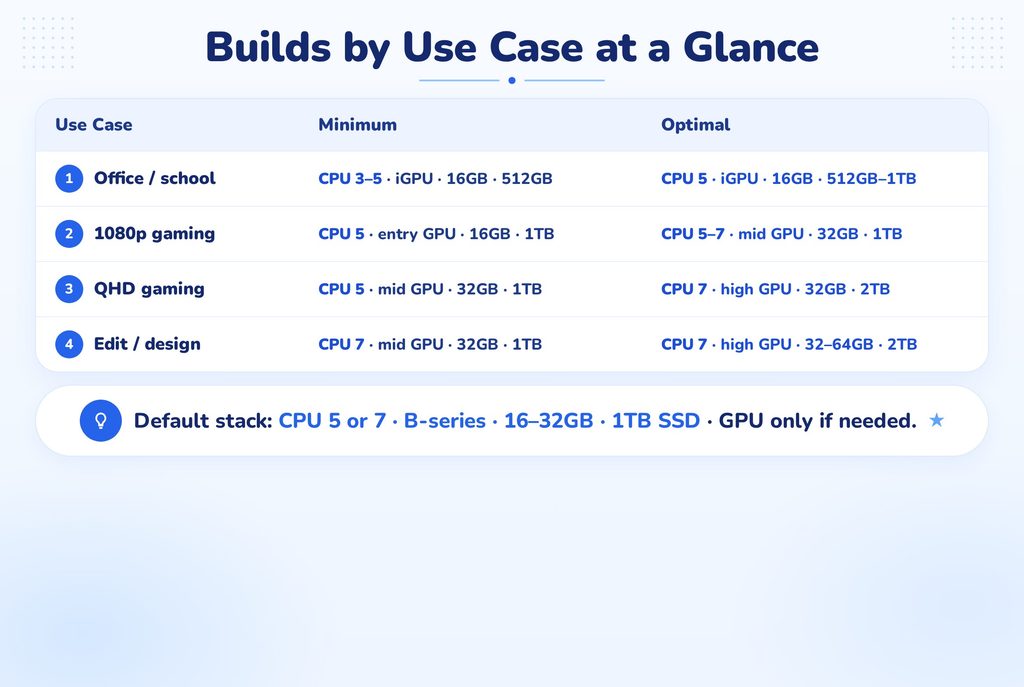
① Documents, web, video, schoolwork
| Part | Minimum | Optimal |
| CPU | Intel Ultra 3 / i3, or Ryzen 3 | Ultra 5 / i5, or Ryzen 5 |
| GPU | Integrated graphics | Integrated graphics |
| RAM | 16GB | 16GB |
| Storage | 512GB NVMe SSD | 512GB–1TB NVMe SSD |
| Motherboard | H / A-series or B-series, m-ATX | B-series, 4 RAM slots |
| PSU / cooler | 500W Bronze, stock or budget air | 550–600W Bronze, quiet air cooler |
Intel or AMD both work. Do not buy a separate graphics card for this use case.
② General office + light photo work + light gaming
| Part | Minimum | Optimal |
| CPU | Ultra 5 / i5, or Ryzen 5 | Same tier, current generation |
| GPU | Integrated, or entry discrete (RTX 3050/4060, RX 6600/7600) | Entry discrete if you game at all |
| RAM | 16GB | 16–32GB |
| Storage | 512GB SSD | 1TB SSD |
| Motherboard | B-series, m-ATX | B-series, 4 RAM slots, 2× M.2, Wi-Fi |
| PSU / cooler | 550–650W Bronze, tower air cooler | 650W Bronze/Gold, standard air cooler |
③ FHD (1080p) gaming
| Part | Minimum | Optimal |
| CPU | Ultra 5 / i5, or Ryzen 5 | Ultra 5 / Ryzen 5 current gen (7 only if you stream) |
| GPU | Entry discrete (RTX 4060 / RX 7600 class) | Mid discrete (RTX 4060 Ti–4070 / RX 7700 XT class) |
| RAM | 16GB | 32GB |
| Storage | 1TB NVMe SSD | 1TB–2TB NVMe SSD |
| Motherboard | B-series | B-series ATX or m-ATX, 4 RAM slots |
| PSU / cooler | 650W Bronze, performance air | 650–750W Gold, performance air or 240mm AIO |
Two ready-made recipes:
- Intel gaming: Ultra 5 / i5 + B-series + RTX mid-range
- AMD gaming: Ryzen 5 + B-series + RX mid-range or RTX mid-range
④ QHD gaming, high settings
| Part | Minimum | Optimal |
| CPU | Ultra 5 / Ryzen 5 | Ultra 7 / Ryzen 7 |
| GPU | Mid discrete (4070 / 7700 XT class) | High discrete (4070 Ti–4080 / 7800–7900 XT class) |
| RAM | 32GB | 32GB |
| Storage | 1TB SSD | 2TB SSD |
| Motherboard | B-series, solid VRM heatsinks | B-series or Z/X only if you overclock |
| PSU / cooler | 750W Gold, strong air or 240mm AIO | 750–850W Gold, 240–360mm AIO |
⑤ Video editing, design, 3D (not 8K studio)
| Part | Minimum | Optimal |
| CPU | Ultra 7 / Ryzen 7 | Ultra 7 / Ryzen 7 (9 only for heavy 3D / 8K) |
| GPU | Mid discrete | High discrete (NVIDIA often easier in creator apps) |
| RAM | 32GB | 32–64GB |
| Storage | 1TB SSD + extra drive | 2TB SSD + extra storage |
| Motherboard | B-series, 4 RAM slots, 2× M.2 | B or X/Z, strong VRM |
| PSU / cooler | 750W Gold, 240mm AIO or dual-tower air | 850W Gold, 360mm AIO |
Creator recipe: Ryzen 7 or Ultra 7 + NVIDIA mid/high + 32GB RAM. NVIDIA is the safer default for Premiere, DaVinci, Blender, and many AI tools. AMD GPU is fine if the software you use is confirmed.
⑥ 4K gaming or professional heavy work
| Part | Minimum | Optimal |
| CPU | Ultra 7 / Ryzen 7 | Ultra 9 / Ryzen 9 |
| GPU | High discrete | Flagship (4090 / 50-series, 7900 XTX class) |
| RAM | 32GB | 64GB |
| Storage | 2TB SSD | 2TB+ SSD + archive drive |
| Motherboard | Z / X-series, ATX | Z / X, strong VRM, max slots |
| PSU / cooler | 850W Gold | 850–1000W Gold/Platinum, 360mm AIO |
Most beginners should not start here. If your screen is 1080p or 1440p, use ③ or ④.
5. Platform Recipes (Same Job, Two Brands)
Same use case, two shopping lists. Performance is close; pick by price and the CPU you already decided on.
1080p gaming — Intel path
Ultra 5 / i5 · B-series · 16–32GB · 1TB SSD · RTX entry/mid · 650W
1080p gaming — AMD path
Ryzen 5 · B-series · 16–32GB · 1TB SSD · RX 7600/7700 or RTX equivalent · 650W
Editing — Intel path
Ultra 7 · B or Z-series · 32GB · 1–2TB SSD · RTX mid/high · 750W+
Editing — AMD path
Ryzen 7 · B or X-series · 32GB · 1–2TB SSD · RTX mid/high (or RX high if your apps like it) · 750W+
Do not mix old AMD AM4 parts with new AM5 boards, or LGA1700 CPUs with newer Intel sockets. The brand can mix with the GPU. The socket cannot mix.
6. Combinations That Waste Money
- High-tier CPU + integrated graphics for gaming. The CPU is not the part that draws the game.
- Entry CPU + flagship GPU. The card waits on the processor.
- 32GB RAM on a 256GB HDD. Storage, not memory, will feel broken.
- i7/Ryzen 7 on an H/A-series board with weak VRM/power delivery. Power delivery becomes the limit.
- 850W PSU on an office PC. Harmless, but the money belonged in the SSD.
- Two-slot RAM board when 32GB later is likely. Optimal builds start with 4 RAM slots.
7. Order to Choose Parts
- Write the use case in one line (office / 1080p games / QHD / edit).
- Pick CPU brand (Intel or AMD), then the tier (usually 5 or 7).
- Pick GPU from the same use-case row — or skip it for office.
- Set RAM and SSD so they are not smaller than the GPU’s job.
- Choose a B-series board that fits that CPU socket.
- Size the PSU from the GPU + CPU row, then add headroom.
- Match the cooler and case to the CPU and board size.
If a shop list skips this order and leads with RGB or a single famous name, it is usually unbalanced.
Final Takeaways
- Decide the job first, then the parts.
- Minimum = balanced and usable. Optimal = comfortable for a few years. Flagship is a third category, not the default.
- Intel + NVIDIA, AMD + NVIDIA, and AMD + AMD are all valid. Only the CPU socket is non-negotiable.
- For most people the stack is: CPU 5 or 7 · B-series board · 16–32GB RAM · 1TB SSD · GPU only if you game or edit · 650–750W PSU.
- One weak part wastes every strong part.
Once this table is clear, a product page is just a checklist — not a new language.

[…] Next Article: Read the next part of the series: [Beginner’s Guide #9] Custom PC Builds by Use Case: Minimum vs Optimal Specs […]