
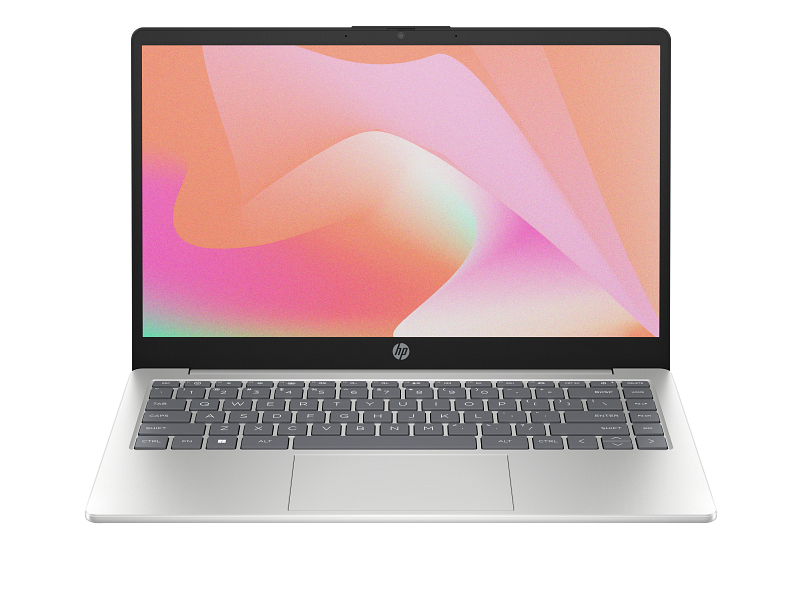
Image Source: HP Official
Who Is It For?
The HP 14 Series is a compact, mainstream laptop designed for users who prioritize portability and essential computing tasks over high-end specialized power. This series is frequently utilized by students who need a lightweight device to carry between classes for note-taking, research, and writing assignments. It is also a common choice for remote workers or frequent travelers who require a machine that fits easily into small bags while providing enough screen space for spreadsheets, emails, and video conferencing. Because of its 14-inch form factor, it serves as a middle ground for those who find 13-inch screens too small for multitasking but find 15-inch laptops too bulky for constant movement.
However, the HP 14 is built with a focus on value, which introduces specific hardware trade-offs. The internal components and thermal management systems are not designed for professional 3D rendering, high-resolution video production, or competitive AAA gaming. The chassis is typically constructed from plastic, making it lighter but less structurally rigid than premium metal alternatives. Users who require a dedicated numeric keypad for heavy data entry will find the keyboard layout insufficient, as the 14-inch size necessitates a more condensed design. If this form factor or power doesn’t quite fit your daily work, exploring other lineup categories would be a better path.
1. Chassis Material, Keyboard Layout, and Display Panel Variations
The Structural Characteristics of the 14-Inch Plastic Frame
The HP 14 series primarily utilizes a plastic chassis to maintain a low total weight, which typically stays around 1.4kg to 1.5kg. While this makes the laptop highly portable, the plastic material is more susceptible to “flex” than aluminum frames. Flex refers to the slight bending of the keyboard deck or the display lid when pressure is applied. The hinges are also encased in plastic, and the screen can usually be opened to an angle of approximately 140 degrees. Because the exterior is often textured or painted plastic, it is resistant to fingerprints but can show scratches more easily over years of use compared to anodized metal.
Keyboard Spacing and the Absence of a Numeric Keypad
Unlike the larger HP 15 models, the HP 14 features a condensed keyboard layout that excludes a dedicated numeric keypad on the right side. This allows the remaining keys to be spaced comfortably for touch-typing, which is beneficial for long-form writing and coding. The keys typically have a travel distance of 1.3mm to 1.5mm, which describes how far the key moves down when pressed. While the layout is spacious for its size, the arrow keys are often “half-height,” meaning the up and down arrows are smaller than the left and right arrows. Some models in this series include a backlight for typing in dark rooms, but this is an optional feature that is not present on every unit.
Screen Technology and Viewing Angle Constraints
The 14-inch display in this series comes in two primary panel types: TN and IPS. TN (Twisted Nematic) panels are often found in the most budget-friendly versions; they have narrower viewing angles, meaning the colors may look distorted or “washed out” if you are not looking at the screen directly from the front. IPS (In-Plane Switching) panels provide much wider viewing angles and more consistent colors. Most HP 14 screens have a brightness of 250 nits. Nits are a unit of measurement for screen brightness; 250 nits is sufficient for indoor use in a standard office or bedroom, but the screen will be difficult to see if used outdoors or in a very brightly lit sunroom.
2. Port Connectivity, Thermal Exhaust, and Battery Mobility
USB-C Limitations and Peripheral Port Layout
The HP 14 series provides a variety of ports to connect external devices without needing many adapters. It typically includes two USB-A ports for standard mice or flash drives, one USB-C port, an HDMI port for external monitors, and a 3.5mm headphone jack. It is important to note that on many HP 14 models, the USB-C port is for data transfer only and does not support “Power Delivery” (charging the laptop) or “DisplayPort” (connecting a monitor). Most units use a traditional “barrel-style” power adapter that plugs into a dedicated round charging port. A full-sized SD card reader is also frequently included, which is useful for transferring photos from a camera.
Internal Cooling Fan Behavior and Airflow Vents
To manage the heat generated by the processor, the HP 14 uses an internal cooling fan and a heat pipe system. The air intake vents are located on the bottom of the laptop, while the exhaust vent is usually positioned near the hinge, blowing air toward the bottom of the screen. Because the intake is on the bottom, placing the laptop on a soft surface like a bed or a carpet can block the airflow, causing the fan to spin faster and louder. Under normal office workloads, the fan is usually quiet, but it becomes audible during software updates or when many browser tabs are open simultaneously.
Battery Capacity and Real-World Travel Weight
The battery in the HP 14 series is typically a 3-cell, 41Wh (Watt-hour) unit. This capacity is designed to provide enough power for several hours of continuous web browsing or document editing. However, battery life decreases significantly if the screen brightness is set to maximum or if the processor is performing intensive tasks. The laptop supports “Fast Charge,” which can typically charge the battery from 0% to 50% in about 45 minutes when the system is powered off. The 14-inch size is specifically designed for mobility, fitting into standard backpacks and messenger bags more easily than 15.6-inch models while weighing significantly less.
3. Performance by Use Case
The following ratings are based on a mid-range configuration featuring a modern Intel Core i5 or AMD Ryzen 5 processor with 8GB or 16GB of RAM.
| Use Case | Software | Rating | Reason |
| Web Browsing | Chrome, Edge (15+ tabs) | Sufficient | Modern mid-range CPUs handle multiple tabs and web scripts effectively. |
| Office Productivity | Excel, Word, PowerPoint | Sufficient | The 14-inch screen provides enough space for side-by-side document work. |
| Video Conferencing | Zoom, Microsoft Teams | Sufficient | Handles video streams and screen sharing simultaneously without significant lag. |
| Photo Editing | Photoshop, Lightroom | Adequate | Can run the software, but the 250-nit screen lacks professional color accuracy. |
| Video Editing | 1080p Simple Cutting | Adequate | Possible for short clips, but the plastic chassis and single fan limit long render times. |
| AAA Gaming | Cyberpunk 2077, Warzone | Not enough | Lacks a dedicated graphics card; frame rates will be too low for smooth play. |
Performance will vary if the unit is equipped with an entry-level Intel N-series or Athlon processor, which would move the “Photo Editing” and “Video Editing” categories to “Not enough.”
4. Official Specs (with plain explanations)
| Category | Specification | Notes |
| CPU | Intel Core or AMD Ryzen | The processor that acts as the brain of the computer. |
| RAM | 4GB / 8GB / 16GB DDR4 | Temporary memory for open apps; often two slots available. |
| Storage | 128GB to 1TB NVMe SSD | High-speed storage for your files and the operating system. |
| Display | 14″ HD or Full HD | HD is 720p (less sharp); Full HD is 1080p (standard sharpness). |
| Graphics | Intel UHD / Iris Xe or AMD Radeon | Integrated graphics built into the CPU; not for heavy gaming. |
| Battery | 3-cell, 41 Wh Li-ion | The internal power source; supports HP Fast Charge. |
| Weight | ~1.46 kg (3.22 lbs) | The total weight of the laptop without the power adapter. |
This series is sold with different CPUs, memory, and storage depending on the release year and generation. Please match the specifications on your current seller page with the official information above.
Source: HP Official Product Page
The specifications above represent the most common configurations. Some models may feature “soldered” memory, which means the RAM is fixed on the board and not removable, while others have two slots that allow for future upgrades.
5. Main Variations in This Series
The HP 14 series is divided into several sub-models, often identified by the letters following the number, such as HP 14-dq, 14-fq, or 14-ep. The “dq” models typically feature Intel processors, while the “fq” models are equipped with AMD Ryzen or Athlon processors. The “ep” models are generally newer iterations with updated chassis designs and thinner bezels (the borders around the screen).
Another major variation is the processor brand. Models with Intel processors often feature “Iris Xe” graphics on higher-tier chips, which provide slightly better performance for video playback. Models with AMD Ryzen processors are known for efficient multi-core performance, which can be helpful when running many applications at once. Additionally, some versions are sold with “S Mode” enabled in Windows. Windows 11 in S Mode only allows apps from the Microsoft Store to be installed for security, though users can switch out of S Mode for free to install standard software.
6. What to Check on the Sales Page
When viewing a listing for an HP 14 laptop, the specific components can change the experience significantly. It is important to verify the following details before purchasing.
- CPU Generation: Check whether you are getting the latest Intel 12th/13th Gen or AMD Ryzen 5000/7000 series processors.
- Screen Resolution: Check whether the screen is “Full HD” (1920 x 1080) or just “HD” (1366 x 768), as HD is much less sharp.
- Panel Type: Confirm if the screen is “IPS” for better viewing angles or “TN” (sometimes called SVA) which has poorer angles.
- RAM Configuration: Check whether the RAM is 8GB or 16GB; 4GB is often insufficient for modern Windows 11 multitasking.
- Storage Type: Ensure the drive is an “SSD” or “NVMe,” and avoid older “HDD” (hard disk drives) which are much slower.
The presence of a backlit keyboard should also be confirmed on the sales page if you frequently work in low-light environments.
7. Disclaimer & Buying Advice
This buying guide for the HP 14 Series is based on official manufacturer specifications and recurring real-world user experiences. It is completely independent, not sponsored, and does not guarantee specific performance for every unit. Hardware configurations such as the processor, memory, and storage can differ by generation and region, so please double-check the exact specifications listed on your seller’s page before purchasing.
8. Beginner Guide
If you are trying to determine which hardware specifications are necessary for your specific daily routine, you can find a clear explanation of the basics at [Start Here].

